ANY-maze Help > I/O devices supported by ANY-maze > The ANY-maze interface device family > Installing and configuring ANY-maze interface devices > Changing an ANY-maze interface device ID
Changing an ANY-maze interface device ID

 | It's usually unnecessary to change an ANY-maze interface device's ID manually. Therefore we don't recommend you do this unless explicitly instructed to by ANY-maze Support. |
Introduction
Each ANY-maze interface device has a unique ID on each computer it is used with. This ID is generated automatically and is used to link configuration information to a particular device.
Usually you won't need to alter a device ID, but doing so can be very useful if you replace an ANY-maze interface device, as setting the ID of the new device to the same ID as the old one will cause all the configuration information for the old device to be applied to the new.
To change an ID you just enter a value from 1-99 into the Change ID window.
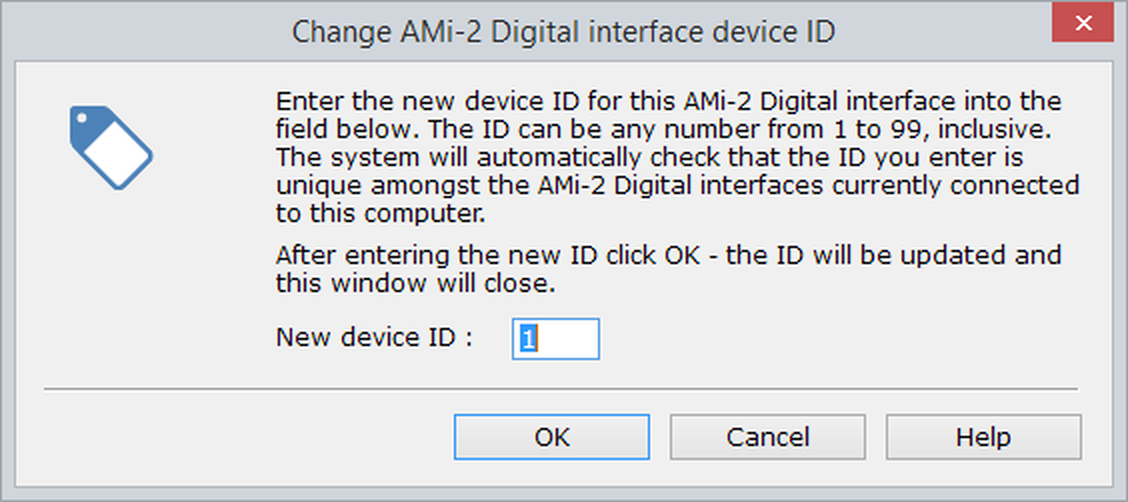
Figure 1. To change the ID of an ANY-maze interface device, you simply have to enter a new ID into the ANY-maze interface device ID window.
Note that Device IDs must be unique among all ANY-maze interface devices of the same type - so you could have an ANY-maze Digital interface with a device ID of 1, and also an ANY-maze Analogue interface with an ID of 1. However, if you added another ANY-maze Digital interface, it would be given an ID of 2. You could then subsequently change these IDs, but both ANY-maze Digital interfaces would need to have different IDs from each other - ANY-maze will enforce this.
Details
What is a device ID?
As you may know, each ANY-maze interface device has a unique serial number, and as you probably know each one also has a name, so why does it need an ID too and what is the ID used for?
The answer is that the ID is what ANY-maze uses to recognise an ANY-maze interface device and store its configuration. You might think that it could use the serial number, but imagine that you had written 20 protocols all of which used an ANY-maze interface device and all of which included the configuration for that device identified by its serial number. Now your ANY-maze interface device breaks down, so we send you a new one. But the serial number will change, so then ANY-maze would no longer recognise that the configuration in all your protocols is for the device, and you would have to reset the configuration manually in every one.
But why not use the name? In that case the name would have to be kept the same, otherwise the same problem would occur, and if the name had to be fixed then the ability to rename devices to make them more easily recognisable would be a liability rather than a benefit.
So, every ANY-maze interface device has an ID. The ID is generated by ANY-maze when it first encounters an ANY-maze interface device it has not met before. So if you connect an ANY-maze interface device (of a given type) to your computer it will be given ID 1, connect a second device of the same type and it will be given ID 2 (whether the device with ID 1 is physically connected at the time or not), connect a third device - ID 3, and so on. These IDs are tied internally to a serial number, so ANY-maze knows that the device with serial number RLQT3UY7 is ID 1, the device with serial number RLHI86W2 is ID 2 and so on.
But the important thing is that you can alter an ID if you want to. So, imagine that the device RLQT3UY7 (ID 1) breaks down; you send it to us and we send you a new device with serial number RLXX98ZZ. When you connect it, ANY-maze will give it the next ID number (say 4), but you want to use this device to replace the one with ID 1, so you change the ID to 1. Now ANY-maze will apply all the configuration settings for device ID 1 to this device and all your protocols and experiments will continue to work normally.
Changing the ID
To change the ID of a device you simply need to click the Change ID... button on the main page of the ANY-maze interface device's Configuration window and type in the new ID.
If you set the ID to be the same as another ANY-maze interface device of the same type that is actually connected, then ANY-maze will complain, and you will need to alter the ID you have entered. If you enter an ID that is the same as another ANY-maze interface device's ID but that device is not connected, then the ID will be given to the device. When the other ANY-maze interface device with the same ID is subsequently connected, ANY-maze will recognise that its ID is no longer unique and will automatically give it a different ID.

© Copyright 2003-2026 Stoelting Co. All rights reserved
ANY-maze help topic T1045