ANY-maze Help > I/O devices supported by ANY-maze > Other I/O devices supported by ANY-maze > The Picolo series digitizer I/O ports > Configuring Picolo digitizer inputs and outputs
Configuring Picolo digitizer inputs and outputs

Configuring I/O lines to be inputs or outputs
The I/O lines on most Picolo digitizers are bi-directional, meaning that they can be configured either as inputs or as outputs.
You can use the options on the Picolo I/O configuration window to choose the direction of any such lines - simply check the appropriate button to set the line direction.
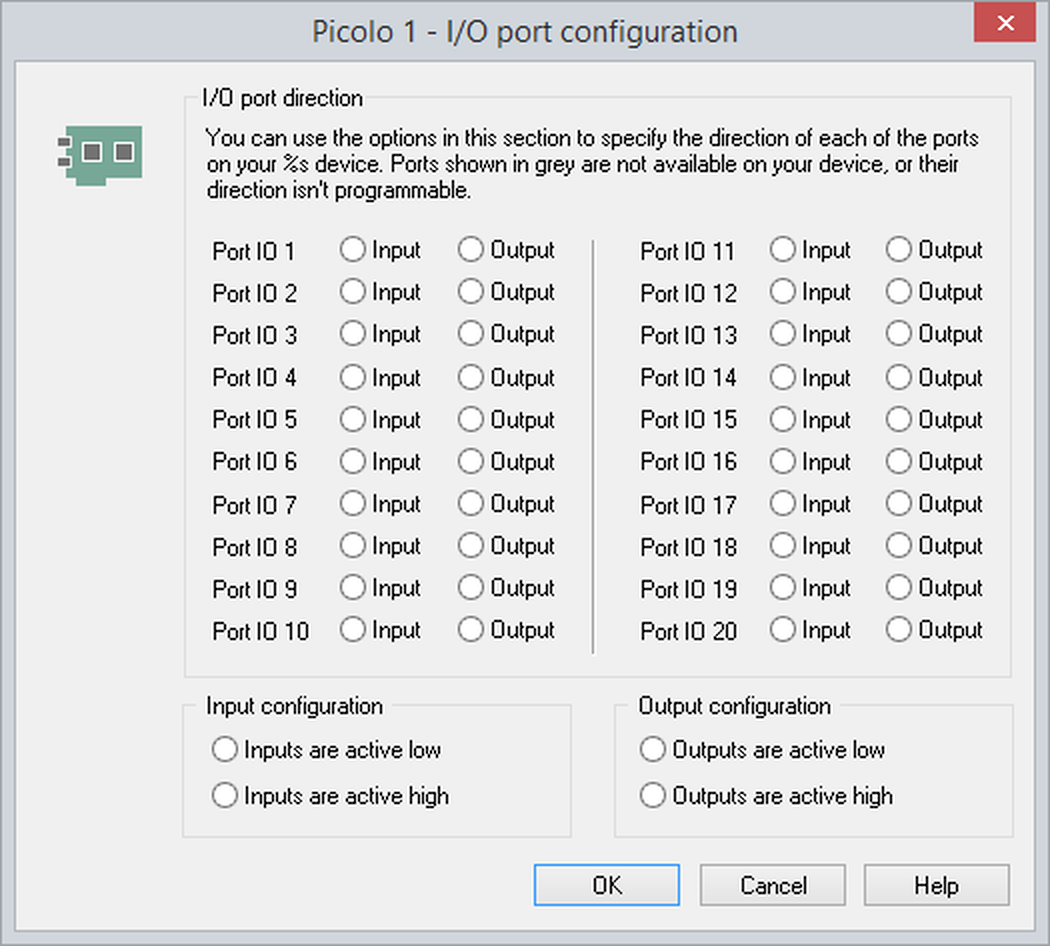
Figure 1. The Picolo I/O port configuration window
Configuring inputs
The Picolo digitizers have TTL level inputs and, by default, ANY-maze will consider these inputs to be active low. You can use the configuration options to alter this logic, such that an input is considered to be active high instead.
Configuring outputs
Picolo digitizers outputs also work at TTL level; in this case ANY-maze considers the outputs to be active high by default, but again, you can use the configuration options to change this so that they're active low.
Additional ports on Picolo add-on modules
It's possible to attach Video modules and MIO modules to most Picolo digitizers. These devices add further IO ports to the device, but these additional ports are not always programmable.
Specifically, ports on Picolo Video modules are programmable, but those of Picolo MIO modules are not. Thus, for example, if you attach a Picolo MIO module to a Picolo Pro 3i device, you will have 5 programmable ports (being those on the device itself) and 4 fixed inputs and fixed outputs provided by the MIO module. Therefore the IO port configuration window will only allow you to set the direction of 5 ports, despite the fact that you have 13 ports in total.
Port naming
ANY-maze names the ports on a Picolo device in sequential order, starting with all programmable ports followed by fixed (unprogrammable) ports. The first port is Port 1.
Clearly, a programmable port can only have a single direction at any time, and therefore the port will only appear in the list of inputs or the list of outputs. There can therefore be apparent discontinuities in the numbering; for example the list of inputs for a Picolo device might read:
| • | Picolo 0 Input 1 |
| • | Picolo 0 Input 3 |
and the list of outputs:
| • | Picolo 0 Output 2 |
| • | Picolo 0 Output 4 |
Fixed (unprogrammable) ports are present on MIO modules, and in this case each device has input ports 1-4 and an output ports 1-4. ANY-maze numbers these ports starting after the last programmable port. So, for example, a Picolo Pro 3i with an MIO module attached and which has the 5 programmable ports set as: Port 1 and Port 3 as inputs; Ports 2, 4 and 5 as outputs, would have the following port names:
| • | Picolo 0 Input 1 | = Programmable Port 1 on the Picolo Pro 3i |
| • | Picolo 0 Input 3 | = Programmable Port 3 on the Picolo Pro 3i |
| • | Picolo 0 Input 6 | = Isolated input 1 on MIO |
| • | Picolo 0 Input 7 | = Isolated input 2 on MIO |
| • | Picolo 0 Input 8 | = Isolated input 3 on MIO |
| • | Picolo 0 Input 9 | = Isolated input 4 on MIO |
| • | Picolo 0 Output 2 | = Programmable Port 2 on the Picolo Pro 3i |
| • | Picolo 0 Output 4 | = Programmable Port 4 on the Picolo Pro 3i |
| • | Picolo 0 Output 5 | = Programmable Port 5 on the Picolo Pro 3i |
| • | Picolo 0 Output 6 | = Isolated output 1 on MIO |
| • | Picolo 0 Output 7 | = Isolated output 2 on MIO |
| • | Picolo 0 Output 8 | = Isolated output 3 on MIO |
| • | Picolo 0 Output 9 | = Isolated output 4 on MIO |
See also:
| • | Using Picolo digitizer inputs |
| • | Using Picolo digitizer outputs |

© Copyright 2003-2026 Stoelting Co. All rights reserved
ANY-maze help topic T1295