ANY-maze Help > I/O devices supported by ANY-maze > Accessories designed specifically for ANY-maze > The ANY-maze multifunction remote > Setting up the multifunction remote > Updating the multifunction remote firmware
Updating the multifunction remote firmware

Introduction
The multifunction remote contains a small computer chip responsible for processing sensor data, displaying information, and managing your interactions with the device. The software that runs on this chip is called firmware.
We periodically release firmware updates to improve functionality or fix bugs. These updates are included with new versions of ANY-maze.
ANY-maze automatically checks for firmware updates for your remotes and will notify you when an update is available.
Performing the update
To update the firmware for a remote:
| 1. | Switch to the I/O page in ANY-maze |
| 2. | Choose the remote you want to update from the list shown on the left of the window |
| 3. | Click the Configure this device button in the ribbon bar. |
| 4. | The multifunction remote configuration window will open. Click the Update firmware... button. |
| 5. | The multifunction remote update window will open - shown below. |
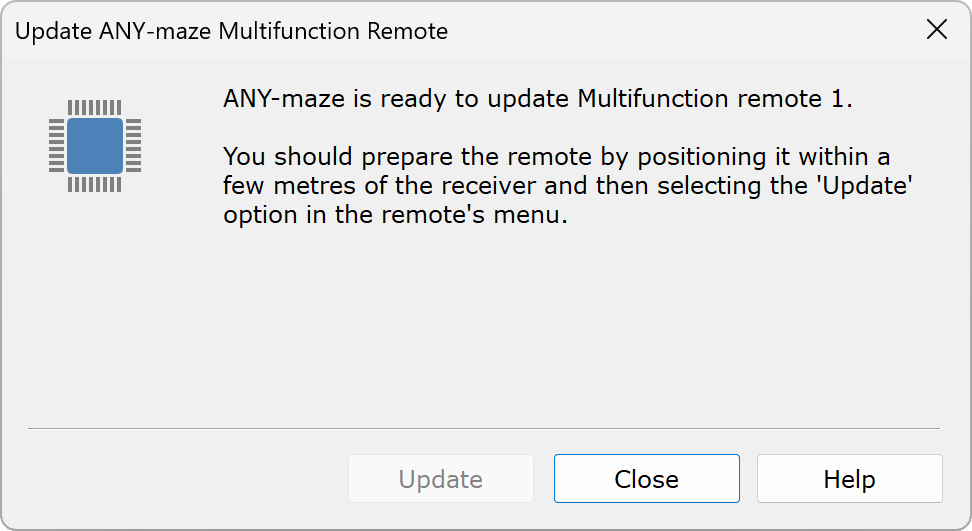
Figure 1. The ANY-maze multifunction remote update window.
| 6. | On the remote you should navigate to the Update menu option (it's on the last page of menu options). When you select this option the remote will probably say 'Ready to update' on the screen. It might say 'Battery too low', in which case you will need to change the battery for a new one before you can perform the update. |
When the remote says 'Ready to update' on the screen the update window in ANY-maze will automatically change - as in figure 2, below.

Figure 1. The multifunction remote update window, when ANY-maze and the remote are both ready to perform the update.
| 7. | Click the Update button. The window will change to show the update progress. The update takes around 5 minutes. |

Figure 1. The multifunction remote update window, when an update is in progress.
You can cancel the update by clicking the Close button. Doing so is harmless and the remote will simply continue to use the old firmware.
You can also cancel the update from the remote, by moving off the 'Update' menu option. Again, this is harmless.
| 8. | When the update completes the screen of the remote will go blank for around 5s and then the remote will restart. |
 | When the 'Update' menu option is selected on the multifunction remote, the device takes 3 minutes to go to sleep (this is irrespective of the option selected in the 'Sleep' menu). This is to ensure you have time to start the update in ANY-maze. Once the update starts, the device won't go to sleep until either it completes or it is cancelled. |
 | You can update a device to the same firmware version as it is currently using. However, updates use a lot of battery power, so we don't recommend performing an update unless it is really necessary. |

© Copyright 2003-2026 Stoelting Co. All rights reserved
ANY-maze help topic T1443