ANY-maze Help > The ANY-maze reference > The Experiment page > Setting up treatment groups and animals > The Treatment groups spreadsheet
The Treatment groups spreadsheet

Introduction
The Treatment groups spreadsheet is used to set up the treatment groups for an experiment. To access the spreadsheet you should switch to the Experiment page and select the  View treatments button - the Treatment groups spreadsheet will then be shown on the right-hand side of the page - see figure 1.
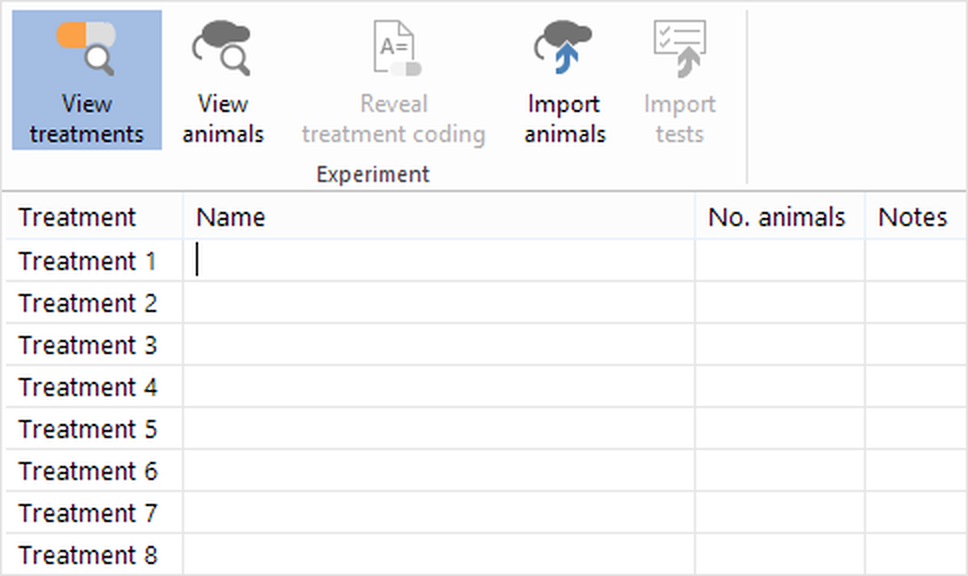
Figure 1. The Treatment groups spreadsheet, shown when the View treatments button is selected.
Entering treatment groups is very simple: for each group you just need to type in its name and the number of animals it contains. You can enter up to 20 different groups and each one can contain up to 999 animals.
What you need to do
Each of the steps below is a link, which you can click for more information.
| 1. | Enter a treatment group name |
| 2. | Enter the number of animals in the group |
| 3. | If necessary, enter the treatment dose |
| 4. | If necessary, enter the treatment concentration |
 | The Notes column isn't editable; ANY-maze will use this to give you relevant information about the treatment, for example the number of deleted or retired animals which were allocated to that treatment. |
Altering this information
For full details about editing or deleting treatment groups refer to the Editing and deleting treatment groups and animals topic.
See also:
| • | Treatment group coding |
| • | Assigning animals to the treatment groups |
| • | Unassigned animals |
| • | Editing and deleting treatment groups |
| • | The Animals spreadsheet |
| • | Understanding the relationship between the Treatment groups spreadsheet and the Animals spreadsheet |

© Copyright 2003-2026 Stoelting Co. All rights reserved
ANY-maze help topic T0741