ANY-maze Help > I/O devices supported by ANY-maze > Ugo Basile instruments supported by ANY-maze > The Ugo Basile Fear Conditioning Cage > Updating an Ugo Basile Fear Conditioning system to version 2
Updating an Ugo Basile Fear Conditioning system to version 2

Introduction
Version 2 of the Ugo Basile Fear Conditioning system has a number of benefits over version 1:
| • | The communication between ANY-maze and the cages has been improved, removing a cause of some problems with version 1 cages. |
| • | Each version 2 cage connects directly to the PC via a single USB cable, making it simpler to set-up than version 1. |
| • | Version 2 cages that are just going to be used with ANY-maze, don't require the touch-screen controller. |
If you own a version 1 system you can update it to version 2 to achieve most of these benefits. We recommend updating, as the improved communication between the cage and the PC is a significant benefit which could impact your experiments.
Getting ready to update
The update process is performed from within ANY-maze and is quite straightforward. However, before you update you need to decide what you'll be doing about USB hubs.
As you probably know, in version 1, the cages connected to the touch-screen controller and the touch-screen connected to a USB hub. All the cameras from all the cages also connected to this same hub.
In version 2, each cage is independent (i.e. they don't all connect to the touch-screen controller) however, they do still require a hub, to connect the cage and it's camera to the PC - see figure 1.
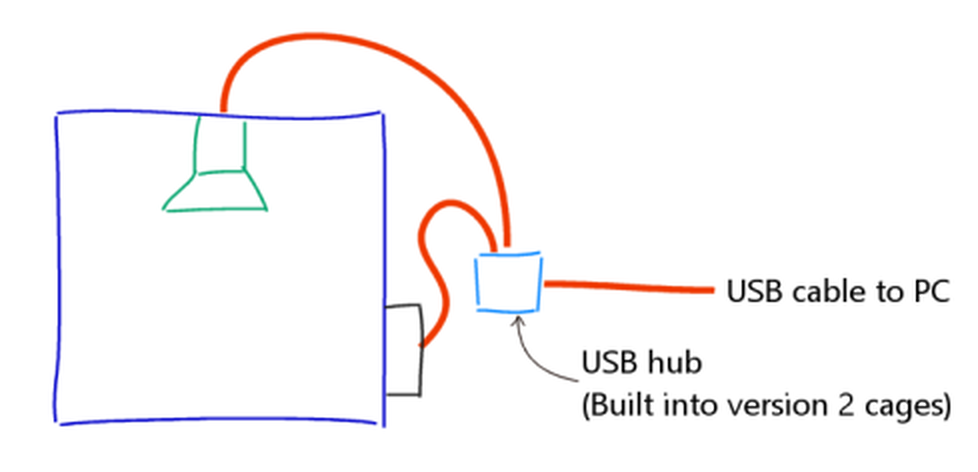
Figure 1. When updated, version 1 cages must use a USB hub to connect the camera and cage to the PC. Version 2 cages have this hub built into the cage.
In version 2 cages, this hub is built into the cage, but when using version 1 cages you will need an external hub (which should be powered). To find out more about the required hub, you should either contact Ugo Basile or your distributor.
Once you have the required hubs connected to the cages, you're ready to update.
Performing the update
The update is performed from within ANY-maze and uses a wizard which will lead you a step at a time through the update process. To start the update you should:
| • | Restart ANY-maze |
| • | Don't open or load an experiment |
| • | Switch to the I/O page |
| • | Select the option to Set up I/O devices from the ribbon bar |
| • | In the Set up I/O ports and devices window which opens, select the Update menu (shown in the top right of the window) and choose the option to Update legacy Ugo Basile Fear Conditioning cages. The update wizard will open. |
| • | Work through the wizard carefully reading the instructions for each step. |

© Copyright 2003-2026 Stoelting Co. All rights reserved
ANY-maze help topic T1253