ANY-maze Help > The ANY-maze reference > ANY-maze plug-ins > Introduction to writing a plug-in
Introduction to writing a plug-in

Introduction
An ANY-maze plug-in is a small Windows DLL which extends the abilities of ANY-maze. For an introduction to plug-ins, refer to Extending ANY-maze using plug-ins.
This topic will describe the basic structure of plug-ins, and how they work at the programming level. If you're thinking of writing a plug-in, this topic is highly recommended reading.
| • | What you need to write a plug-in |
| • | What makes a DLL into a plug-in? |
| • | Enumerating the available plug-ins |
| • | Activating a plug-in |
| • | How a plug-in gets used during a test |
| • | Plug-in results |
| • | Plug-in settings |
| • | Action plug-ins |
| • | Plug-in Help |
| • | It's not as complicated as it sounds - see the demo plug-in |
| • | What next? |
What you need to write a plug-in
To write a plug-in, you need a software development system capable of creating Windows DLLs. The most commonly used development system is Microsoft's Visual Studio, and any version can be used to author an ANY-maze plug-in.
Of course the other requirement is some knowledge of a programming language, and some experience writing software for the Windows environment. However, ANY-maze plug-ins are not complicated and you don't need to be a highly experienced programmer to write one. Furthermore, ANY-maze Support will be more than happy to help you in any way and will even write a plug-in for you (for free) provided you can supply full details of what you want the plug-in to do. Contact us for more details.
What makes a DLL into a plug-in?
As mentioned above, a plug-in is simply a Windows DLL, but not all DLLs are plug-ins - so what makes a DLL into an ANY-maze plug-in? The answer is that for a DLL to be recognised by ANY-maze as a plug-in, it simply needs to export a routine called ANYmazeExtension_Main.
The ANYmazeExtension_Main routine
All communication between ANY-maze and the plug-in is through the ANYmazeExtension_Main routine, which is passed messages by ANY-maze to which it responds. In this respect, the ANYmazeExtension_Main routine is very like a Window's WNDPROC routine, which handles messages addressed to a window.
Implementing multiple plug-ins in one DLL
A plug-in DLL will always contain just one ANYmazeExtension_Main routine but, if desired, the DLL can implement multiple plug-ins. Note that from the user's point of view the plug-ins will appear to be separate entities, and the fact that they happen to all be implemented in the same DLL will be invisible.
Choosing whether to build a 64- or 32-bit DLL
The plug-in DLL must be built for the same 64-bit/32-bit configuration as the version of ANY-maze you plan to use it with. For example, if you are running 64-bit ANY-maze then you must build a 64-bit plug-in. This is because 64-bit applications can only use 64-bit DLLs and 32-bit applications can only use 32-bit DLLs. Of course, if you want your plug-in to be compatible with both 64- and 32-bit versions of ANY-maze then you can simply build two versions of it.
Enumerating the available plug-ins
When ANY-maze starts, it searches for DLLs in the folder where the ANY-maze.exe file is located, which by default is C:\Program Files\ANY-maze. For each DLL that it finds, it checks whether the DLL exports a routine called ANYmazeExtension_Main. If it does, then ANY-maze sends the routine an AME_ENUMERATE message. The DLL responds by returning the ID of the first plug-in it implements. ANY-maze will then send the DLL another AME_ENUMERATE message, and the DLL responds with the ID of the next plug-in it implements. This continues until the DLL has returned the IDs of all of its plug-ins (which will often be just one).
Through this mechanism, ANY-maze discovers which plug-ins are available and what their IDs are. From this, it builds an internal list of available plug-ins. Note that this process is performed whenever ANY-maze starts, which means that to install a new plug-in you simply have to copy the DLL to the ANY-maze.exe folder. Also note that this means 'hot' installation of a plug-in is not supported - i.e. if you copy a plug-in DLL into the ANY-maze.exe folder while ANY-maze is running, the plug-in won't be recognised until the next time you start ANY-maze.
Plug-in IDs
Plug-in IDs are unique IDs which are used to identify a single plug-in (remember that one DLL may implement multiple plug-ins). Of course different authors will write different plug-ins, and you can't assume that an ID you choose will not be chosen by another author. To address this, ANY-maze plug-in IDs are in fact Windows Globally Unique Identifiers, or GUIDs. GUIDs, which can be created using the free tool GUIDGEN.EXE, are guaranteed to be unique.
 | GUIDGEN.EXE is shipped with the Microsoft Visual Studio system, but can also be downloaded, for free, from the Microsoft web-site. |
Plug-in names
Although internally ANY-maze will refer to a plug-in by its ID, users will refer to it by a name. Thus a plug-in needs to include some type of descriptive name (usually based on what the plug-in will actually do), and during plug-in enumeration ANY-maze will send an AME_GETNAME message to the plug-in to retrieve its name.
Names will not necessarily be unique, but it's quite unlikely that two authors will choose exactly the same name for their plug-ins. If they do, this won't cause any technical problems, although it may confuse the user - so authors should try to choose descriptive names rather than just calling a plug-in something like 'My plug-in'. Names can be up to 48 characters long.
Activating a plug-in
Following enumeration, ANY-maze will know which plug-ins are available and will list them in the ANY-maze plug-ins item of the Analysis element of the Protocol. Here the user will be able to choose which of the available plug-ins he actually wishes to use in his protocol - see figure 1. By choosing a plug-in, the user is activating it. Thus the user can utilise different plug-ins in different protocols, depending on the protocol's needs. When the user activates/deactivates a plug-in, ANY-maze sends the plug-in an AME_ENABLE message.
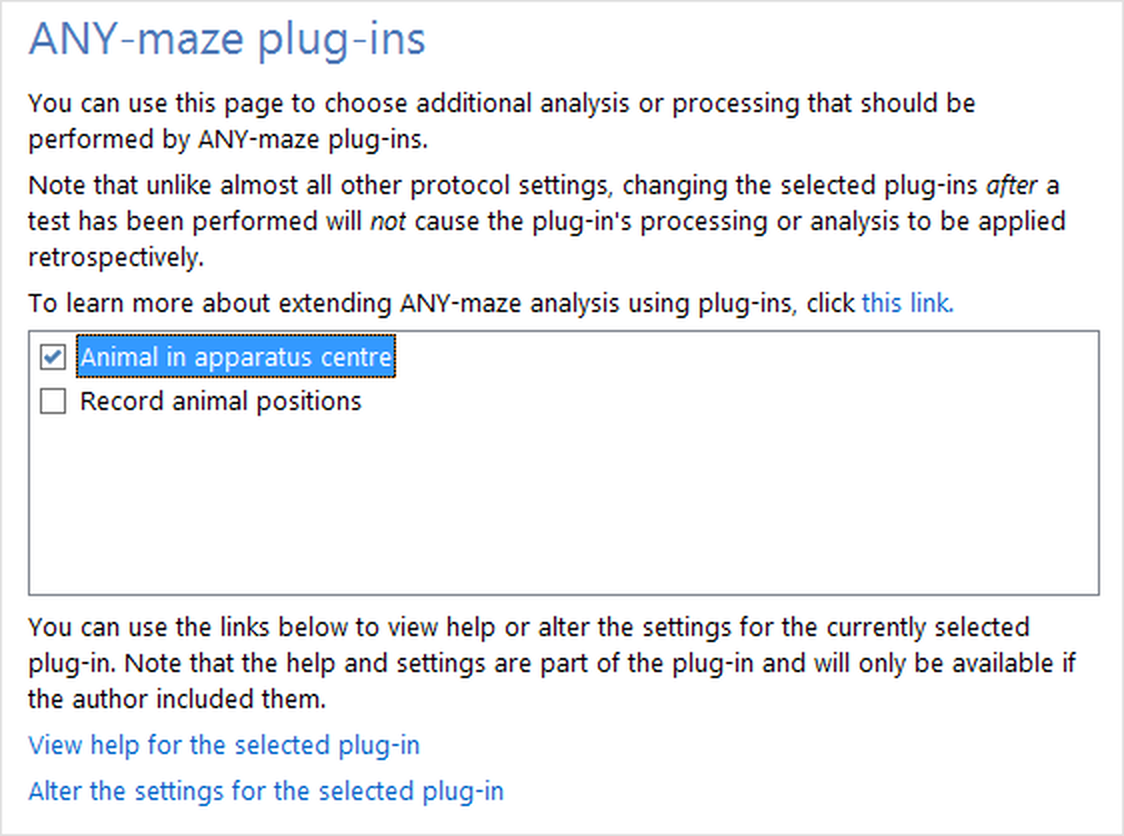
Figure 1. The plug-ins detected during enumeration are listed in the protocol, so the user can choose which he wishes to use.
 | Plug-ins are only available in licensed copies of ANY-maze. |
How a plug-in gets used during a test
When ANY-maze starts a test, it sends an AME_TESTSTART message to all the active plug-ins, i.e. those which the user activated in the protocol. This gives each plug-in an opportunity to initialise itself ready for the test.
During the test, ANY-maze sends AME_POSN messages to each activated plug-in, for each detected position of the animal. The plug-in can process this data in any way it wishes, although the processing should not take too long (ideally just a few milliseconds) otherwise it may cause ANY-maze to drop frames from the camera - typically a new frame arrives every 33ms. If the plug-in wishes to, it can return a result from this message.
At the end of the test, ANY-maze sends either an AME_TESTEND message or an AME_TESTABORT message to each activated plug-in, to tell them that the test has finished.
Plug-in results
The processing that a plug-in performs when it receives an AME_POSN message will, of course, depend on what the plug-in is actually designed to do - but in many cases, the plug-in will want to return some type of result to ANY-maze. For example, a plug-in that's designed to interface to a piece of equipment that monitors the animal's heart rate will want to return the current heart rate on each AME_POSN message; or a plug-in designed to determine when the animal is feeding will want to return a result to indicate when a bout of feeding starts, and when it ends.
Results are returned in the AME_POSNDATA record, which is one of the parameters of the AME_POSN message, and a plug-in can choose to return one of four different result types:
| RT_NONE | An RT_NONE result simply means that the plug-in doesn't return any result at all. This might be the case for a plug-in that simply passes the animal's position data to some other system. |
| RT_ONOFF | RT_ONOFF results are used when a plug-in detects when something occurs. In this case the result's data is 0 (to indicate OFF) or 1 (to indicate ON). ANY-maze will analyse RT_ONOFF results and provide measures such as Number of activations; Time active; Longest activations; etc. (See Plug-in measures for a full list.) |
| RT_VALUE | An RT_VALUE result has a specific value at a certain moment in time - for example, the animal's heart rate would be an RT_VALUE result. ANY-maze will analyse these results and provide measures for the average value, the maximum and the minimum. It's important to remember that ANY-maze will also analyse results for each zone independently, and for test segments. Thus a plug-in that returns the animal's heart rate will actually be making results available for 'Heart rate in the ABC zone', 'Heart rate in the XYZ zone' and 'Heart rate in period 0-30 seconds' (for example). To benefit from this analysis, the plug-in author doesn't need to do anything - it just happens. |
| RT_CUMULATIVE | RT_CUMULATIVE results are discrete results that are summed during the test. For example, a plug-in which determines how far the animal travels would return an RT_CUMULATIVE result with data of how far the animal travelled from the previous position to the current one. ANY-maze will sum the results and thus report the total distance the animal travelled. Again, it's worth remembering that ANY-maze will also automatically calculate separate results for each zone and for each test segment. |
Plug-in settings
A plug-in can optionally include a 'Settings window', which will allow the user to specify options or settings that the plug-in should use during its analysis. For example, the demo plug-in determines when the animal is in the centre of the apparatus and returns an RT_ONOFF result. But what should be the definition of 'In the centre of the apparatus'?
To set this, the plug-in provides a settings window (see figure 2) where the user can specify how far from the centre the animal can be while still being considered to be 'in the centre' - by default the plug-in uses 10cm, but the user can alter it to any value from 1cm to 999cm.
Obviously what actual settings a plug-in uses won't be known to ANY-maze, but it does store the settings as part of the protocol and it passes them to the plug-in as part of the AME_TESTSTART message. To do this, ANY-maze simply treats the settings as an opaque buffer of a fixed size.
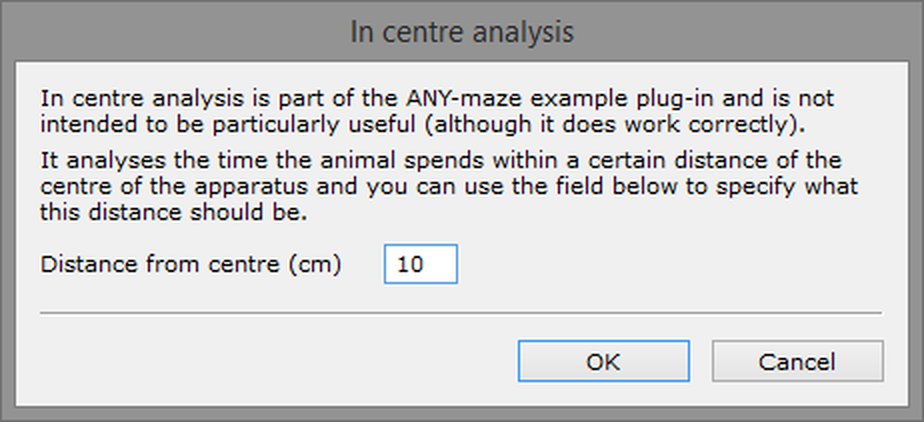
Figure 2. The settings window of the demo plug-in.
Editing settings
When a plug-in is first activated in a protocol, the settings buffer is initialised to all zeros. If the user chooses to edit the settings, ANY-maze will load the current settings from the protocol and pass a pointer to them in an AME_EDITSETTINGS message. The plug-in can detect whether the settings are all zero, and if so can complete the settings with default values. It can then use a window to allow the user to edit the settings, and finally it can use the return from the AME_EDITSETTINGS message to indicate to ANY-maze whether the settings buffer should now be saved or not.
Action plug-ins
Action plug-ins are a little different to normal plug-ins. Rather than performing analysis of the test data, they can 'do something' during a test.
Action plug-ins are invoked during a test by an ANY-maze procedure firing an action (or, if the protocol is using the older 'Events and Actions' system, by an action directly triggered by an event). An event can detect a wide range of different things that occur during a test - for example, when the animal enters a certain zone. When this occurs, the procedure or event can be set to trigger an action, and the action can invoke an 'Action' plug-in. The plug-in could do virtually anything - perhaps it would send a message to another program, or perhaps it would switch on some piece of equipment.
To make a plug-in into an 'Action plug-in', you simply need to return RT_ACTION as the plug-in's result type when sent the AME_GETRESULTTYPE message. For full details, see Writing an Action plug-in.
Plug-in Help
Unless a plug-in is only intended to be used by the author, it should include some help to explain to users what it does, how to interpret the results and how to alter the settings (if it includes any).
Plug-in help is displayed within the ANY-maze help page, but the text of the help is provided by the plug-in. For the author, help is very easy to implement - when the user requests help, ANY-maze sends a message to plug-in which returns three strings:
| • | The help topic title |
| • | Some 'introductory' text |
| • | Some 'details' text |
Within the text, the author can use some basic mark-up to alter the text format (using italic, bold, etc.) and to structure the text (using paragraphs and bullet points). Note that the mark-up is NOT HTML - it's the mark-up used by the ANY-maze help page, which is broadly based on RTF (Rich Text Format). For more details, see the help topics for the AME_GETHELPTITLE, AME_GETHELPINTRO and AME_GETHELPDETAILS messages.
It's not as complicated as it sounds - see the demo plug-in
Having read all the above, you may be thinking that writing a plug-in is a complicated business, but actually it's really quite simple - as can be seen in the demo plug-in DLL.
The demo DLL includes two plug-ins, both of which perform useful (albeit simple) functions; furthermore, one of them provides a settings window and both provide help. Excluding comments and blank lines, the total code is just 300 lines, and much of this can be reused as 'boiler-plate' code in your own plug-in projects.
Incidentally, an absolutely minimal plug-in could probably be implemented in about 40 lines of code.
What next?
Having read this topic, you should now have a basic understanding of how a plug-in DLL works. As a next step to writing your own plug-in, I suggest you first install the demo plug-in DLL and review the code. Then, use the Step-by-step instructions to write your own plug-in.
And don't forget, ANY-maze Support are just an e-mail away if you need any help.
See also:
| • | Step-by-step instructions for writing a plug-in |
| • | Writing an Action plug-in |
| • | The ANY-maze demo plug-in |
| • | Plug-in API reference |

© Copyright 2003-2026 Stoelting Co. All rights reserved
ANY-maze help topic T0998