ANY-maze Help > The ANY-maze reference > The Protocol page > The elements of a protocol > Apparatus > Apparatus > An introduction to apparatus
An introduction to apparatus

Introduction
As you would expect, all protocols in ANY-maze must include a definition of at least one piece of apparatus, as this is where testing is going to take place.
When video tracking, the most essential aspect of this definition is the apparatus map, which specifies both the part of the video image which corresponds to the apparatus and divides the apparatus into discrete areas.
| • | Apparatus maps |
| • | Working with real-world distances |
| • | Using multiple apparatus |
Apparatus maps
As you probably know already, a video source provides images of a single piece of apparatus. This is fine, but how can ANY-maze know which part of the image is the apparatus, and within the apparatus, what parts are of particular interest to you?
Well, that's what the protocol's Apparatus element is for. Essentially, to set up a piece of apparatus, you select the video source which shows an image of the apparatus and then you draw an apparatus map over the top of the video picture - see figure 1.
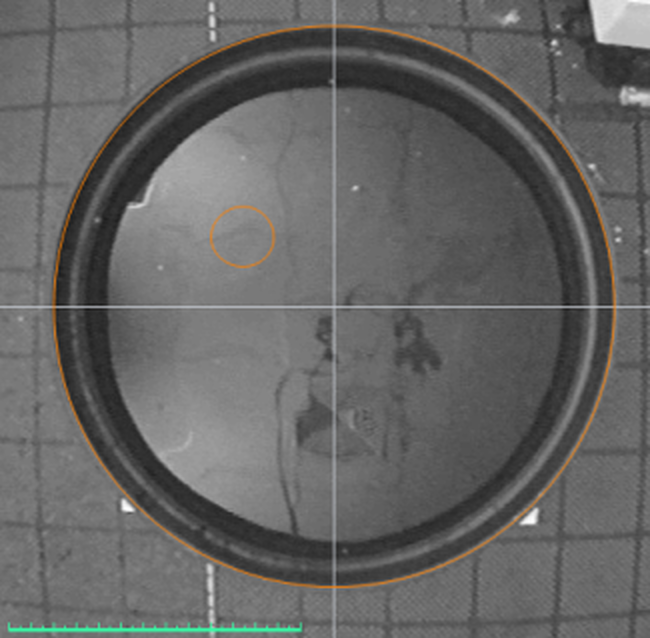
Figure 1. A simple apparatus map for a water-maze.
The apparatus map serves two purposes:
| 1. | It defines the borders of the apparatus. This is important because while tracking, ANY-maze will ignore almost* everything that goes on outside these borders. For example, if you walk around in the video picture during a test, but you stay outside the apparatus's borders, then ANY-maze will simply ignore you. |
* ANY-maze's auto-start feature actually tracks you (the experimenter) in the area outside the apparatus borders - when you leave the camera's view, ANY-maze automatically starts the test. However, after the test has started you can reappear in this area without causing any effect.
| 2. | It defines distinct areas within the apparatus which might be of interest to you. For example, in figure 2 the first map just defines the borders of the plusmaze, so how can ANY-maze know which are open and which are closed arms - or indeed which parts are arms at all? This is solved in the second map, where the apparatus is divided into different areas. |
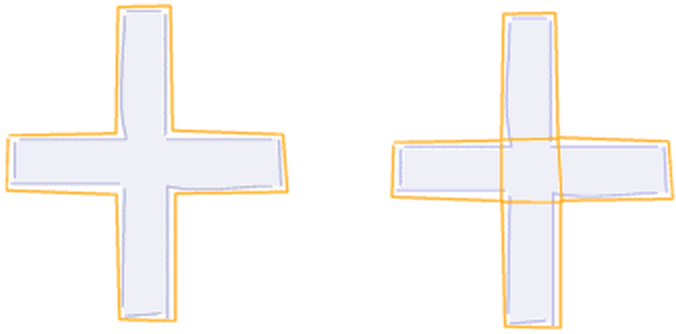
Figure 2. The apparatus map on the left only defines the borders of the plusmaze, whereas the one on the right divides the plusmaze into discrete areas.
Working with real-world distances
As well as defining the apparatus map, the apparatus element is also used to define the apparatus's real-world size. For example, imagine a round open field arena - in the video picture it would appear as something like a large bucket, but how big is it? Of course there's no way to know - a 1m diameter open field would look just like a 50cm diameter open field, particularly if viewed through a vari-focal (zoom) lens.
In fact, the actual size of the apparatus doesn't matter to ANY-maze, but it will to you - for example, you probably won't want measures such as Distance travelled reported in pixels!
To solve this, you need to set a scale for the video image which you can do using the ruler line. Essentially, you just position the ruler line along a known distance in the image, perhaps across the diameter of an open field, and then tell ANY-maze how long that distance actually is in millimetres. Armed with this information, the system can translate all distances from pixels to metres and thus report measures in units such as metres and metres/second.
Using multiple apparatus
As you're probably aware, ANY-maze can track simultaneously in up to 40 pieces of apparatus in a single experiment. To achieve this, you first need to create one video source for each piece apparatus and then add one apparatus element for each one. This means you'll need to draw one apparatus map for each one, and set the scale for each one too. This is necessary because each apparatus element corresponds to a physically different piece of apparatus possibly being viewed by a different camera and lens, with the result that the exact form of the apparatus and their exact scales will probably all differ to some extent. This might all sound like quite a lot of work, but remember, you can save protocols and then use them again and again, so you'd typically only have to draw all the apparatus maps once.
See also:
| • | Setting up a piece of apparatus |
| • | Adding elements to a protocol |
| • | An introduction to apparatus |
| • | Saving and loading protocols |

© Copyright 2003-2026 Stoelting Co. All rights reserved
ANY-maze help topic T0117