ANY-maze Help > The ANY-maze reference > The Protocol page > The elements of a protocol > Testing > Events and actions > An introduction to events and actions
An introduction to events and actions

 | Events and actions have been replaced by procedures, but they are documented here as they can still be used in legacy experiments. |
Introduction
Events and actions provide a method by which you can detect specific situations that occur during a test (events) and take some action because of them. For example, you could:
- Detect when the animal enters a zone, and end the test when this occurs (see figure 1);
- Detect when the animal is immobile for a certain amount of time, and pause the ANY-maze video recorder; unpausing it when the animal becomes mobile again;
- Detect when the animal activates an on/off input, and turn on an on/off output for a certain duration - perhaps to activate a shocker.
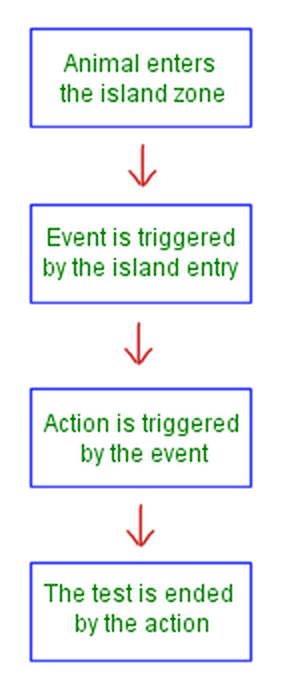
Figure 1. The steps that would occur in a water-maze, where entry into an island zone is to end the test.
Detecting events
The intention of ANY-maze events is to detect when a particular situation occurs during a test. To this end, ANY-maze allows you to base an event on a wide range of different things, including,
| • | The actual performance of the test; e.g. the test starting. |
| • | Time; for example, a set duration since the test started or a specific time of day. |
| • | Activity and inactivity of the animal in the apparatus as a whole and also in individual zones. |
| • | Mobility and immobility of the animal in the apparatus as a whole and also in individual zones. |
| • | Entry, exit, permanence, etc. in a zone. |
| • | The occurrence, non-occurrence, etc. of a sequence |
| • | The occurrence, duration, etc. of a 'key behaviour' either in the apparatus as a whole or in an individual zone. |
| • | The activation, deactivation, etc. of an input switch either in the apparatus as a whole or in an individual zone. |
Performing actions
The purpose of an action is to do something when an event occurs. What the action actually does is defined by you, and could be:
| • | To end, pause, or unpause the test. |
| • | To start, stop, pause, or unpause the ANY-maze video recorder. |
| • | To add a label to the video of the test (so you can quickly find the event in the recording). |
| • | To play a sound or to turn the ANY-maze white noise generator on or off. |
| • | To turn a switch on or off. |
| • | To activate or reset another event. |
In fact, a single action can cause any number of these things to occur - so it might add a label to a video, play a sound, and activate a switch.
Detecting multiple events
An obvious question about the events/actions model used in ANY-maze is to ask why the system includes these two elements separately - why not simply have a single item which, when triggered, performs the action?
In fact, there are two reasons why the system works this way. First, it allows you to define a number of different events, any of which can trigger a single action - e.g. the action will occur if event A or Event B or event C occurs. And secondly, it allows you to define multiple events, all of which must occur in order to trigger an action - e.g. the action will only occur if event A and Event B and event C occur.
For example, you might want to end the test if the animal enters a certain zone but only if it does this after 1 minute of the test has passed. In this case, you could create an event that would be triggered 1 minute after the test start and another that would be triggered when the animal enters the zone. You would then create an action to end the test but set it to occur only if BOTH of the events were 'active' (i.e. they had both been triggered).
In fact, you might spot a problem with this example - if the animal enters the zone during the first minute, then the action WON'T be triggered because the '1 minute' event is not active; but when the end of the first minute occurs, the action WOULD be triggered because now both events would have occurred. In other words, the test would end after one minute provided the animal had visited the zone during that minute - and this is NOT what we intended.
The solution to this problem is related to how events are reset. Basically, after an event has been triggered, it is said to be active and it remains in this state until it's reset which can be done either automatically, by the system, or 'manually' by an action. In the case where an event is reset automatically, the system first processes all the effects of the event and then resets the event so it's no longer active. In contrast, a manual reset event has its effects processed and is then left in an active state - it's only reset if some action explicitly resets it.
Let's see how this can be used to fix the problem with the above example: What we would want to do is to set the 'Animal enters the zone' event to be automatically reset, but the '1 minute' event to be manually reset (in fact, we'll never reset it). Thus, if the animal enters the zone during the first minute of the test the 'Animal enters the zone' event will become active; however, nothing will actually happen because the '1 minute' event will be inactive. Having determined that there are no actions to perform, ANY-maze will simply reset the 'Animal enters the zone' event back to an inactive state.
Now, after 1 minute the '1 minute' event will become active, but it won't trigger the action either, because the 'Animal enters the zone' event won't be active - and because it's a manual reset event, it'll be left in the active state. What will happen now if the animal enters the zone is that both events will become active, and this WILL trigger the action which will end the test.
 | In fact, this would be much easier to handle with procedures - so if you have a set-up like this, you're better off using procedures instead of events and actions. It's possible to change a protocol that uses events and actions to use procedures instead - for more details, see Understanding the changeover from Events and Actions to Procedures. |

© Copyright 2003-2026 Stoelting Co. All rights reserved
ANY-maze help topic T0412