ANY-maze Help > The ANY-maze reference > The Protocol page > The elements of a protocol > Behaviour > Zones > Setting up a zone > Setting up hidden zones
Setting up hidden zones

In brief
If your apparatus includes areas where the camera can't see the animal - a tunnel or nest box, for example - then you can include hidden zones in your protocol. When it can't see the animal, the system will assume it's in one of these zones.
 | In order to use hidden zones, the tracking must be quite good (i.e. ANY-maze must be able to find the animal in most of the frames) because the software assumes, when it can't find the animal, that it's hidden. This usually won't be an issue unless you're using apparatus with very low contrast and/or strong reflections. |
Setting up a single hidden zone
In most cases where the animal can't be seen by the camera, there's only one place it could have gone - for example, into the dark side of a light/dark box. In these cases setting up a hidden zone is very simple: you should just select the option in the Hidden zone drop list (on the Zone settings page) for 'This is the only hidden zone'.
When you do this ANY-maze will automatically select the option If the animal is hidden at the start of the test then assume it is in this zone, which makes sense, because if the animal can't be seen at the start of the test then there's only one place it can be - in this zone.
Setting up multiple hidden zones
Imagine you have a light/dark box with a nest box in the light side - as in figure 1, below:
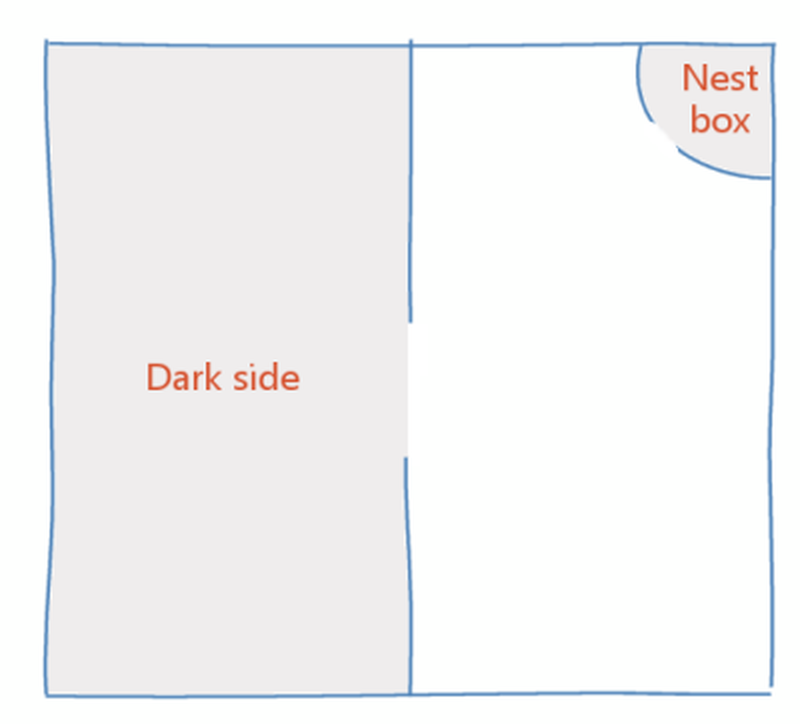
Figure 1. A light/dark box with a nest box in the light side. When the animal is in either the dark side or in the nest box it will be hidden from the camera's view.
Now we have two places where the camera won't be able to see the animal, the dark side and the next box, so (if we want to differentiate the time it spends in these two locations) we will need two hidden zones.
But how will ANY-maze know which hidden zone the animal is in when it can't be seen? The answer is that it considers which zone the animal was in immediately before it disappeared. So, if it was in the 'In front of nest box zone' (see figure 2, below) and then it disappears, it seems reasonable to assume it has gone into the nest box; but if it was in the 'In front of dark side entrance zone' then it seems reasonable to assume it has gone into the dark side.
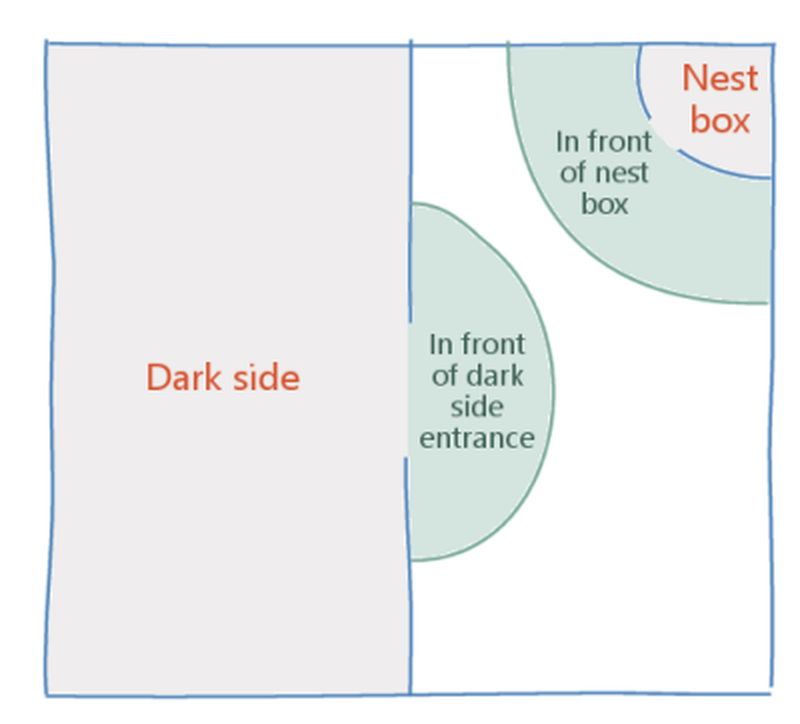
Figure 2. Zones placed in front of the entrances to the dark side and the nest box will allow ANY-maze to determine where the animal has gone when it disappears.
To actually set this up in the protocol you first need to create the zones that the animal will leave in order to enter the hidden zones - so in the above example, these would be a 'In front of nest box zone' and a 'In front of dark side entrance zone'. Then you can create a new zone, call it, for example, 'Nest box' and in the Hidden zone drop down list select the option This is a hidden zone - the animal enters it from the In front of nest box zone. Do the same thing again for a 'Dark side' hidden zone, and you'll have two hidden zones that ANY-maze can differentiate between.
There is one other thing to consider when setting up multiple hidden zones - what if the animal is hidden at the start of the test? Clearly ANY-maze won't be able to use the last zone the animal was in to determine which hidden zone it is in now, so instead it will simply not consider it to be in any zone at all... unless, you select the option If the animal is hidden at the start of the test, assume it is in this zone for one of the hidden zones you have created. (Note that you can only select this option for one zone).
There are a few other things to be aware of when setting up multiple hidden zones:
| • | You should avoid using very small zones as the zone the animal leaves in order to enter a hidden zone. The reason is that if the animal runs quickly through the zone and into the hidden zone, then ANY-maze may not see it as being in the zone - see figure 3. |

Figure 3. The dots represent the animal's track - i.e. the points at which ANY-maze determined its location. The zone in front of the dark side entrance is so small that, in this case, ANY-maze doesn't see the animal in this zone before it disappears into the dark side. (This effect has been exaggerated in this diagram to aid explanation).
| • | If, immediately before it disappears, the animal was not in any zone that is set to be a 'zone that the animal leaves in order to enter a hidden zone' then ANY-maze WON'T consider it to be in any of the hidden zones, although it WILL consider it to be hidden. |
| • | In theory the animal could be in two hidden zones at the same time. This is possible because it can be in two normal (non-hidden) zones at the same time (as zones are not mutually exclusive). So if a particular area of the apparatus is in both 'Zone A' and in 'Zone B' and the animal can leave 'Zone A' to enter 'Zone Hidden A' and can leave 'Zone B' to enter 'Zone hidden B' then, if it is in this area of the apparatus and then disappears, ANY-maze will report it as being in 'Zone Hidden A' and in 'Zone Hidden B'. |
Hidden zones and mobility
When an animal is in a hidden zone, ANY-maze will consider that it is mobile. This is an arbitrary decision, as we can't actually know whether the animal's mobile or not. An effect of this is that the result for the total time mobile will include the time the animal was in the hidden zones. If this doesn't suit your needs, then you can simply use a calculation to deduct the time in the hidden zones from the total time mobile.

© Copyright 2003-2026 Stoelting Co. All rights reserved
ANY-maze help topic T0328