ANY-maze Help > The ANY-maze reference > The Protocol page > The elements of a protocol > Behaviour > Keys > An introduction to using keys to score behaviours
An introduction to using keys to score behaviours

Introduction
Although ANY-maze can automatically score many measures, there may be some specific behaviours that you would like to score which the system can't detect - grooming is a good example. Of course, you could simply revert to a manual system to score these behaviours but a much better method is to use keys.
| • | Scoring behaviours with keys |
| • | Working with multiple apparatus |
| • | Key results |
| • | Keys and activity |
| • | Scoring large numbers of behaviours |
Scoring behaviours with keys
Keys are keys on your computer's keyboard, and you can use them to record behaviours during a test. For example, you might choose to define the 'G' key for grooming.
In this case, you would simply observe the animal on the computer's screen during the test and whenever it starts grooming, you would press down the 'G' key, releasing it only when the behaviour ended. As you only have to press a key to score a behaviour, it's quite easy to simultaneously score two or more.
If you want it to, ANY-maze can indicate the active behaviours while it tracks - see figure 1.
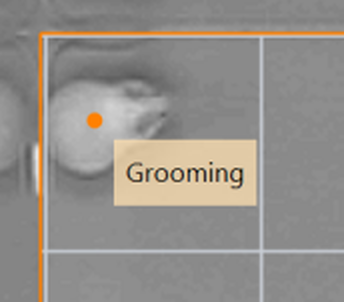
Figure 1. ANY-maze can indicate which behaviours are currently occurring while it tracks.
Working with multiple apparatus
If a protocol includes more than one piece of apparatus, then you will need to define one key for each behaviour in each apparatus. For example, with two plusmazes you might define the 'G' key for grooming on Plusmaze 1 and the 'L' key for grooming on Plusmaze 2. Of course, you could also score other behaviours too, perhaps rearing using the 'R' and 'P' keys.
Key results
For any behaviour that you score, ANY-maze can report a range of different results including the total number of presses (i.e. the number of episodes of the behaviour) and the total time pressed (i.e. the total duration of the behaviour). What's more, the system can report these values for the apparatus as a whole and also for individual zones - so, for example, you could easily get the result for 'Time spent grooming in the drug-paired side zone' as well as 'Total time spent grooming'.
Keys and activity
In some apparatus, you may be interested in how much time the animal is active for. In this case, you would probably consider that the animal is active if it's mobile, but what if it's standing in one place and grooming? You would probably still consider that it's active.
This is the essential difference between mobility and activity in ANY-maze - mobility just refers to the movement of the animal, whereas activity can also include other behaviours scored using keys.
When you set up a key, you can choose whether or not the behaviour it represents should be counted as an activity or not. For example, 'Grooming' probably would be, but 'Sleeping' probably wouldn't.
Scoring large numbers of behaviours
If you want to score more than a few behaviours, then it can become quite difficult to keep track of what's happening and press all the correct keys at the right times. For example, imagine you want to score grooming, sniffing, rearing, feeding and drinking; you would need to define five different keys. Then you would watch the animal and press the keys whenever one, or more, of the behaviours occurs. The problem is that the animal might be feeding, pause and start sniffing for a second, then immediately start grooming before quickly starting to feed again. Even with none of these behaviours occurring simultaneously, it would still be hard to register them all accurately - and if you did want to score behaviours which could occur simultaneously, then the problem would just get worse.
To address this, ANY-maze allows you to score the same test more than once. So in the example, you might score feeding and drinking while watching the 'live' test, then you could watch a video of the test and score grooming and rearing, and finally you'd watch the test video again and score sniffing. This way, you can focus on just a couple of behaviours each time, and it would be much easier to score them accurately. Note that you do need to have recorded a video of the test in order to do this, but you can simply have ANY-maze record the video automatically as the 'live' test is run.
This ability to score the same test multiple times is described in detail in the Adding additional scoring to a performed test topic.
See also:
| • | Testing which keys can be used together |
| • | Adding additional scoring to a performed test |
| • | Key measures |

© Copyright 2003-2026 Stoelting Co. All rights reserved
ANY-maze help topic T0362