ANY-maze Help > The ANY-maze reference > The Protocol page > The elements of a protocol > Behaviour > Points > An introduction to points
An introduction to points

Introduction
As you may know, ANY-maze allows you to identify areas of your apparatus which are of interest by defining zones. But what if you're not really interested in an area of the apparatus, but rather in a specific position? Well, you could try to create a very small zone, but this would not be very satisfactory - instead, ANY-maze allows you to define a point.
| • | Defining the location of a point |
| • | Automatic point positioning at the end of the test |
| • | What ANY-maze reports for a point |
Defining the location of a point
Defining a point could hardly be easier - usually, you'll define the point manually which means that you just click in the apparatus map at the point's location - see figure 1.
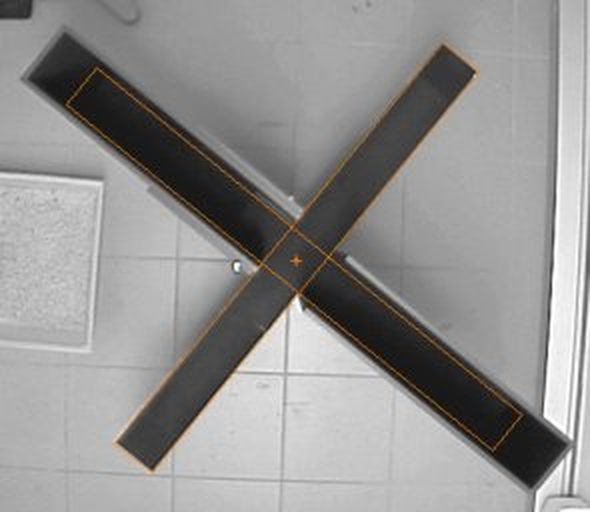
Figure 1. In this plusmaze a point has been defined in the centre of the apparatus.
You can define any number of points, and they can be located anywhere at all - even outside the apparatus map. This can be useful if, for example, you want to know how much time the animal spends oriented towards a cue outside the maze.
Automatic point positioning at the end of the test
You can also get ANY-maze to determine the location of a point automatically, based on what happened in the test - for example, set the point's location to where the animal spent the most time. There are a number of options you can choose here, including (but not limited to):
| • | The location where the animal spent the most time (either the animal's centre point, or its head) |
| • | The location where the animal spent the most time when I/O inputs or outputs were active |
| • | The location where the animal spent the most time freezing |
| • | The location where the animal spent the most time when a key was pressed |
Choosing one of these options means that you don't need to select the point's position on the apparatus image, and it also means that the point's location won't be known until after the test has finished - it's only when ANY-maze analyzes the results of the test that it can determine the required location and generate measures for that point.
What ANY-maze reports for a point
If you defined a point in your apparatus, ANY-maze will report a range of measures related to it. These include:
| • | Average distance from the animal to the point |
| • | The amount of time the animal was moving towards the point |
| • | The amount of time the animal was moving away from the point |
For a complete list, see Point measures.
See also:
| • | Setting up a point |
| • | Point measures |

© Copyright 2003-2026 Stoelting Co. All rights reserved
ANY-maze help topic T0337