ANY-maze Help > The ANY-maze reference > The Protocol page > The elements of a protocol > Inputs and outputs > Temperature controllers > Setting up temperature controllers > Setting up OPAD cage temperature cycles
Setting up OPAD cage temperature cycles

 | The settings described in this topic are only available for the OPAD temperature controller. |
In brief
When setting up the temperature controller in an OPAD cage, you will find that the temperature controller element in the protocol list includes a sub-element titled 'OPAD temperature cycle', which can be used to program a 'temperature cycle' - see figure 1.
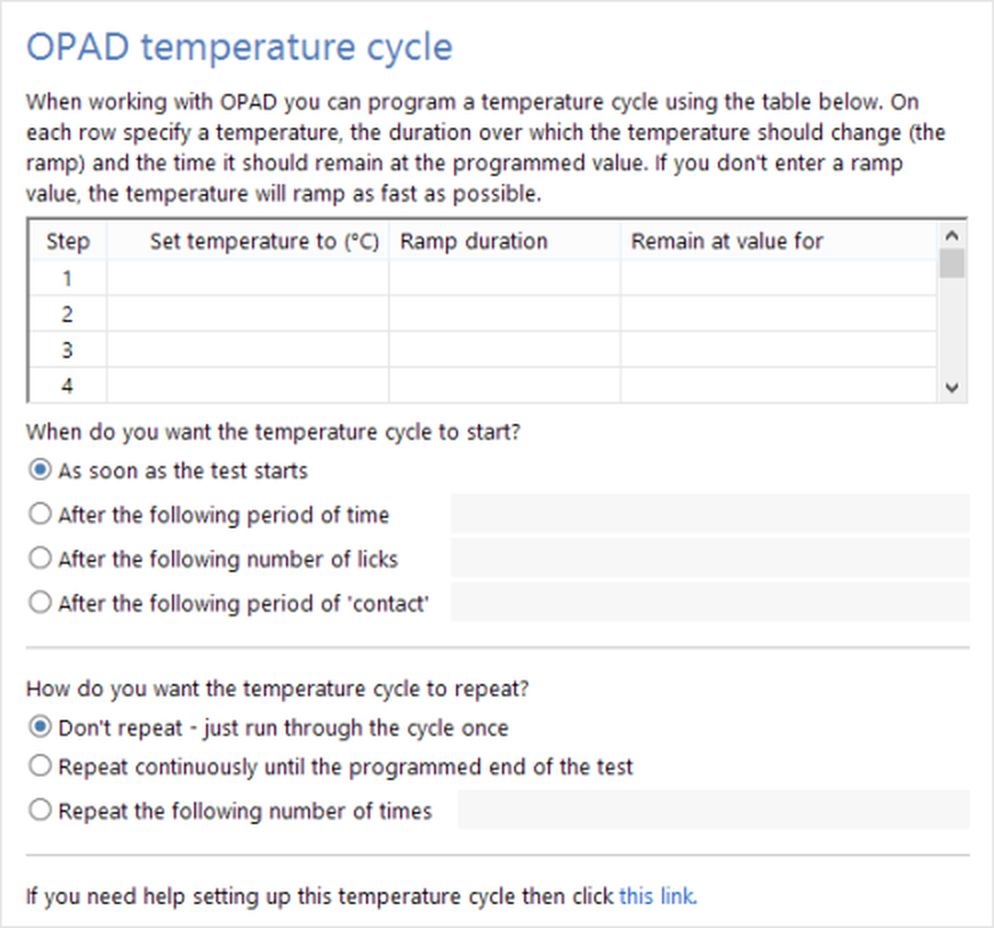
Figure 1. The OPAD temperature cycle settings page.
A temperature cycle is simply a series of temperatures that the controller should assume. For example, you might want the temperature controller to be at 30°C for 1 minute, then heat up to 50°C over the course of 30 seconds, remain at 50°C for 1 minute, and then cool back down to 30°C, again over the course of 30 seconds. You might want this to happen just once, or you might want it to repeat again and again, throughout the test. It is this sort of 'cycle' which you can set up using this option.
Details
A temperature cycle is set up using a simple table with three columns: Temperature, Ramp duration, Remain at value for (see figure 1, above). For example, entering 50, 30s, 1min would ramp the temperature from whatever value it has now to 50°C over the course of 30s, and then remain at that temperature for 1 minute. After the 1 minute, the next step (or row in the table) would be performed - this might be 10, 5min, 1min - which would ramp the temperature down (from 50°C) to 10°C over the course of 5 minutes and then remain at 10°C for 1 minute.
Clearly, the temperature at the start of one step is whatever the temperature was at the end of the previous step, but what about the temperature at the start of the first step? This will be whatever value you specified as the temperature controller's start temperature.
An important thing to understand about temperature controllers is that they can't alter the temperature of something instantly - so entering a value of 0 for ramp duration does NOT mean that the temperature will jump immediately to the new temperature - it will just cause the temperature to change as fast as possible. In fact, if you want the temperature to change as fast as possible, then you should just leave out the ramp value entirely.
Specifying when the cycle should start
Unless you specify otherwise, the temperature cycle will start as soon as the test begins, so the temperature will immediately start to change from the 'Start temperature' to whatever temperature is specified in the first step. However, you can alter this:
| • | You can specify that the temperature cycle should only begin after a certain period - for example, 1 minute (which you would enter as 1min). |
| • | You can specify that the cycle should begin after the animal has licked the bottle spout a certain number of times - for example, after 100 licks. |
| • | You can specify that the cycle should begin after the animal has been in contact with the thermal stimulus elements for a certain period - for example, 20 seconds. |
Repeating the temperature cycle
Normally, a temperature cycle will be performed just once, and the temperature will end up at whatever the value is specified in the last step. However, if you wish, you can specify that the cycle should repeat, either a certain number of times, or continuously (until the test ends). Note that when a cycle repeats the criteria specified for when it should start are NOT repeated - for example, if you specify that the cycle should start after 100 licks and then you set it to repeat, then the FIRST cycle will only start once the animal has licked 100 times, but then the cycle will just keep repeating continuously, irrespective of whether the animal licks the bottle spout or not.

© Copyright 2003-2026 Stoelting Co. All rights reserved
ANY-maze help topic T0285