ANY-maze Help > The ANY-maze reference > The Protocol page > The elements of a protocol > Testing > What to record while testing > Recording animal positions and areas
Recording animal positions and areas

Introduction
When tracking, ANY-maze attempts to identify the position of the animal in every image it receives from the camera. This is generally around 15-30 images per second, although it can be many more for cameras with a higher frame rate. However, it's generally unnecessary to record all these positions in order to analyse the animal's track and/or behaviour; indeed, doing so just serves to make the experiment file larger for no gain. For this reason, you can specify the maximum number of positions that the system should record each second.
In addition, ANY-maze will, by default, record the area of the animal (the 'animal image'), although it's possible to turn this off to make your files smaller. However, you should be aware that doing so will bring with it some limitations.
| • | Specifying the maximum number of positions the system should record each second |
| • | Choosing whether to recording untracked frames |
| • | Choosing not to record animal images |
Specifying the maximum number of positions the system should record each second
As mentioned in the introduction, ANY-maze will attempt to identify the animal's position in every image it receives from the camera. However, it isn't always necessary to record all these positions in order to analyse the animal's track and/or behaviour. In fact, recording about 8 positions per second is usually fine for rats or mice that are walking at normal speeds.
The benefit of recording fewer positions per second is that it will reduce the size of your experiment files. If your tests are only short this isn't usually much of a concern, but if you plan to track for long periods and/or your experiment includes many tests, then the experiment file can become really quite large (multi-gigabyte files are not uncommon).
In most cases the best approach is to select the 'automatic' option, in which case ANY-maze will adjust the number of positions it records per second based on the duration of the longest programmed duration of a test. For example, if your protocol includes three stages with tests lasting 10 minutes in stage 1, 60 minutes in stage 2 and 10 minutes in stage 3 then ANY-maze will choose a recording frequency based on the 60 minute duration, in this case, as shown in figure 1, it would choose to record no more than 20 positions per second.
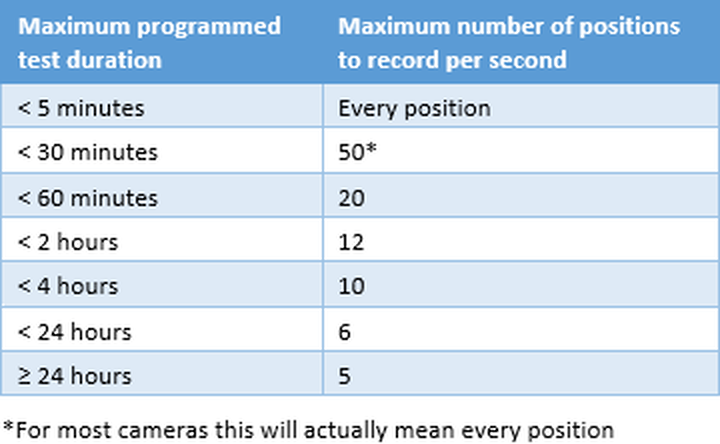
Figure 1. Table showing the maximum number of positions per second that ANY-maze will record when using the option to 'Automatically set the recording frequency'.
Note that once you start performing tests then the automatic option will ALWAYS use the same recording frequency as the first test in the experiment. This is so that the frequency doesn't differ between different tests (which is generally undesirable, although not too serious if it does happen).
You can, however, always change the recording frequency manually to any value at any time. For example, you might start the experiment with it set to 'automatic' and then after running 5 tests, change it to 'Record every position of the animal' - this new setting will be used for tests 6 onwards.
Choosing whether to recording untracked frames
 | This option is only available when you specify that the system should record every position of the animal. |
Typically, ANY-maze receives 30 images (called 'frames') from the video source (usually a camera) every second. If it tracks the animal in all of these frames then, as you'd expect, you'll have 30 animal position results recorded every second, i.e. one every 33 milliseconds.
However, if in some of these frames, ANY-maze fails to determine where the animal is, then you'll have fewer than 30 frames recorded per second - i.e. there will be 'gaps' in the position results. For example, you might have positions for times 33ms, 66ms and 132ms - but the position for time 99ms is missing.
You can use the Record frames in which the animal was not tracked option to have ANY-maze record 'positions' for these gaps. Clearly, if ANY-maze doesn't know where the animal is (because it failed to track the animal) then it can't actually record the position, but it can record the time of the frame and a note that it couldn't determine the animal's location. For example, with this option switched on the Test data report might look like figure 2.
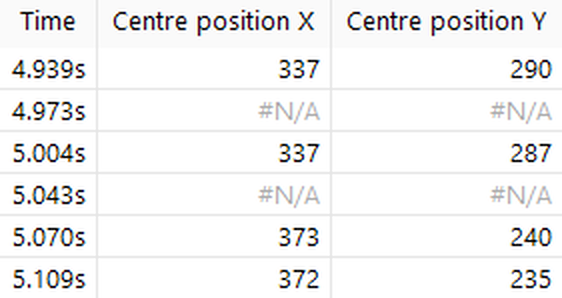
Figure 2. In this test ANY-maze failed to track the animal in the frames received from the camera at times 5.004s and 5.043s, this is why the position is shown as #N/A. Nevertheless, every frame received from the camera is represented in the results.
Choosing not to record animal images
During a test, ANY-maze normally records not just the position of the animal's centre, but also the entire area of the video image which it considers to be the animal. This has a number of advantages, but it also makes experiment files quite large.
On modern computers, having large experiment files is really not a problem - and if you're working with short test durations (say less than 30 minutes), then there's no need to concern yourself about this. However, if you plan to track animals for long periods (for example, for days) then the size of the experiment file can become more of an issue. For example, if you intend to track sixteen animals for 72 hours each, then even if you chose to only record 4 positions each second, the experiment file could easily be larger than 1GB in size.
In cases where experiment files are likely to be very large, you may wish to turn off recording of the animal's area, which will reduce the file size dramatically - but you will lose some functionality.
Specifically, not recording the animal's area has the following effects:
| • | ANY-maze will no longer be able to analyse periods when the animal is immobile, whether you've turned on immobility detection or not. Note that the system may still indicate periods of immobility while actually performing a test, but the results will just show the animal as mobile the entire time. |
| • | ANY-maze will no longer be able to use the percentage of the animal that's in a zone to analyse zone entries - it will just use the animal's centre point, irrespective of the setting you've made for the individual zones. In fact, during the test the system will continue to use the animal's area to detect zone entries, but it will use the centre point in the results. For this reason, if you intend to use this option, it's a good idea to alter all zones to use the animal's centre point to detect zone entries - this will make the behaviour during tests consistent with the analysis of test results. |
| • | The distance from the animal to a zone's border will always be calculated based on the distance from the centre of the animal to the zone. |
| • | The distance from the animal to a point will always be based on the distance from the animal's centre point. |
In general, we don't recommend that you use this option. However, if you're running extremely long tests and immobility and/or precise zone entries are not required, then it can be a big help.

© Copyright 2003-2026 Stoelting Co. All rights reserved
ANY-maze help topic T0575