ANY-maze Help > The ANY-maze reference > The Protocol page > The elements of a protocol > Apparatus > Video sources > Setting up a Video Source > Erasing cage bars, grid lines or cables from a video image
Erasing cage bars, grid lines or cables from a video image

In brief
By clicking the  Erase lines button (which is shown in the ribbon bar when a video source is selected in the protocol), you can open the Erase grid lines, cage bars or cables window. Using the controls on this window, you can electronically remove cage bars, grid lines or cables from the image of your apparatus; generally speaking, this will improve the tracking.
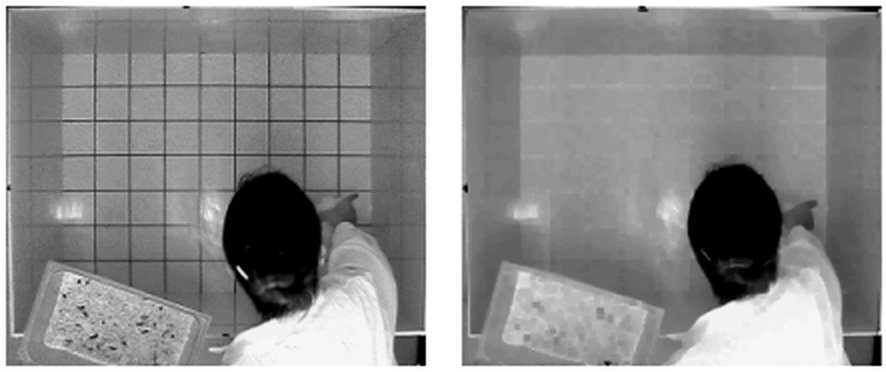
Figure 1. This open field has grid line painted in its base, and these will interfere with the tracking. In the image on the right, the grid lines have been electronically erased.
Details
If your apparatus is being viewed through cage bars, then as you'd expect, the animal will appear to be broken into pieces by the bars. Although this doesn't inconvenience a human observer, ANY-maze will often see all the pieces as separate animals and won't track (or if it does track, not very well). The solution is to electronically erase the bars so the animal is then viewed as a whole. This sounds like some kind of magic, but it's actually quite a mundane image processing technique that expands the parts of the image either side of the bars until they join up, effectively making the bars disappear.
Although it's quite easy to understand why you might want to erase cage bars, it's harder to appreciate why it is necessary to delete grid lines painted on the apparatus - after all, the animal is standing on top of the lines so the camera can see all of it!
This is of course true, but in this case the problem relates to how ANY-maze detects where the animal is. To do this, it compares an image of the apparatus without the animal in it to the one that does have the animal in. So, taking the image above as an example, it will be looking for areas of the image that are darker than the background (the animal being a touch darker) and it will consider that these are the animal. However, where the animal is standing over a grid line, it will be lighter than the background and the effect of this will be that ANY-maze won't consider the animal to be in those places, so the grid lines will seem to break the animal into pieces. A simple solution to this problem is to tell ANY-maze that the background is non-uniform - then it looks for places where the animal is either lighter or darker than the background (i.e. just different). However, in the above example this wouldn't work very well because the animal is so similar to the background colour. This would mean that the system would also detect the shadow cast by the animal and the tracking would therefore be quite poor. So in this case, erasing the grid lines and then tracking the animal as a target that's just darker than the background would be the best solution (and indeed in the above example it works very well).
Another common scenario is where there's a cable or tube in the picture - for example, a cable coming from an electrophysiology head-stage. In this case, the cable will be very like cage bars and will potentially break the animal into two parts - erasing it will overcome this problem.
Actually erasing the lines is done by clicking the  Erase lines button in the ribbon bar and using the options on the Erase grid lines, cage bars or cables window that appears.
 | ANY-maze will erase lines in the images it uses internally to track the animal; however, the image you see on the screen will continue to be the unadjusted picture, and so the lines will still be shown. |
See also:
| • | The Erase grid lines, cage bars or cables window |

© Copyright 2003-2026 Stoelting Co. All rights reserved
ANY-maze help topic T0093