ANY-maze Help > The ANY-maze reference > The Protocol page > The elements of a protocol > Apparatus > Video sources > Setting up a Video Source > Selecting the area of a video picture which shows a piece of apparatus
Selecting the area of a video picture which shows a piece of apparatus

In brief
You should use the mouse to select the part of the video picture which shows just this video source's apparatus. To do this, simply left click in the video picture and drag the mouse. The area you define is known as the video source's region of interest.
Note: To select the area, you should first ensure that the appropriate video source is selected in the protocol list.
Details
You can edit the region of interest after you've drawn it by dragging its edges or by picking it up and sliding it around over the top of the video picture.
To remove the region of interest, either click the  Remove region of interest button, or just double click the left mouse button on the video picture.
If the video picture only shows a single piece of apparatus, then you don't have to define any region of interest - you could just use the whole picture. Nevertheless, if the apparatus doesn't fill the picture then it's still a good idea to define a region of interest, as you can use it to remove the surplus parts of the image - thus reducing the amount of information ANY-maze has to process. This can be very useful if you are tracking in more than one piece of apparatus at the same time.
However, take care not to crop the image to the very edge of the apparatus as this may prevent the auto-start feature from working - see figure 1.
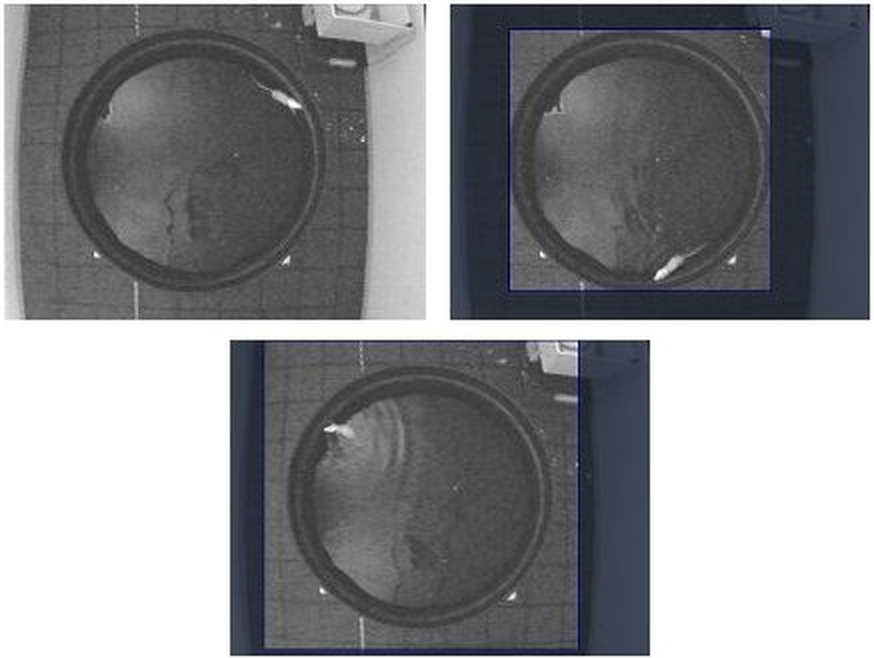
Figure 1. The first image shows the full picture from the camera. As there's a lot of the image which isn't part of the water-maze, it would be a good idea to crop the excess. In the second image, too much of the excess has been cropped, so auto-start probably won't work. In the final image, the selected area is just right.

© Copyright 2003-2026 Stoelting Co. All rights reserved
ANY-maze help topic T0091