ANY-maze Help > The ANY-maze reference > The Protocol page > The elements of a protocol > Behaviour > Virtual switches > Setting up a virtual switch > Using hysteresis with a virtual switch
Using hysteresis with a virtual switch

Introduction
A 'threshold' virtual switch can be created such that it will turn on when some measure is greater than or equal to a certain value. By implication, this means that the switch will turn off when the measure is less than that value. But having a single on/off value can lead to rapid switching when the measure is very close to the threshold and this can yield artificially high 'activation counts' for the switch. This problem can be overcome using hysteresis.
Details
The best way to describe the problem that hysteresis is designed to overcome is by an example. Imagine that you might create a virtual switch to determine when the animal is moving 'fast' and you choose to set the switch to turn on when the animal is moving at 1.0 m/s or faster.
Now let's analyse what will actually happen when the animal is moving at a speed very close to 1.0 m/s. Let's suppose its speed is 0.5 m/s; 2 seconds later it is 0.95 m/s and then it gets a little faster and is moving at 1.05 m/s, so the switch turns on. But a moment later, it is moving at 0.95 m/s again so the switch turns off; a moment later it's at 1.0 m/s so the switch turns on again and then it gets faster, reaching 1.5 m/s - this is represented graphically in figure 1.
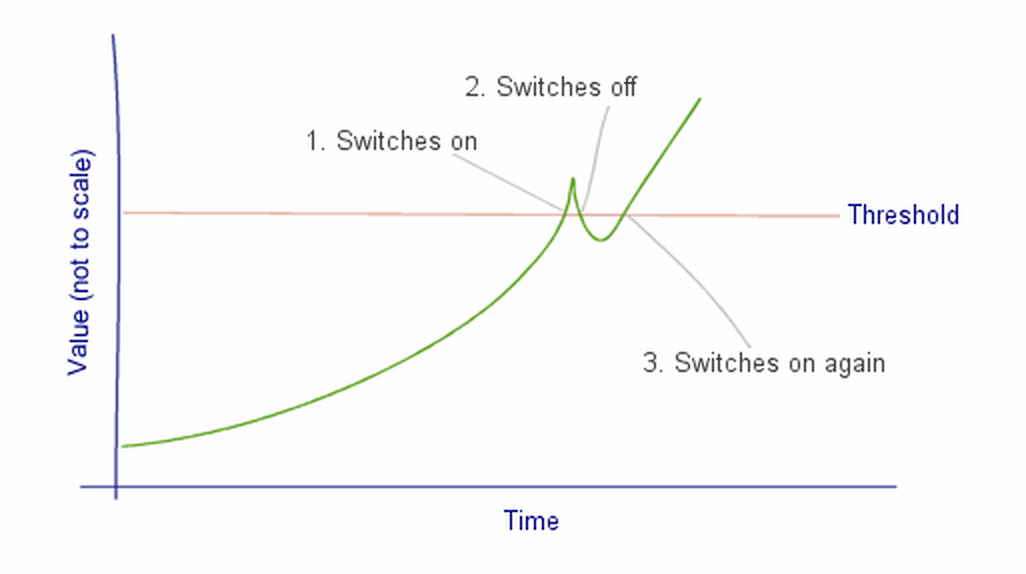
Figure 1. With a single threshold, two switch activations are detected as the value oscillates slightly around the threshold value.
So during this sequence we will have detected two switch activations, which is strictly correct, but if you wish to analyse the number of bouts of moving 'fast' you would probably want to consider this sequence as being one such bout. Furthermore, this problem could be much worse than described above, and a little 'noise' at the switching value could yield very large counts.
To overcome this we need to add a little hysteresis to our switch. This works by setting two thresholds, one to turn the switch on and another to turn it off. Let's say, for example, that we set the 'on' threshold to be 1.0 m/s and the 'off' threshold to be 0.90 m/s. This means that to turn the switch on the animal's speed needs to be 1.0 m/s or greater, but once the switch is on it won't turn off again until the speed drops below 0.90 m/s, thus small oscillations in speed close to the 'on' threshold won't cause the rapid switching we saw in the example above. This is shown graphically in figure 2.
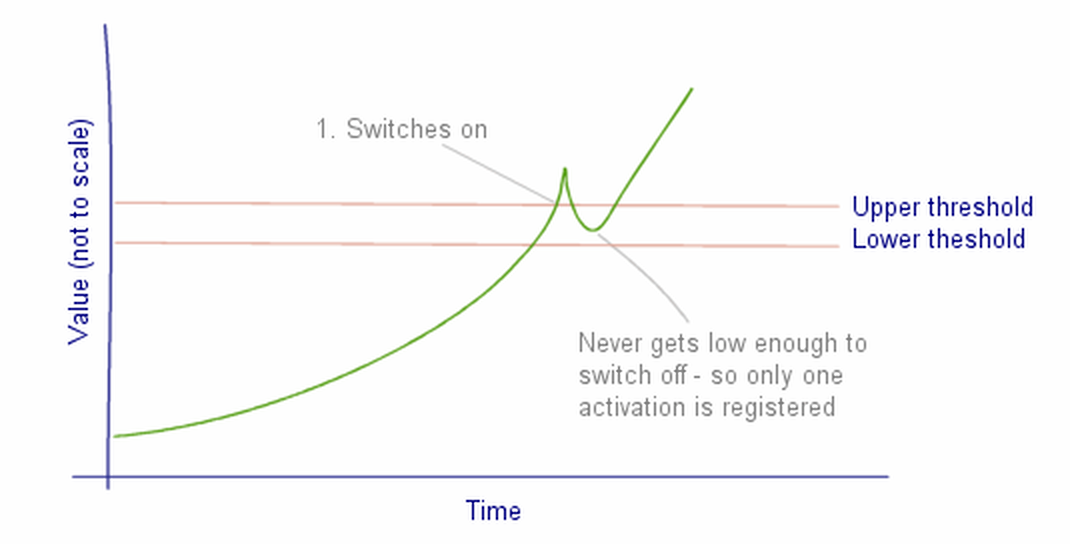
Figure 1. With two thresholds, we introduce some hysteresis into the switch. Now the oscillations are not enough to deactivate the switch, so only a single activation is detected.
So by using hysteresis, we can make our switch more stable, but how do you actually set the hysteresis for a virtual switch? The answer is that when creating a 'greater than threshold' type of virtual switch, you can optionally enter an 'off' threshold in the Lower limit field. This should be less than the 'on' threshold (which you enter in the Upper limit field) but only by a small amount; around 10% is usually fine, although this will depend on your conditions.
You can also apply hysteresis to a 'less than threshold' type of virtual switch. In this case, the 'on' threshold will be the value you enter in the Lower limit field, so you should enter the 'off' threshold in the Upper limit field. A value about 10% greater than the 'on' threshold should be about right.
The other type of threshold virtual switch is one that is on when the measure is between two values. In this case, you can't apply any hysteresis to the switch, as you will have to enter both an upper and a lower limit anyhow.

© Copyright 2003-2026 Stoelting Co. All rights reserved
ANY-maze help topic T0380