ANY-maze Help > The ANY-maze reference > The Protocol page > Protocol errors and warnings
Protocol errors and warnings

In brief
ANY-maze automatically checks a protocol as you create it and indicates any issues using  error and
  warning markers - see figure 1.
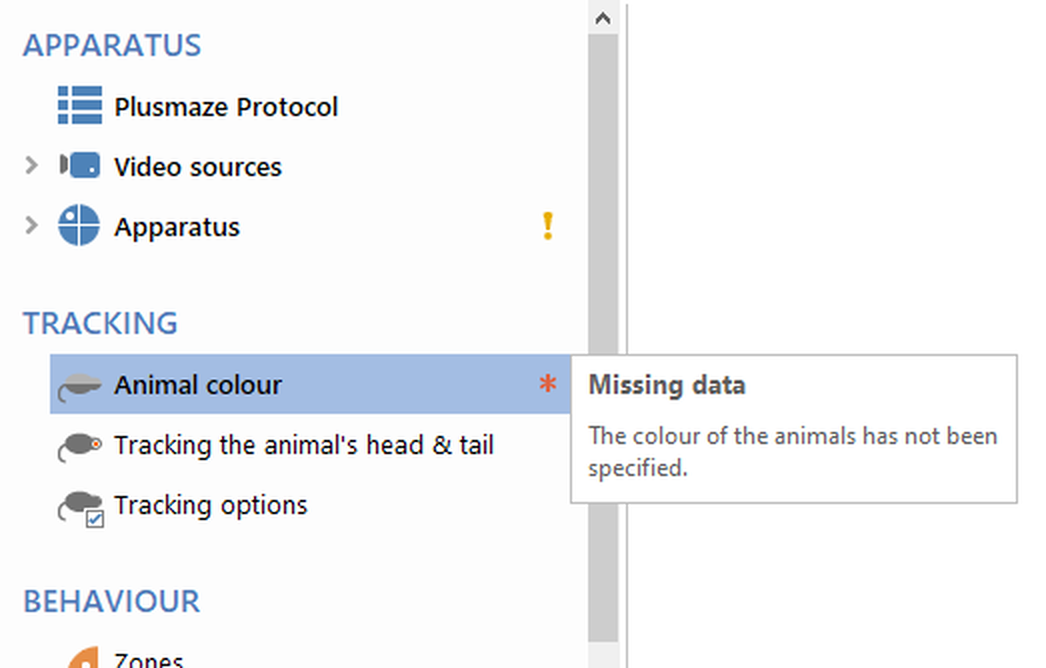
Figure 1. Here the 'Animal colour' element has an error, while the Apparatus has a warning.
Details
A protocol item with an error is marked with 
Usually errors will prevent the protocol from working, meaning you won't actually be able to start any tests until you've resolved the problem.
A protocol item with a warning is marked with 
Warnings won't stop you from performing tests, but you should pay attention to them, as they might mean that the test won't work quite how you expect it to.
Moving the mouse over an item that has an error or warning will cause a pop-up message to be displayed which will detail what the problem is.
Sometimes the problem will be inside an item. For example, if there's a warning relating to a zone then the Zones item in the protocol list will have a warning marker, moving the mouse over the marker will display a message that says that there's a problem with one of the zones inside the item. If you then open the Zones item you'll find that one (or more) zone will have a warning marker and moving the mouse over that marker will tell you what the problem actually is.
Errors in empty protocols
Usually, when you first create a protocol it will be completely empty, however it will include some errors. This is because there are some items that a protocol must include, such as at least one piece of apparatus, so the Apparatus element will be shown as having an error because in a new protocol there will be no apparatus defined.
In fact this is quite useful, as the error markers will highlight exactly those items which you have to set up in order for to use the protocol. Typically there are just 5 and having them highlighted makes it very easy to build a simple, but functional protocol.
See also:
| • | Adding elements to a protocol |
| • | Editing the elements of a protocol |
| • | Deleting elements from a protocol |

© Copyright 2003-2026 Stoelting Co. All rights reserved
ANY-maze help topic T0732