ANY-maze Help > Cameras and Videos > Legacy cameras > Analogue cameras and digitizers
Analogue cameras and digitizers

 | Support for analogue cameras is considered a legacy feature of ANY-maze and will be removed in a future version. |
Introduction
ANY-maze will work with almost any analogue video camera you might encounter. There are a few specialist cameras you can't use, but any standard CCTV (closed circuit TV) camera, such as a security camera, will work fine (subject to the considerations described below).
Before going into the details, it's important that you understand that to use an analogue camera with ANY-maze you'll need a digitizer (sometimes called a 'frame grabber' or a 'capture card'). These devices convert the analogue video signal from the camera into digital data which ANY-maze can process. This, by the way, is the key difference between analogue and USB cameras - USB cameras don't need a digitizer, the video signal already being digital. For more details see Choosing a camera.
| • | Choosing an analogue camera |
| • | Choosing a lens |
| • | Choosing a digitizer |
| • | Video cables, connectors and camera mounts |
Choosing an analogue camera
As I already mentioned, ANY-maze will work with almost any analogue camera. However, if you plan to work in low light, you should pay particular attention to the camera's sensitivity. Here are the recommended specifications:
| Camera type | Use a black and white camera. ANY-maze will work with colour cameras, but it doesn't use the colour information so buying a colour camera is a waste of money. Indeed, even if you use a colour camera, the video pictures in ANY-maze will still be black and white. |
| CCD size | Modern analogue cameras use devices called CCDs to capture the video picture. These come in various sizes, but the most common are half inch and third inch. If you're going to buy a camera for ANY-maze, buy one with a third inch CCD - they're cheaper and perfectly good enough for ANY-maze. You may also encounter quarter inch CCDs - they're not as good as third inch devices but should work OK. |
| Sensitivity | If you plan to work in low light conditions, make sure your camera has a sensitivity of 0.1 lux or below. If low light work is not relevant then you don't need to concern yourself with the camera's sensitivity. Note that colour cameras generally have a much lower sensitivity than black and white cameras. |
| IR sensitivity | All black and white cameras are sensitive to infrared light, but some include an IR block filter. Make sure you choose a camera without a filter, as you'll then be able to use infrared lights to track in darkness. |
| Resolution | Unless you plan to track very small targets (in relation to the apparatus size), then the camera resolution is not likely to be important. If you do want to track small targets, then a horizontal resolution of 500 lines or greater is best. |
| Video output | 1.0Vp-p 75ohms. |
As I said almost all cameras will meet this specification - so apart from sensitivity in low light, how do you choose one? Well, there are some considerations.
| • | There are two common types of lens mount: C and CS. Some cameras use one type and some use both. Be careful that your lens and your camera use the same type otherwise the lens won't fit - in fact, you can irreparably damage a camera by trying to attach the wrong type of lens. |
| • | Different cameras use different power supplies. Some connect directly to the mains power (120VAC or 240VAC), some connect to 24VAC power supplies, and some to 12VDC supplies. If you use a camera that uses 24VAC or 12VDC, you will need to buy a separate power supply too. For this reason we recommend you try to use a mains powered camera. |
| • | If you plan to mount the camera inside a box (for example inside a light-dark box) or close over an animal's home cage, then a board camera is probably the best solution. These are very small cameras (typically 2-3 cm cubes) which usually use have a pre-installed (although interchangeable) lens. They're cheap and their image quality is not fantastic, but if the target animal is close to the camera they work well and take up almost no space. |
| • | Although you might find some very cheap cameras on the market, the image quality is likely to be poor. Although ANY-maze doesn't demand perfect quality, these cameras probably won't be good enough. Expect to pay around $150 for a good camera. |
Choosing a lens
Choosing a lens is relatively simple once you've calculated the minimum lens angle you need - see Lens calculations. However, you still need to consider the following points:
| • | Make sure you buy a lens that matches the CCD size of your camera. As mentioned above, cameras are available with third inch and half inch CCDs (we recommend third inch) and you must use a lens which matches the camera's CCD size. |
| • | Make sure you buy a lens that's compatible with your camera's lens mount, either C or CS. Some cameras can accept either type of lens, but some will only work with one or the other. |
| • | Some lenses have fixed irises, some have manual irises and some have automatic irises. Using a fixed iris lens is not recommended with ANY-maze because you're likely to want to track in various lighting conditions and a fixed iris will be restrictive. An auto iris is nice, but costs more and must be supported by your camera - see above. |
| • | If you expect your target animals to be close to the lens (for example, if you'll be tracking inside a place-preference box), then check that the lens will be able to focus at that distance. |
| • | Generally speaking, the best type of lens to buy is a vari-focal lens as these allow you to zoom in and out so that your apparatus nicely fits the camera's field of view. This is particularly beneficial if you want to work with different sized pieces of apparatus - a rat plusmaze and a mouse Y-maze, for example. |
Choosing a digitizer
A digitizer is a device which converts the video signal from an analogue video camera into digital data which a computer can process. You may sometimes hear digitizers referred to as frame grabbers, capture cards or video acquisition cards.
Unfortunately, there are no standards in the world of digitizers, with the result that each manufacturer has its own proprietary system for capturing video images and making them available to application software such as ANY-maze. This means that it's difficult for ANY-maze to support a broad spectrum of devices because we need to develop specific software for each one.
That said, over the years ANY-maze has supported around 30 digitizers from various manufacturers, but today, these are all considered to be legacy devices and the most of them are obsolete. One which (at the time or writing - December 2022), is still available is the Picolo Alert from Euresys s.a. This is a good quality device which can connect to up to four cameras and capture images from them all simultaneously.
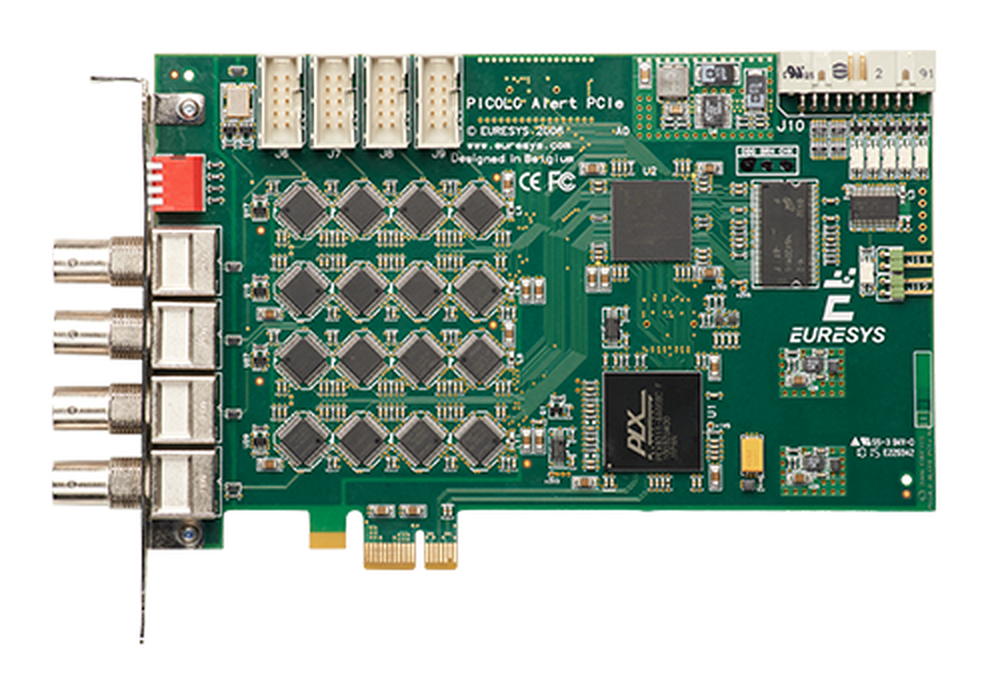
Figure 1. The Picolo Alert PCIe digitizer.
As mentioned above, all digitizers are considered to be legacy devices, which means they either no longer work with the latest version of ANY-maze, or may stop working in some future version. Refer to the ANY-maze legacy policy for further details and a list of the affected digitizers.
How a digitizer connects to your computer
The RTV-24 is a PCIe expansion card which fits into a slot inside a desktop computer. This means that your computer must have a free PCIe slot for the card, something which modern 'compact' desktops sometimes lack.
All the legacy digitizers also fit into PCIe (or in some cases older PCI) slots, except for the DFG/1394-1 and DFG/USB2PRO which are FireWire and USB devices, respectively.
Video cables, connectors and camera mounts
Analogue cameras are rarely supplied with a video cable, so you'll need to buy one. This isn't actually such a bad thing, as you can then buy a cable that's just the right length to reach from your camera to your computer. However, be careful with connectors. There are two types of connectors in common use with cameras - BNC and RCA. You need to check the type of connector on your camera and on the digitizer - which is what the camera is going to connect to. You may well find that the camera has a BNC connector and the digitizer has an RCA connector. Don't worry - the company that supplies the camera can probably make a suitable length cable for you with the correct connectors on it. You can also buy adaptors to convert from BNC to RCA or vice versa.
Don't forget you'll need a mount for your camera. Although these are simple to find, you need to make sure that you buy one which will allow the camera to be mounted pointing straight down when the cable is attached - see figure 7.
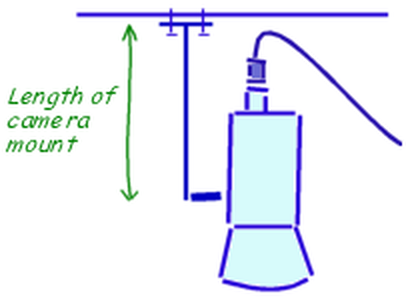
Figure 7. Make sure your camera mount is big enough to allow the camera to point straight down when the cable is connected.
See also:
| • | Connecting multiple cameras |
| • | Lens calculations |
| • | Installing, configuring and testing cameras and digitizers |

© Copyright 2003-2026 Stoelting Co. All rights reserved
ANY-maze help topic T1328