ANY-maze Help > Cameras and Videos > Working in low light or darkness
Working in low light or darkness

Introduction
Many behavioural experiments are performed in either low light or complete darkness, but clearly you'll still want to track your animals; this topic explains how you can do this.
Tracking in low light
Some black and white analogue cameras are extremely sensitive and can produce surprisingly clear images even in very low light conditions. For example, cameras with a sensitivity of 0.01 lux are not uncommon (or very expensive) and these will work well in even in extremely dim conditions. Note that colour cameras don't share this high sensitivity.
Black and white industrial USB cameras are also quite sensitive, although not to the same extent as analogue cameras. Nevertheless, they can often create usable images in low light. USB webcams, on the other hand, are usually even less sensitive and while they may produce an image in low light, it will typically be low contrast and quite noisy.
Having said all that, if you have high contrast between your animal and the background of the apparatus (for example, a white rat on a black maze), ANY-maze will usually track satisfactorily even if the image quality is quite poor. However, if you want to detect the full area of the animal, for example to determine precisely when the animal enters a zone, or you want to detect freezing, then low-contrast, noisy images will not suffice. In these cases, you should use a very sensitive camera and/or use the techniques for tracking in darkness - see the next section.
Tracking in darkness
Most of the cameras you can use with ANY-maze are infrared sensitive. This means you can illuminate your apparatus with infrared light, which the animal won't be able to see, but which will allow the camera to produce an image as if the apparatus were brightly lit.
To use this technique, you will need two things:
| • | An infrared sensitive camera. Almost all analogue and industrial USB cameras are infrared sensitive, and many USB webcams are too. An easy way to check is to view an image from the camera (for example, in the ANY-maze Video page), then point a television remote control at the camera and press a button. If you see a bright spot appear at the end of the remote control then the camera can see infrared. By the way, here we are talking about near infrared; there are also thermal imaging cameras available which are sensitive to long-wavelength infrared, but these are very expensive. |
| • | Infrared lights to illuminate the apparatus. Infrared lights are quite inexpensive and usually take the form of a bank of infrared emitting LEDs - see figure 1. These can be found quite easily by searching Google for "Infrared illuminator". One thing to be careful about is the beam angle; if it is narrow then you'll be lighting the apparatus with something like a flash-light, which will tend to make the centre very bright and the edges dim. One way to address this is to point the device upwards so the light reflects off the ceiling, which usually helps to disperse it. |
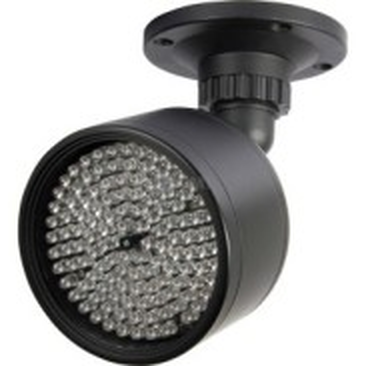
Figure 1. Infrared illuminators are inexpensive and can be used to 'light' the apparatus so ANY-maze can track in darkness.
See also:
| • | USB cameras |

© Copyright 2003-2026 Stoelting Co. All rights reserved
ANY-maze help topic T1332