ANY-maze Help > The ANY-maze reference > The I/O page > Working with the I/O page > Setting up the I/O devices to use with ANY-maze
Setting up the I/O devices to use with ANY-maze

 | To access the I/O devices set-up window, select  Set up devices button in the ribbon bar on the I/O page. Set up devices button in the ribbon bar on the I/O page. |
Introduction
ANY-maze works with a wide range of I/O devices and will, generally, detect them automatically when it starts-up - it will then begin using any that it finds. But what if you have a device connected to your computer which you don't want ANY-maze to use? And what about devices which ANY-maze doesn't detect automatically - for example, devices such a syringe pumps, which connect to a serial port can't be detected automatically - how will ANY-maze know they're there?
These issues are what the I/O ports and devices set-up window addresses; it allows you to specify which ports and devices ANY-maze should use and, in the case of serial ports, what devices are attached to them - see figure 1..
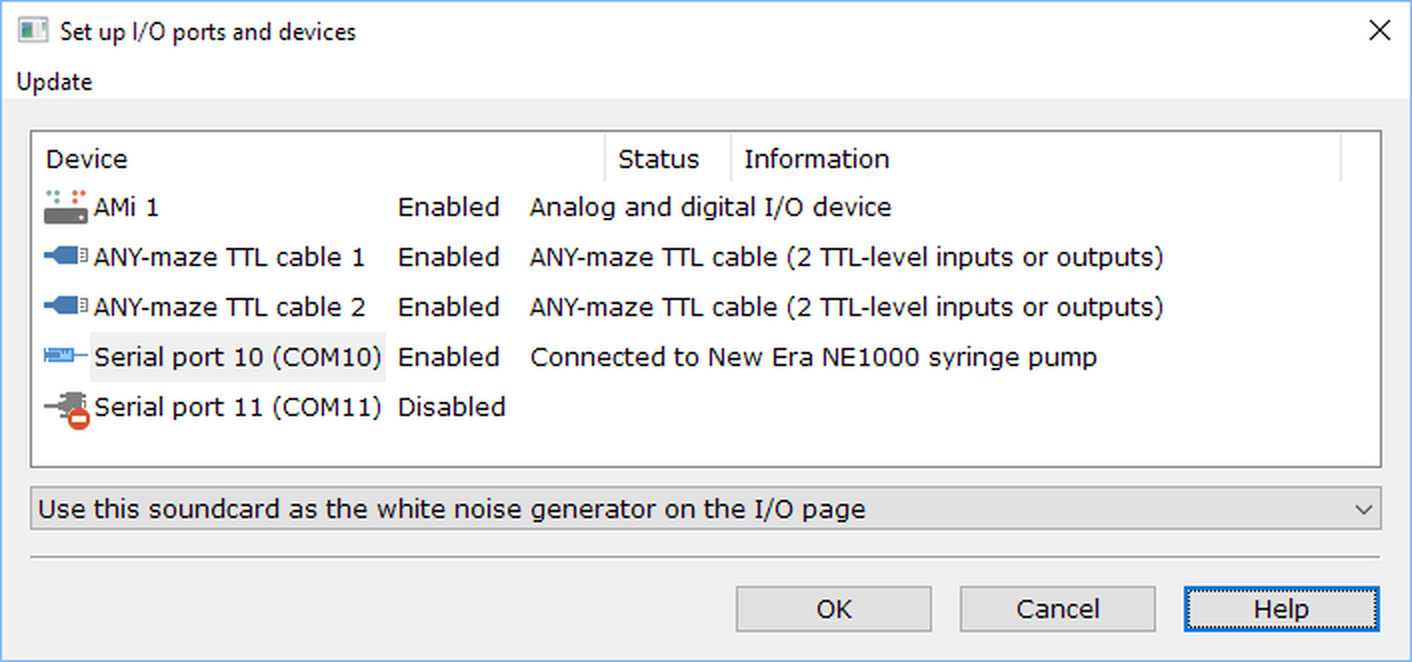
Figure 1. The I/O ports and devices set-up window.
Choosing which devices to enable
By default serial ports (and if you have any, parallel ports) will be disable for use in ANY-maze, while all other I/O devices will be enabled. To alter this you simply need to select the relevant device in the list and then alter its state in the drop-down list at the bottom of the window.
Specifying the device connected to a serial port
In the case of a serial port, you will find that the drop-down list doesn't simply allow you to enable or disable the port, rather it shows a list of all the serial devices that ANY-maze supports and you can choose which of them is physically connected to your port. In fact the device needn't be connected at the time, but what you're telling the system is that it can assume that the port will either have the specified device attached to it, or no device at all. ANY-maze will then detect when the device is physically present.
Configuring individual devices
Note that this window is not used to configure the individual devices you have connected (for that you should see the information in the Working with the I/O page topic), rather its purpose is simply to specify what devices will and will not be available for ANY-maze to use.
The Update menu
As can be seen in Figure 1, above, the I/O ports and devices set-up window includes an Update menu. This contains options that are used to update the Ugo Basile Fear Conditioning system from the original version 1 to version 2.
See also:
| • | Working with the I/O page |

© Copyright 2003-2026 Stoelting Co. All rights reserved
ANY-maze help topic T0924