ANY-maze Help > I/O devices supported by ANY-maze > Ugo Basile instruments supported by ANY-maze > The Ugo Basile Operon > Ugo Basile Operon configuration
Ugo Basile Operon configuration

Introduction
The Ugo Basile Operon configuration window is used to show information about your Operon, and allows you to change its ID and update its firmware.
| • | Accessing the Operon configuration window |
| • | Changing the device ID |
| • | Updating the device firmware |
| • | Suppressing the LED on the front of the Operon |
Accessing the Operon configuration window
To access the Operon configuration window, select your Operon in the list on the left side of the I/O page and then click the  Configure this device button in the ribbon bar.
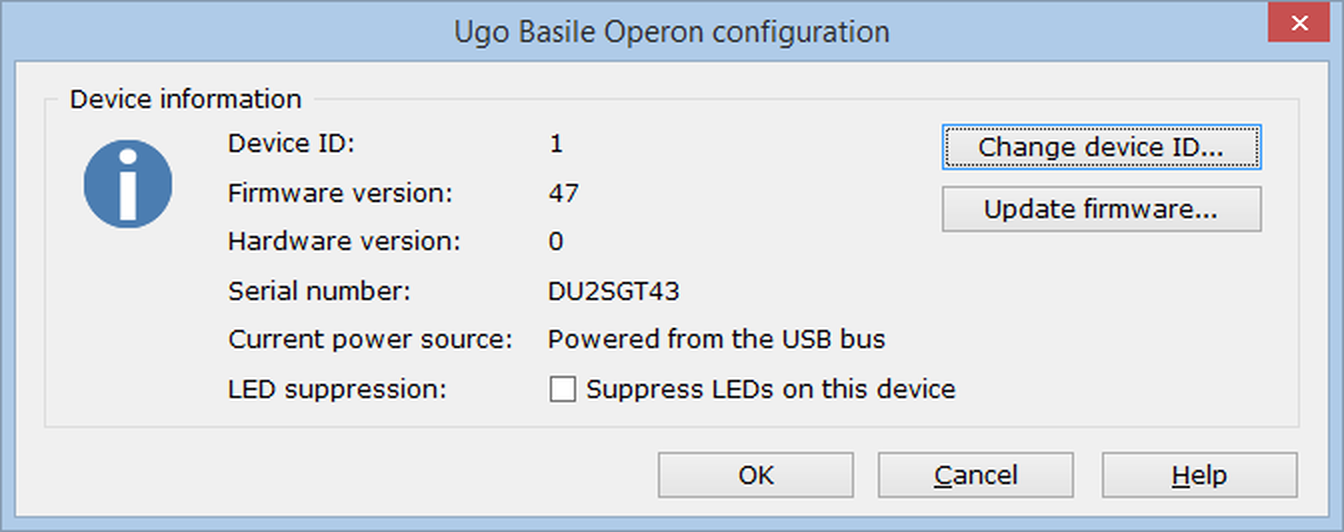
Figure 1. The Operon configuration window.
Changing the device ID
The Ugo Basile Operon is based on the ANY-maze Digital interface interface, therefore the method of changing the device ID is the same as for any ANY-maze interface device. Full details, including what the device ID is, and why you might want to change it, can be found here.
Updating the device firmware
The process of updating the firmware is the same as for all ANY-maze interface devices. Full details can be found here.
 | The Ugo Basile Operon actually contains multiple ANY-maze Digital interface boards, and updating the firmware will update each of them sequentially. As a consequence the firmware update takes a few minutes. |
Suppressing the LED on the front of the Operon
The Operon has an LED on the front panel which shows the status of the device; red when connected to the PC and green when communicating with ANY-maze.
You may wish to suppress this LEDs, for example if you're concerned that it could provide unwanted visual cues to the animal that might get mixed up with the LEDs within the device itself. To suppress the LED, you simply need to check the Suppress LEDs on this device button in the Device information section of the configuration window.
See also:
| • | The Ugo Basile Operon |
| • | Connecting and testing the Ugo Basile Operon |
| • | Setting up an ANY-maze protocol for the Ugo Basile Operon |
| • | Running experiments with the Ugo Basile Operon |

© Copyright 2003-2026 Stoelting Co. All rights reserved
ANY-maze help topic T1270