ANY-maze Help > The ANY-maze reference > The Tests page > The Experiment management reports > The Test schedule report > Weighing animals on the Test schedule report
Weighing animals on the Test schedule report

The Weighing status column
If the experiment's protocol specifies that you will weigh animals before their tests, then you will find that Test schedule report includes a Weighing status column - see figure 1.
Exactly what the Weighing status column will show depends on whether you are manually weighing animals or using the ANY-maze Animal scales.
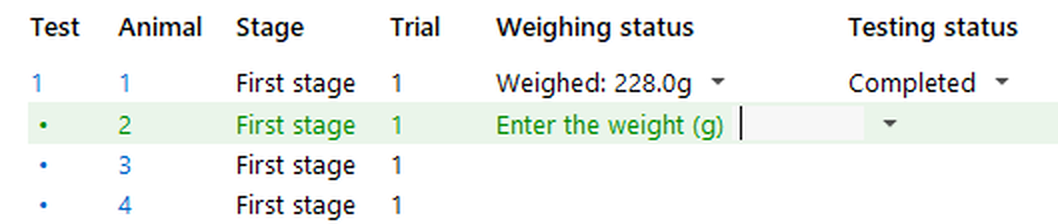
Figure 1. In this experiment, animals are set to be weighed manually before their first trial.
Manually weighing animals
If you are manually weighing animals, then the Weighing status column will prompted you to enter the animal's weight - as in figure 1. You should:
| 1. | Weigh the animal |
| 2. | Type its weight into the field |
| 3. | Press return or enter |
The field will change to show the weight you just entered and, if relevant, ANY-maze will prompt you to weigh the next animal.
If after weighing an animal, you want to weigh it again (perhaps you typed in the wrong value), then you simply need to open the Weighing status menu, by clicking the little down arrow next to the weight, and select Reweigh the animal from the options that appears - see figure 2.
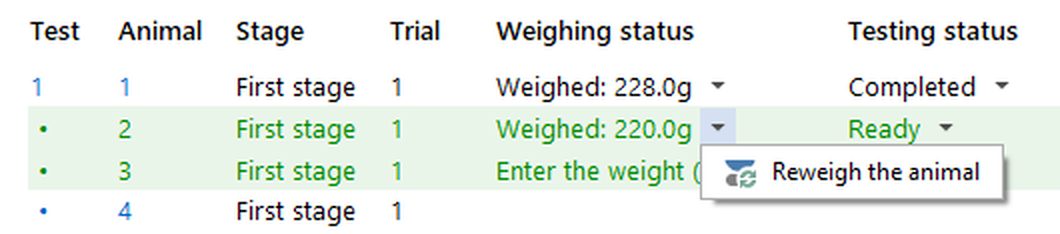
Figure 2. The animal from figure 1 has been weighed and its weight (220g) has been entered. If you want to reweigh the animal you can open the Weighing status menu and select the option to 'Reweigh the animal'.
Weighing animals using the ANY-maze Animal scales
If you are using the ANY-maze Animal scales to weigh your animals then the Weighing status column will prompted you to weigh each animal - see figure 3.

Figure 3. Animal 2 is ready to be tested, but you must weigh the animal first.
To weigh an animal, simply place the animal in the basket and place the basket on the scales - the animal will be weighed automatically. ANY-maze weighs animals for a few seconds and uses the average weight registered during the period, this avoids problems that would otherwise arise if the animal moves while being weighed. During the weighing process the Weighing status counts down the seconds until the weighing cycle will complete - see figure 4.

Figure 4. While weighing ANY-maze counts down the seconds until the weigh cycle will complete.
When the weighing cycle ends, the Weighing status prompts you to remove the animal from the scales - see figure 5. Removing the animal confirms the animals weight and stores it in ANY-maze. If after weighing an animal, you want to weigh it again (perhaps you weighed the wrong animal!), you simply need to open the Weighing status menu, by clicking the little down arrow next to the weight, and select Reweigh the animal from the menu that appears - see figure 2, above.

Figure 5. When the weigh cycle completes, you will be prompted to remove the animal (and basket) from the scales - doing so causes ANY-maze to store the animal's weight.
Skipping weighing of an animal
ANY-maze will work through the animals in the experiment, weighing each one in turn. If you don't want to weigh a particular animal, you should open the Weighing status menu, by clicking the little down arrow next to the weight, and select Skip weighing this animal from the menu that appears. Note the if a test is waiting for the animal to be weighed, then skipping weighing may or may not mean that you can then start the test - this will depend on whether the protocol is set to prevent a test from starting if the animal has not been weighed. However, if the protocol does prevent the test from being started, you can still skip the test and move on to the next animal.
If you have skipped weighing of an animal then opening it's weighing status menu will show an option to Unskip weighing the animal - see figure 6.
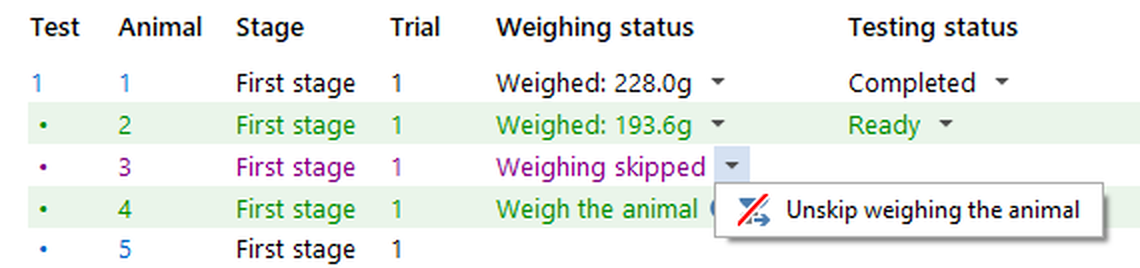
Figure 6. You can use the Weighing status menu to both 'Skip' and 'Unskip' (shown here) the weighing of an animal.
Weighing all the animals before starting a stage
One of the options in the protocol for when to weigh animals is to 'Weigh all the animals before starting the stage'. If you select this then the Test schedule report will include one row per animal (before stage's 'test' rows) for you to weigh the animals. In other words, you will first weigh all the animals and then test them - see figure 7.
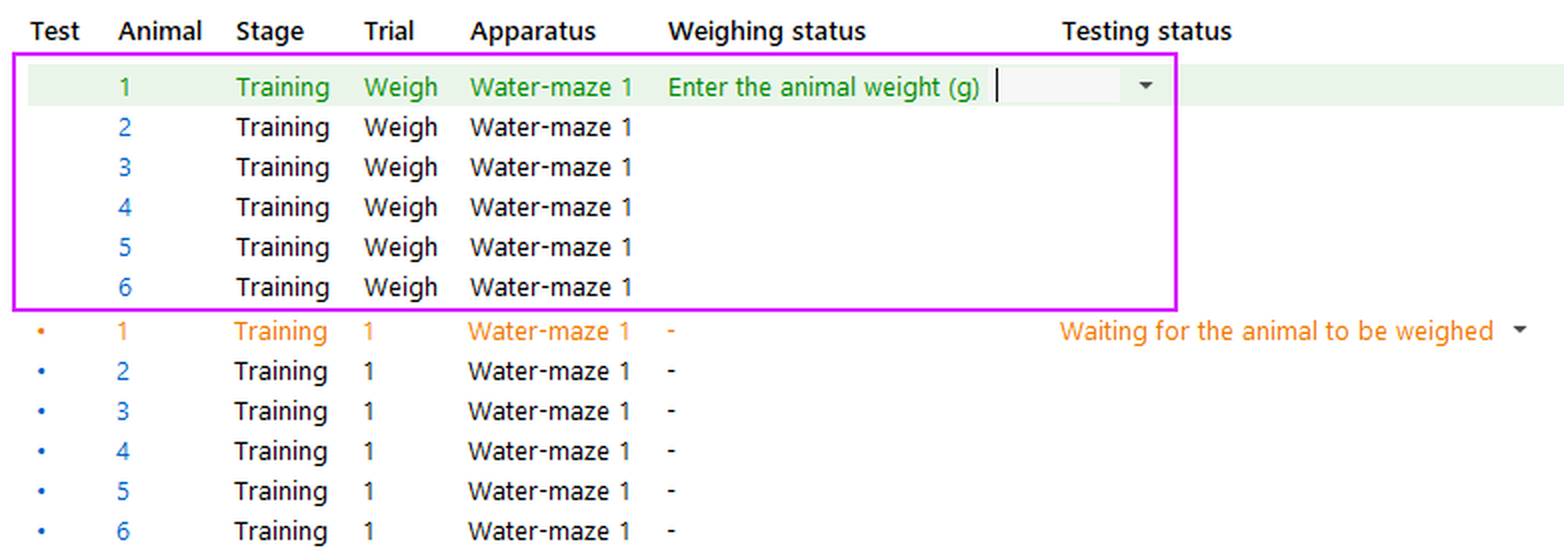
Figure 7. In this experiment, the animals are set to be weighed BEFORE any of them are tested in their training stage - this causes special 'weigh' rows (highlighted in the figure) to be included in the Test schedule report.
See also:
| • | Setting up animal weighing in the protocol |
| • | The ANY-maze Animal scales |

© Copyright 2003-2026 Stoelting Co. All rights reserved
ANY-maze help topic T0768