ANY-maze Help > I/O devices supported by ANY-maze > The ANY-maze Operant interfaces > The ANY-maze Operant interface M > The Operant interface M specification
The Operant interface M specification

Introduction
The ANY-maze Operant interface M is a drop-in replacement for a Med Associates connection panel.
Inputs
The interface has 10 inputs. These are identical to the inputs on the Med Associates connection panels. The inputs are used to connect components such as levers and also to connect feedback from components such as pellet dispensers and retractable levers.
The physical connectors are the same Molex connectors as used by Med and have the same pin-out:
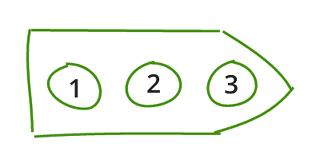
Figure 1. ANY-maze Operant interface M input connector pin numbers. Viewed looking into the connector.
| Pin 1 | 28V |
| Pin 2 | Input - switch to ground to activate |
| Pin 3 | GND |
Outputs
The interface has 20 outputs. These are identical to the outputs on the Med Associates connection panels. Components such as indicator lights or pellet dispensers connect to the outputs.
The physical connectors are the same Molex connectors as used by Med and have the same pin-out:

Figure 2. ANY-maze Operant interface M output connector pin numbers. Viewed looking into the connector.
| Pin 1 | 28V |
| Pin 2 | Output - switched to ground when activated |
| Pin 3 | GND |
All of the outputs on the Operant interface M include the ability to dim LEDs or incandescent lights connected to them.
28 Volts connectors
The interface has three 28 volts connectors. These are identical to the 28V connectors found on most Med connection panels. Each of the connectors can be used to either:
| • | Provide 28V power to the interface - see Connecting the Operant interface M to a power supply. |
| • | Power components which should always be on, such as a fan or a house light. |
DC power input connectors
There are two DC power connectors on the top of the interface which can be used to connect external power supplies to the interface - see Connecting the Operant interface M to a power supply for full details.
Power switch
The power switch, on the left side of the interface, can be used to turn off power, which will cause everything in the cage, including fans and house lights, to switch off.
Note this switch only works when the cage is connected to an external power supply via one of the two DC power connectors on the top of the interface. It does not work if the interface is powered via one of the front panel 28 volt connectors.
Test control push button
The red, test control push button, is mounted on the top of the interface. It can be configured to start a test when pushed - this is very helpful as it means you can quickly start a test after placing an animal in the cage.
LED indicator
There is an LED indicator on the front of the interface which shows the interface's status:
| Off | No USB or 28V power connected. |
| Red | 28V Power supply is connected, but USB is not connected. |
| Brief flashing green | USB is connected, but the 28V power supply is disconnected or switched off. |
| Solid green | Both USB and power are connected and switched on - the interface is ready to use. |
| Even flashing green | The interface has been set to identify itself. |
USB connector
The interface connects to the computer via a USB 2 'B' connector. The interface will work correctly when connected to either a USB 2 or USB 3 connector on the computer.
Physical
The interface has the same footprint as the standard Med Associates connection panels and so will fit into the same position in a cage and screw into the same holes in the base plate.

© Copyright 2003-2026 Stoelting Co. All rights reserved
ANY-maze help topic T1408