ANY-maze Help > The ANY-maze reference > The I/O page > Making I/O connections > Connecting lights
Connecting lights

Details
To switch a light on and off, what we need is something like a computer controlled switch. >The ANY-maze Relay interface includes eight of them (they're called relays).
So, to connect a light you need to build the same sort of circuit that you'd use if the light was going to be controlled by a manual switch, but connect to a ANY-maze Relay interface port instead - see figure 1. Note you can connect either wire to either pin 2 or pin 3 of the port (all the port does is connect the two pins together when the port is switched on).
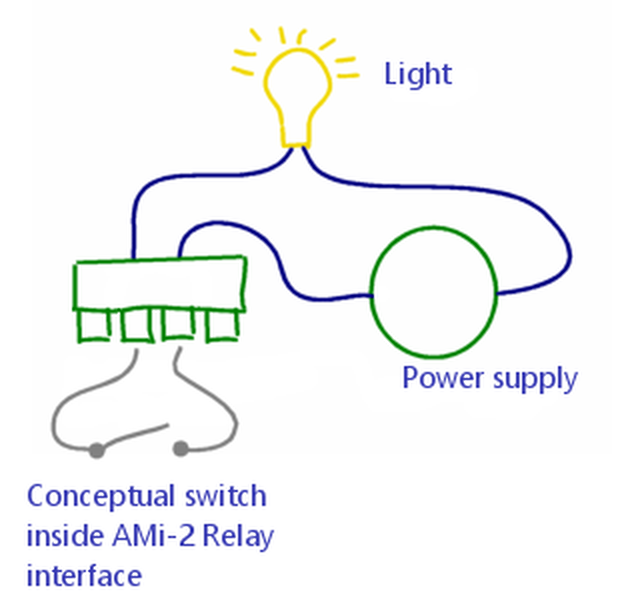
Figure 1. Each output of the ANY-maze Relay interface acts like a simple on/off switch. Here closing the switch will cause the light to turn on.
After connecting a light, you should test that it is working correctly using the I/O page.
To actually use the light in an experiment, you'll need to add it to the protocol as an on/off output. You'll probably also want to add a procedure, as it's the procedure which will actually turn the light on and off during tests.
See also:
| • | The ANY-maze Relay interface |
| • | An introduction to on/off outputs |

© Copyright 2003-2026 Stoelting Co. All rights reserved
ANY-maze help topic T0904