ANY-maze Help > The ANY-maze reference > The I/O page > Making I/O connections > Connecting motors
Connecting motors

Details
Being able to have ANY-maze control a motor can be very helpful - for example, you might have doors in your apparatus which are controlled by small motors, so by being able to switch the motors on and off you can control which doors are open and therefore what parts of the apparatus the animal can access.
The ANY-maze Relay interface ports can be used to control low voltage motors - that is any motor that uses a voltage of 42V (AC or DC) or below and a current of 2A or below. To achieve this you simply need to connect the motor to the output switch port in the same way as you'd connect it to a manual switch, so something like the circuit shown in figure 1. By the way, if you are technically inclined, you may be aware that a motor is what's called an inductive load and that connecting this type of load to a relay requires some care - don't worry, the ANY-maze interface switch output ports include a built-in 'snubber circuit' for exactly this reason.
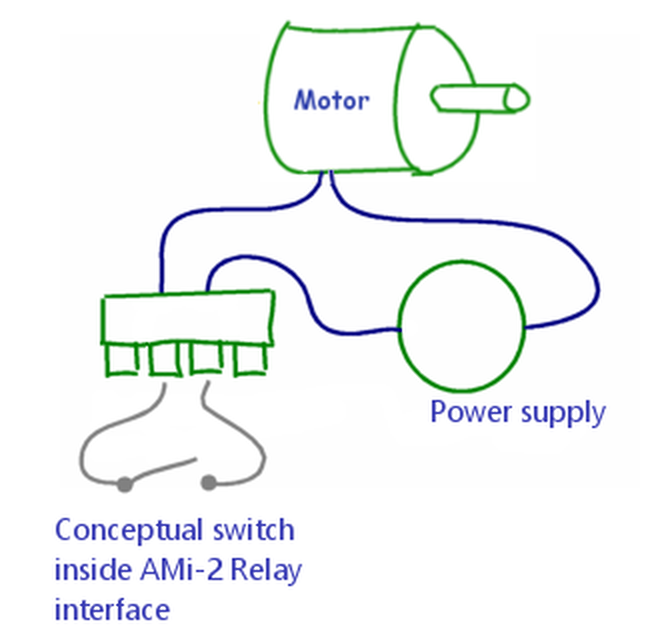
Figure 1. A simple circuit to connect a motor to an ANY-maze Relay interface port. ANY-maze will then be able to turn the motor on and off.
Once you have connected the motor you should test that it is working correctly using the I/O page.
To actually use the motor in an experiment, you'll need to add it to the protocol as an on/off output. Here you'll find that you can set up the output such that it turns on for a specific period of time and then turns off automatically. This can be very helpful if you just want the motor to run for a few seconds - as would be the case if it controls a door. You'll probably also want to add a procedure, as it's the procedure which will actually activate the motor during a test.
See also:
| • | The ANY-maze Relay interface |
| • | Connecting the ANY-maze Relay interface to your apparatus and testing it |
| • | An introduction to on/off outputs |

© Copyright 2003-2026 Stoelting Co. All rights reserved
ANY-maze help topic T0908