ANY-maze Help > The ANY-maze reference > The Protocol page > The elements of a protocol > Testing > Events and actions > Setting up an action > Specifying the effect of an action > Changing the running state, direction, flow rate or volume of a syringe pump
Changing the running state, direction, flow rate or volume of a syringe pump

 | The action described here is for use in protocols created in version 4 of ANY-maze. In version 5, Events and actions have been replaced by procedures, for which there are similar, but more flexible, actions available. |
Introduction
During a test, you can use an action to alter the running state, direction, flow rate or volume of a syringe pump. This is done using the Adjust syringe pump window shown in figure 1.
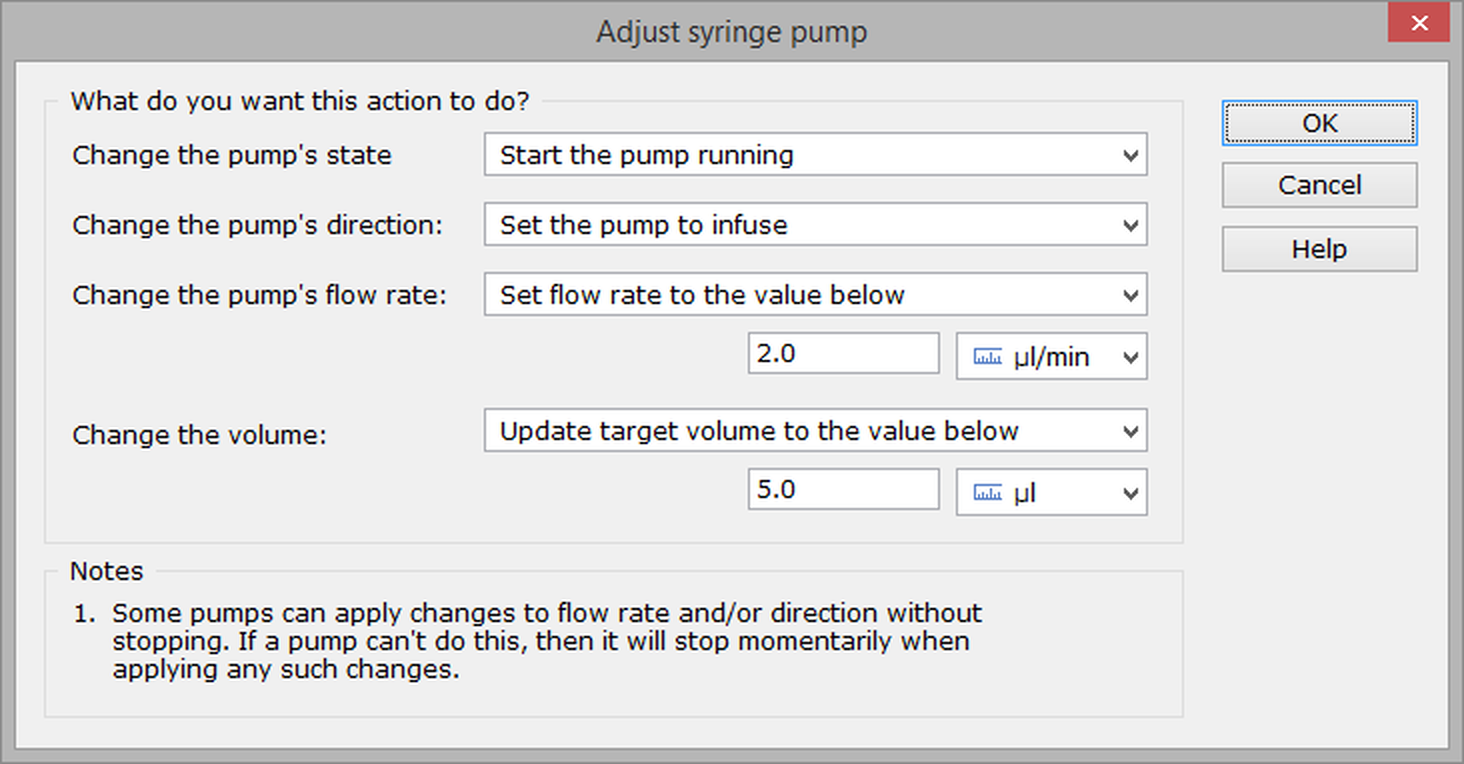
Figure 1. The Adjust syringe pump window, which is used to specify how an Action should alter the syringe pump.
Changing the pump's state
There are four options for changing a pump's state (i.e. whether it is running or not):
| • | No change - As you'd expect, this leaves the pump in the same state. |
| • | Start the pump running - This will cause the pump to start running in whatever the current direction is, and at whatever the current rate is. If you also specify changes to the direction and/or rate (see below), then these will be applied before the pump starts. If the pump is already running, then this action will have no effect. Note that a pump may not actually start; for example, it might be stalled (at the end of its travel), in which case it will start and immediately stop again. |
| • | Stop the pump - This causes the pump to stop. If the pump is already stopped, then it has not effect. |
| • | Toggle the pump's state - If the pump is running, this will stop it. If it is stopped, this will start it. Note that the same considerations as are listed above for starting a pump apply when a pump is toggled from stopped to started. Note that the new state of the pump will be the opposite of its actual state, which may not be the last state you set it to. For example, imagine you set a pump to run, and then two minutes later you set it to toggle - you'd expect the pump to stop, right? This is indeed what would happen, unless the pump has stalled during the two minutes; in which case, it will be stopped and so toggling it will try to start it again. |
Changing the pump's direction
There are four options for changing a pump's direction:
| • | No change - As you'd expect, this leaves the pump set to the same direction. |
| • | Set the pump to infuse - This will set the pump's direction to infuse (liquid will come out of the syringe). If the direction is already set to infuse, then this will have no effect. |
| • | Set the pump to withdraw - This will set the pump's direction to withdraw (liquid will flow into the syringe). If the direction is already set to withdraw, then this will have no effect. |
| • | Reverse the pump's direction - If the pump is currently infusing, this will set it to withdraw; if it is currently withdrawing, this will set it to infuse. |
You can change the direction of a pump when it is running. Some pumps can change direction without stopping, in which case this is what will happen; others require that the pump is stopped, the direction is changed and the pump is started again. If this is the case of the pump being used, then it will be stopped momentarily so the direction change can be applied (the stop is usually so short that you won't notice it).
If you change the direction of a pump that is stopped, then the new direction will be used the next time you start the pump.
Note that not all pumps support two directions (some only infuse and don't withdraw). If you try to alter the direction of a single-direction pump, then it will simply ignore you.
IMPORTANT: When you change the direction of the pump, the volume will always be reset. For example, imagine you specified that the pump should infuse 3ml at a rate of 1ml/min. Then, after 2 minutes, you change the direction to 'withdraw'. At this point, the pump will have infused 2ml, so will have 1ml remaining. But because you have changed the direction, the volume will be reset to 0 and the pump will begin to withdraw 3ml at a rate of 1ml/min. Of course, you can alter the volume at the same time as you change the direction (see below for options for altering the volume), so if you only want to withdraw 1ml, you could alter the volume accordingly.
Changing the pump's flow rate
There are only two options for changing the flow rate:
| • | No change - As you'd expect, this leaves the flow rate as it is. |
| • | Set flow rate to the value below - If you select this option, then some fields will be enabled where you will enter the flow rate and units. For example, you might specify 3.5 with units of µl/min. |
You should take care to ensure that you specify a flow rate that your pump supports; for example, setting the flow rate to 0.1 nl/hour probably won't work on many pumps (which simply don't support such low rates). If you do specify an unsupported rate, then the flow rate won't change.
You can always change the flow rate of a pump that is running. If the pump supports flow rate changes while running, then the rate will change immediately. If not, then the pump will be stopped, the rate change will be applied and the pump will start again. This usually occurs so quickly that you won't even notice that it happened.
If you change the flow rate of a pump that is stopped, then the new rate will be used when the pump is next started.
Changing the volume
There are four options for changing the volume:
| • | No change - As you'd expect, this makes no change to the volume that will be infused (or withdrawn). |
| • | Update target volume to the value below - If you select this option, then some fields will be enabled where you will enter the new volume and its units. For example, you might specify 5.0 with units of ml. The important point about this option is that it takes into account the volume already infused (or withdrawn). For example, imagine you set up a syringe pump to infuse a volume of 4ml at a rate of 1ml/min. So after 1 minute, 1ml will have been infused and the remaining volume will be 3ml. But now you specify that you want to Update the intended volume to 6ml; so what will happen is that the intended volume, rather than being 4ml as you original specified, will be 6ml; but 1ml will still have been infused, so there will be a remaining volume of 5ml still to go. An important aspect of this option is that it can cause the pump to stop. For example, imagine if instead of updating the intended volume to 6ml, we updated it to 0.5ml; but 1ml has already been infused - so the intended volume has already been delivered (indeed it has been exceeded, but there's not much we can do about that) so the pump will stop. |
| • | Reset the target volume to the value below - If you select this option, then some fields will be enabled where you will enter the new volume and its units. For example, you might specify 5.0 with units of ml. The important point about this option is how it differs to the previous one. In this case, you are telling ANY-maze that you want to infuse (or withdraw) the entire specified volume starting now. So the volume that has already been infused (or withdrawn) is ignored (although it is of course recorded in the test's results) and the volume is 'reset'. For example, imagine you specified that the pump should infuse a volume of 4ml at a rate of 1ml/min. So after 1 minute, 1ml will have been infused and the remaining volume will be 3ml. At this point, you Reset the intended volume to 6ml - so 6ml MORE will now be infused (the 1ml already infused will just be ignored). |
| • | Clear the volume - Clearing the volume means that the pump will continue to run without giving any consideration to the volume that is being infused (or withdrawn). The pump will only stop when it is either explicitly stopped (by an Action), the test ends, or the pump stalls (it reaches the end of its travel). |
Note that changes to the pump's direction always reset the 'current' volume to zero and begin infusing (or withdrawing) the intended volume again.
See also:
| • | An introduction to syringe pumps |
| • | Setting up a syringe pump |

© Copyright 2003-2026 Stoelting Co. All rights reserved
ANY-maze help topic T0443