ANY-maze Help > The ANY-maze reference > The Protocol page > The elements of a protocol > Analysis > Calculations > Setting up a calculation > Defining a calculation's formula
Defining a calculation's formula

In brief
A calculation's formula is entered into the box shown at the bottom of the calculation's settings page. Specifically, you can define a calculation by:
| • | Entering absolute numeric values. For example 10.2 |
| • | Using the mathematical operators + - * / For example 20 / 2 |
| • | Using the mathematical functions: Abs, Sqrt, Log, Ln, Sin, Cos, Tan, Asin, Acos, Atan. For example Sqrt 25 |
| • | Using the comparison operators = < > For example 10 > 5 |
| • | Setting precedence using parenthesis ( ). For example 20 / ( 2 + 3 ) |
| • | Selecting the value of a measure's result by pressing the Insert key and choosing the measure from the menu which appears. |
| • | Including the result of a function by pressing the Insert key and choosing Add function... from the menu which appears. The function wizard will then help you define the function. |
Details
For full details about defining a formula, refer to the sections below:
| • | The elements of a formula |
- Operator precedence and parenthesis
| • | Syntax errors in formulas |
| • | Editing a formula |
| • | External changes which affect a formula |
The elements of a formula
A formula can consist of absolute numbers, operators, measure results, and function results.
You can include any number in a formula, provided it has no more than 15 digits including a decimal point. For example, 10, 3.14159, 10000000 are all valid numbers. You can't enter negative numbers directly; for example, -10 is illegal, but you can simply use 0 - 10 to create the same result.
You can include the four standard mathematical operators + - * / in a formula. As you'd expect, these perform operations of addition, subtraction, multiplication and division respectively.
You can include the following mathematical function in a formula:
| Abs | Calculates the absolute value of whatever is to the right of it. For example: Abs -20 = 20 |
| Sqrt | Calculates the square root of whatever is to the right of it. For example: Sqrt 81 = 9 |
| Log | Calculates the base 10 logarithm (also called the common logarithm) of whatever is to the right of it. For example: Log 72 = 1.857 |
| Ln | Calculates the natural logarithm of whatever is to the right of it. For example: Ln 72 = 4.277 |
| Sin | Calculates the sine of the number of degrees to the right of it. For example: Sin 30 = 0.5 |
| Cos | Calculates the cosine of the number of degrees to the right of it. For example: Cos 30 = 0.866 |
| Tan | Calculates the tangent of the number of degrees to the right of it. For example: Tan 30 = 0.577 |
| Asin | Calculates the inverse sine in degrees of the value to the right of it. For example: Asin 0.866 = 60° |
| Acos | Calculates the inverse cosine in degrees of the value to the right of it. For example: Acos 0.5 = 60° |
| Atan | Calculates the inverse tangent in degrees of the value to the right of it. For example: Atan 1.732 = 60° |
You can apply multiple functions, one after the other; for example, Sqrt Abs -81. Here the Sqrt function will be performed on Abs -81, and Abs will be performed on -81, so the result will be: abs -81 = 81, Sqrt 81 = 9.
A mathematical function can be included in a formula by right clicking, or pressing the Insert key, and selecting Maths functions from the menu which appears.
You can include the comparison operators = > < in a formula. These operators compare the values on either side of them and create result of 1 if the comparison is true and 0 if it is false.
This is more useful than it might at first appear, because you can multiply the comparison result by some other value to implement what is effectively an 'if' statement. For example, the formula ((MyValue > 10) * Result1) + ((MyValue < 10) * Result2) would yield a result of Result1 when MyValue is greater than 10 and a value of Result2 when it is less than 10 (you would need to add another clause to cope with the situation when MyValue is equal to 10).
Operator precedence and parenthesis
There is no operator precedence as such in ANY-maze formulae; rather, formulae are always calculated from the left to the right. This means, for example, that the result of 20 / 2 + 3 is 13, because 20 / 2 = 10 and 10 + 3 = 13.
You can alter this left-to-right calculation order using parenthesis. For example, in the formula 20 / ( 2 + 3 ), ANY-maze will first calculate 2 + 3 and then divide 20 by the result.
If parentheses are nested, then calculation starts with the inner-most parentheses. For example, in the formula 20 / ( 5 - ( 2 + 1 ) ), ANY-maze will first calculate 2 + 1, then subtract the result from 5 and finally divide 20 by the answer; i.e. this would be 2 + 1 = 3, 5 - 3 = 2, 20 / 2 = 10.
The result of a measure can be included in a formula by right clicking, or pressing the Insert key, and selecting the appropriate measure from the menu which appears - see figure 1.
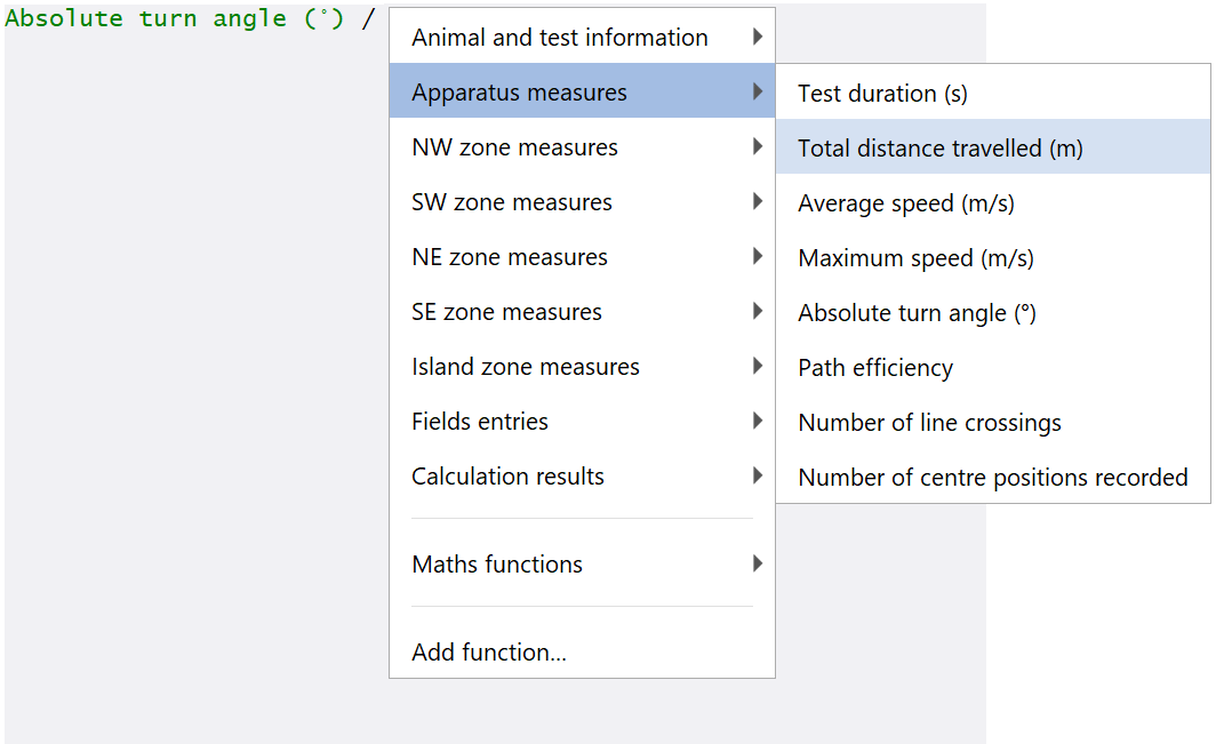
Figure 1. To add a measure result to a formula, press the Insert key and choose the measure from the menu which appears.
Measures that don't have numeric results, such as First zone entered, won't be included in the list shown. Measures appear in formulae in green.
The values of distance measures will always be in metres, irrespective of the distance units you have chosen in the protocol's analysis options. The same is true of other distance related values, such as speeds, which will always be in units of m/s. This has the advantage that you can change the chosen distance units without affecting the results of your calculations. Note that you specify the units of the result of a calculation when you create it, so if you want the calculation to yield a result in, for example cm, then you can simply write the calculation in an appropriate way - in this case you might need to multiply the final result by 100 to convert it from metres to centimetres.
The values of numeric and choice fields are available as measure results, in the case of choice fields, the first available choice is given a value of 0, the second choice a value of 1, the third choice a value of 2, and so on.
A Named value can be included in a formula by right clicking, or pressing the Insert key, and selecting Named values from the menu which appears. Note: If you haven't defined any named values then there will be no entry for Named values in the menu.
To add a function to a formula, you should press the Insert key and choose Add function... from the menu which appears. This will cause the Function wizard to open which will guide you through the necessary steps.
After adding a function to a formula, its full definition will be shown in blue.
ANY-maze includes the following functions:
| Count | Counts the number of trials (from a specific group of trials) for which an animal has a result - i.e. for which the result is NOT undefined. For example, you could use this to find out in how many trials of a stage the animal entered a particular zone. If the animal never enters a zone, then the result for 'Time in the zone' will be undefined, so counting how many trials have a result for 'Time in the zone' will tell you in how many trials it entered the zone. |
| Sum | Calculates the sum of a particular measure across a group of trials. For example, you could use this to find out the total amount of time that the animal spent in a particular zone in all the trials of a particular stage. |
| Mean | Calculates the mean value of a particular measure across a group of trials. For example, you could use this to find out the mean amount of time that the animal spent in a particular zone in the trials of a particular stage. |
| Max | Calculates the maximum value of a particular measure in a group of trials. For example, you could use this to find out the maximum amount of time the animal spent in a particular zone in the trials of a particular stage. |
| Min | Calculates the minimum value of a particular measure in a group of trials. For example, you could use this to find out the minimum amount of time that the animal spent in a particular zone in the trials of a particular stage. Note that this returns the minimum result of those trials which actually have a result for the measure. So if, for example, an animal spent 10s and 50s in a zone in the first two trials of a stage and then didn't enter the zone at all in the third trial, then the Minimum time in the zone in the three trials is 10s, not zero. |
| ResultForTrial | Returns the result of a particular measure for a specific trial in a specific stage. This can be useful when you want to calculate the results of one trial in relation to another. For example, to calculate the change in distance travelled between the first trial and subsequent trials in a stage. |
| ResultForLastTrial | Returns the result of a particular measure for the last trial in a stage. This is useful when a stage can be ended by a Stage end rule, as the index of the last trial will be different for different animals. For example, for one animal the last trial might be trial 4 whereas for another animal it might be trial 6. |
| ResultForPeriod | Returns the result of a particular measure for just a part of a test. For example, you could use this function to find out the distance travelled by the animal in the first two minutes of a five minute test. If a particular test ended during the period you specify, then its result will be the value up to the end of the test. If a particular test ended before the start of the period you specify, then its result will be undefined. |
 | ANY-maze has been designed to be extended, and we'll be delighted to add any new functions you might find useful, for free! Just contact ANY-maze Support. |
Syntax errors in formulas
If you define a formula which doesn't make sense, then ANY-maze will tell you that the formula contains a syntax error. This just means that ANY-maze doesn't understand it. For example, entering 10 * / 2 would generate a syntax error.
When a syntax error is detected ANY-maze will highlight, in red, the part of the formula it doesn't understand - this usually makes it very easy to find and correct the mistake. Below are some points to note about the formula syntax:
| • | Operators + - * / must have an absolute number, measure, or function on either side of them. For example, '10 * 2' is valid; '10 * / 2' is not. |
| • | All opening brackets must have a corresponding closing bracket. For example, '( 10 + 2 )' is valid; '( 10 + 2' is not. |
| • | There must be an operator between any two absolute numbers, measures, or functions. For example, '10 / Test duration' is valid; '10 Test duration' is not. |
Editing a formula
You can edit a formula much like you would text, i.e. by simply moving the cursor to the relevant position and then entering or deleting characters. However, you should note that measure names and function definitions act like a single 'character'.
| • | To move about in the formula, use the left, right, up and down arrows. |
| • | To move the cursor to an arbitrary position, move the mouse pointer there and click. |
| • | To delete a value, operator, measure, or entire function that's in front of the cursor, press the Delete key. |
| • | To delete a value, operator, measure, or entire function that's behind the cursor, press the Backspace key. |
| • | To edit a function, move the cursor to the start of the function and then press the Insert key. Select the Edit function... option from the menu which appears. |
| • | Formulae are self-formatting; in other words, spaces appear automatically and you can't alter them. |
| • | You can't make selections in a formula like you can in text; nor can you cut, copy or paste. |
External changes which affect a formula
As you may realise, it's possible to make alterations to a protocol which will have side effects on formulas. For example, if a protocol includes the formula:
( Time in the open arms zone / Test duration ) * 100
then deleting the open arms zone will obviously have a rather dramatic effect on the formula! In these cases, ANY-maze will replace parts of a formula which are no longer valid with ???, so our formula would become:
( ??? / Test duration ) * 100
The result of such formulae is considered to be undefined, which means that ANY-maze will simply act as if the formula has no result at all.
See also:
| • | Adding elements to a protocol |
| • | Editing a calculation |
| • | Deleting a calculation |

© Copyright 2003-2026 Stoelting Co. All rights reserved
ANY-maze help topic T0621