ANY-maze Help > The ANY-maze reference > The Protocol page > The elements of a protocol > Testing > Stages > Creating stage end rules
Creating stage end rules

Introduction
In some experiments, particularly those related to memory, it's common to train animals to achieve a certain goal. For example, in a water-maze, the goal might be to find the island within a certain time in a number of consecutive tests.
Although it's possible to manually check when an animal achieves a goal such as this, and then instruct ANY-maze to stop its trials, it's much easier to get ANY-maze to check for you - which you can do using Stage end rules.
As the name implies, a stage end rule ends a stage for a particular animal; in other words, the animal stops having trials in the stage. The rules you can define in ANY-maze are very flexible, and should cover most situations; you can even define multiple rules for the same stage, so the trials end if the animal achieves either Goal A or Goal B.
| • | The stage end rules sub-element |
| • | Creating a stage end rule |
| • | Editing or deleting a stage end rule |
| • | Manually ending a stage for an animal |
| • | Skipping a stage for an animal |
| • | Automatically retiring animals |
The stage end rules sub-element
All stage elements in a protocol automatically include some sub-elements, one of which is used to set up the stage's Stage end rules - see figure 1.
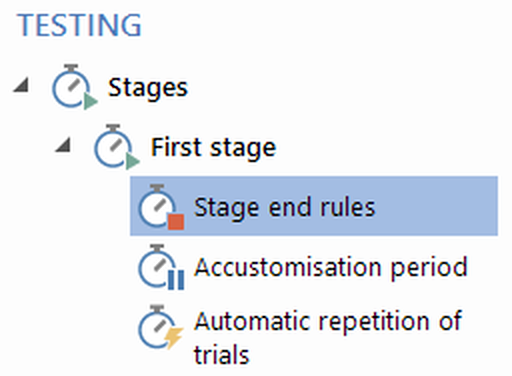
Figure 1. A stage's Stage end rules sub-element is used to manage rules which can end the stage before an animal has had the maximum number of trials.
Selecting this sub-element displays the stage end rules settings which you can use to create new rules, edit or delete existing rules, and set certain options.
Creating a stage end rule
In the settings pane of a stage end rule sub-element is a link titled Help me create a new stage end rule which, when clicked, opens the Stage end rules wizard. This wizard takes you a step at a time through the process of defining a new stage end rule. When you've finished defining a rule, it's added to the list of rules shown in the settings pane.
Editing or deleting a stage end rule
At any time, you can either edit or delete a stage end rule. To do this, you simply need to select the rule in the list of rules shown in the setting pane and click the Help me edit the rule... or Remove the rule... link respectively.
When you edit or remove a stage end rule that applies to an experiment's current stage (i.e. the stage which animals are currently being tested in), then ANY-maze will recheck all the animals to see whether any of them should, as a result of the change, either stop being tested or restart their tests - with any such effects simply being reflected in the test schedule.
However, unless you have selected the option to allow adjustments to completed stages, this will only affect the current, or future, stages - any stages which are complete won't be rechecked, even if such a check would cause an animal to require more tests.
In fact, this type of checking will also occur if other elements of a protocol - which could impact a stage end rule - are edited. For example, imagine a simple stage end rule that specifies that the stage should end if the animal enters the X zone within 30 seconds. Now you change the definition of the X zone, perhaps making it bigger. Some animals may now satisfy the rule, because in one of their existing tests they entered the new, enlarged area of the zone.
Manually ending a stage for an animal
Ordinarily, ANY-maze will automatically apply stage end rules without any intervention from you. However, there are two situations when you might want to end a stage manually. One is when an animal has almost satisfied a rule, and in your judgement it's enough to end the stage (perhaps the animal entered a zone in 31 seconds rather than the strictly-required 30 seconds); the second is when you want to use a rule which is just too complicated to be defined using the 'Stage end rule' wizard.
If you think that you may want to end stages manually in this way, you will need to check the box title Allow the user to specify when an animal should stop having trials in this stage, or whether an animal should skip the stage entirely in the stage end rule's settings pane. You will then be able to end trials manually, as described in Ending an animal's tests in a stage manually.
Skipping a stage for an animal
Ordinarily, ANY-maze will require that all animals pass through all stages. So, for example, even though a stage end rule might cause an animal to have only one trial in a stage, it would still have a trial. However, there might be situations in which you don't want an animal to have any trials in a stage at all - in other words you would like the animal to skip the stage.
If you think that you may want to skip a stage in this way, you will need to check the box title Allow the user to specify when an animal should stop having trials in this stage, or whether an animal should skip the stage entirely in the stage end rule's settings pane. You will then be able to skip the stage, as described in Skipping an entire stage for an animal.
Automatically retiring animals
In some experiments, you might want to remove animals which don't achieve some type of goal in any of the trials in the stage. This is commonly the case in a training stage, because failure to achieve the goal implies that the animal isn't trained.
Although it's easy to manually remove such animals from your experiment, you can also ask ANY-maze to do this for you by checking the box titled Automatically retire any animal that reaches the end of this stage without satisfying any stage end rule.
By the way, retiring an animal means that it will no longer be tested (i.e. it won't proceed to the following stage), but its results for the trials it has already had are retained.

© Copyright 2003-2026 Stoelting Co. All rights reserved
ANY-maze help topic T0397