ANY-maze Help > The ANY-maze reference > The Tests page > Running tests > Before starting a test > Skipping an entire stage for an animal
Skipping an entire stage for an animal

Introduction
In some circumstances you might not want an animal to have any trials in a stage at all. This can be done simply by skipping the stage.
Details
In order to skip a stage, you need to ensure that you've checked the box labelled Allow the user to specify when an animal should stop having trials in this stage, or whether an animal should skip the stage entirely which is shown on the Stage end rules settings page in the protocol.
How to skip a stage:
| 1. | Click the Animal number on the Test schedule report. |
| 2. | The Animal details report will open. Half way down this report is a section which shows the individual animal's Test schedule. At the end of the relevant stage you will see a link labelled Skip the xxx stage for this animal - see figure 1. Click the link. (NOTE: The link won't appear if the animal has already started the stage - i.e. it has started any trial in the stage.) |
| 3. | All the trials for the animal in this stage will be removed and the link will change to read Unskip the xxx stage for this animal. Clicking this link will reinstate the stage's trials. |
 | When manually scheduling tests, skipping a stage will cause any tests in the stage to be moved to the next unskipped stage. If there are no further stages then the tests will be deleted. |
 | After a stage subsequent to the skipped is started (i.e. the animal starts a test in the subsequent stage) then the skipped stage can no longer be unskipped. |
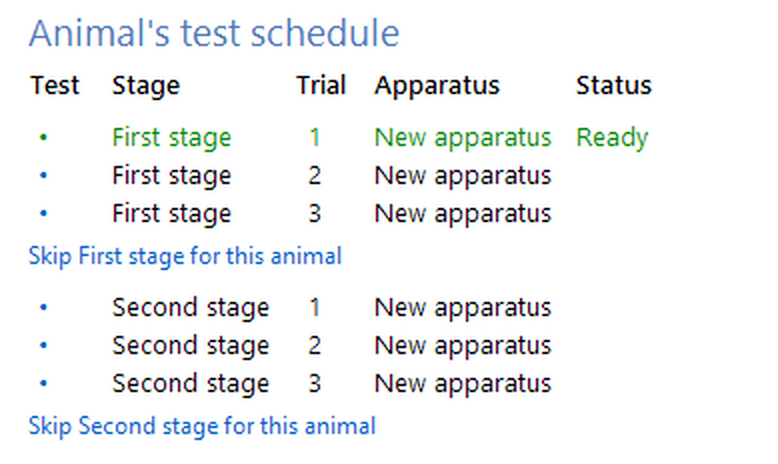
Figure 1. If specified in the protocol, an animal's test schedule (which is part of the Animal details report) can include a link which will skip the animal's trials in a particular stage.

© Copyright 2003-2026 Stoelting Co. All rights reserved
ANY-maze help topic T0805