ANY-maze Help > The ANY-maze reference > The Protocol page > The elements of a protocol > Additional information > Fields > An introduction to fields
An introduction to fields

Introduction
It's common to record additional information in an experiment beyond just the test's results - for example, you're likely to want to record the ages of the animals you use.
Obviously, this information can easily be recorded on paper and doesn't need to be entered into ANY-maze. Nevertheless, there are some major benefits to recording such additional information in the system:
| 1. | Numeric data, such as animals' ages, can be analysed within ANY-maze. For example, you could use an ANOVA to check that there's no significant difference between the ages of the animals in the various treatment groups in an experiment. |
| 2. | Data which can have one of a number of specific values, such as gender, can be used as an independent variable in analysis. Thus, for example, you could analyse results between male and female animals; indeed you could use a 2-way ANOVA to analyse both gender and treatment groups. |
| 3. | The information can be used by procedures, for example to alter a zone's position based on the animal's gender or to set a light to a certain brightness. |
| 4. | At a purely practical level, recording data within ANY-maze reduces paperwork and keeps all the information relating to an experiment in one place. |
Creating fields
To record additional information such as that described above, ANY-maze uses fields. Essentially, a field is just a place in ANY-maze where you can enter some information - so, for example, you could create one field to record the animals' ages and another one to record their genders.
Here, it's important to understand that creating a field in a protocol just tells ANY-maze that you want it to include somewhere for you to record this information in an experiment - it doesn't actually mean that you're recording a age or a gender in the protocol; see figure 1.
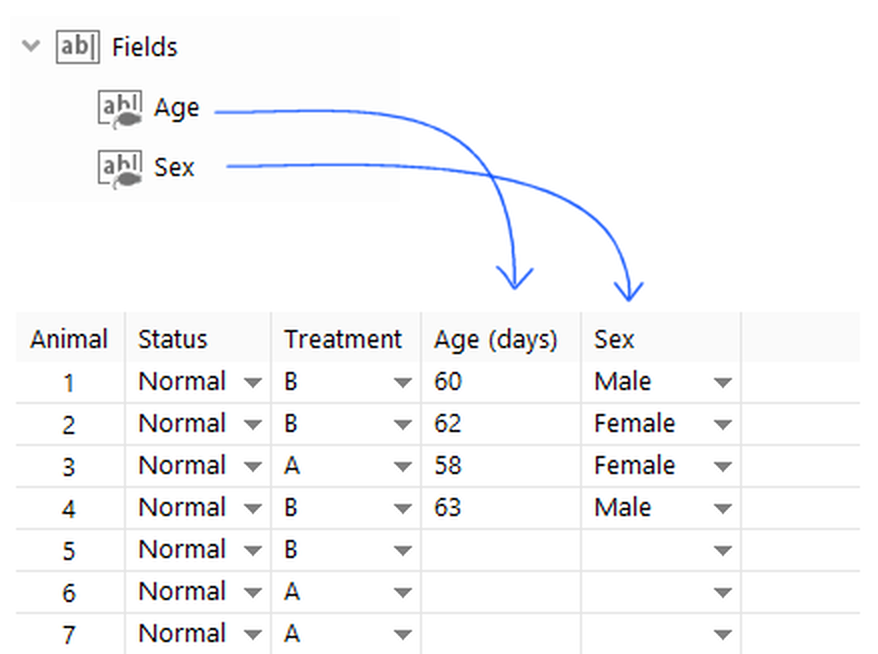
Figure 1. Creating fields in the protocol causes ANY-maze to include locations to record the specified data in the experiment.
There are three different types of field in ANY-maze - Text, Numeric, and Choice.
| Text fields | Text fields can accept any data you want to record; however, they can't be used in any analysis. They're useful because they allow you to record data within ANY-maze which would otherwise need to be written on paper. |
| Numeric fields | Numeric fields can accept any numeric value. A numeric field can be analysed as a dependent variable and can also be included in calculations and procedures. |
| Choice fields | Choice fields accept one of a number of different choices such as 'Male' and 'Female'. Choice fields can be used as dependent or independent variables in analysis. |
Fields can record data for the animals, the tests or the entire experiment
If you want to record the sex of your animals you would use an Animal field, which would mean that each animal would have a single sex associated with it. On the other hand, if you want to record the water temperature in a water-maze, then you'd use a Test field so each test could have its own temperature recorded, even if the same animal might be tested multiple times.
Experiment fields
Experiment fields record a single value for the entire experiment. This may not sound too useful but can be really helpful when used together with procedures to control something about the experiment as a whole. For example, imagine you created a protocol for fear conditioning, in which you would have a certain delay between the presentation of an audible stimulus and the presentation of an aversive shock. You would program this delay using a Wait until: Time elapsed statement in a procedure, but what time would need to elapse? Well, in some experiments you might want this to be 5s in others 10s, etc. This would mean you'd need to edit the procedure each time you create an experiment based on your fear conditioning protocol. A better solution would be to create an Experiment field for 'Post stimulus delay' and then set the procedure to Wait until: Time elapsed: Post stimulus delay
ANY-maze would then include a place on the Experiment page where you would enter the 'Post stimulus delay' and this would automatically get used in the procedure - see figure 1.
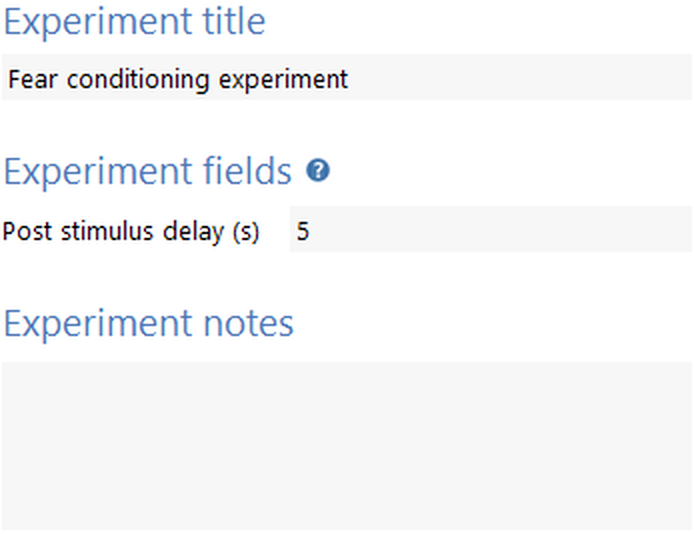
Figure 2. Experiment fields are included on the Experiment details pane.
Entering data into fields
As mentioned above, creating a field just tells ANY-maze you'll want to record some information in an experiment - the information itself is entered into either:
| • | The experiment details pane (see figure 2) |
| • | The Animals spreadsheet (see figure 1) |
| • | The Animal details report |
| • | The Test details report |
Field entries are always optional, so even though you might include a field to record the animals' sex, you don't actually have to make any entries if you don't want to.
That said, there may be situations in which you would like to ensure that a field's value has been entered before a test starts, in which case you can use a procedure like the one shown in figure 3 to achieve this.
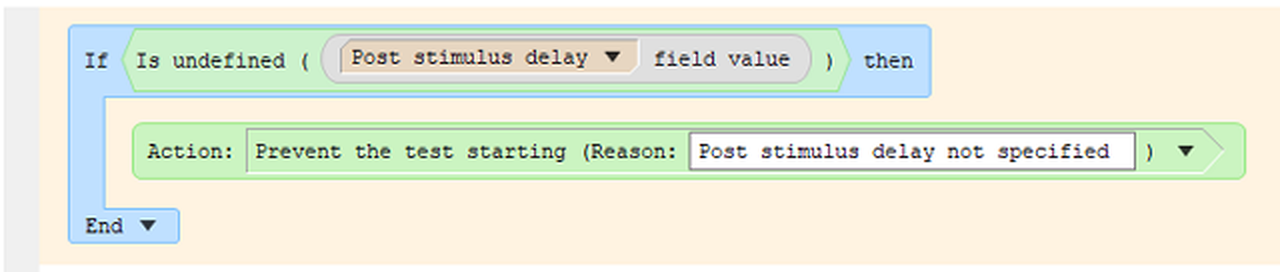
Figure 3. A procedure like this will prevent the test from starting until the field (in this case 'Post stimulus delay') has been specified. Note this must be included in the top, orange, part of a procedure, as these statements are run before a test is started.

© Copyright 2003-2026 Stoelting Co. All rights reserved
ANY-maze help topic T0602