ANY-maze Help > The ANY-maze reference > The Protocol page > The elements of a protocol > Behaviour > Orientation and movement > Analysing movement towards and away from zones and points
Analysing movement towards and away from zones and points

Introduction
ANY-maze includes an option to determine when the animal is moving towards or away from a zone or point.
| • | Defining movement towards or away from something |
| • | Setting the critical angle |
Defining movement towards or away from something
Analysis of movement towards or away from something isn't quite as simple as it might at first appear. For example, if an animal moves in a direct line from position A to a point at position B, then clearly it would be considered to be moving towards the point; but if its course would miss the point by 2cm, should it still be considered to be moving towards the point?
To resolve this issue ANY-maze uses a 'critical angle'. A good way to visualise this angle is to imagine that the animal has a flashlight and is pointing it in the direction that it's moving in. The flashlight will illuminate a conical area in front of the animal, and if a zone or point is 'illuminated' then ANY-maze will consider that the animal is moving towards it. In this analogy, the 'critical angle' defines the angle of the flashlight's cone - see figure 1.
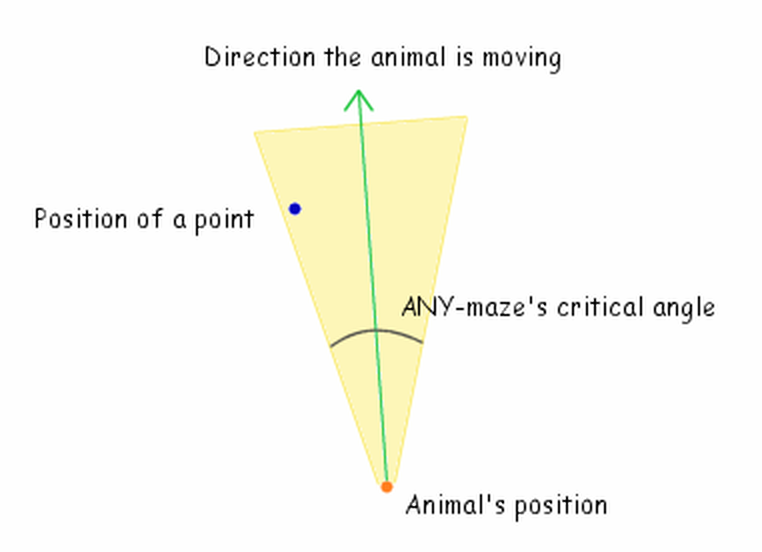
Figure 1. The 'critical angle' can be thought of as describing a cone projected in front of the animal and centred on the animal's direction of movement (like the light from a flashlight). If any point or zone is within the cone, then ANY-maze considers that the animal is moving towards it.
Here the direction of movement is defined as a vector which joins the previous position of the animal and its current position.
Of course, this still leaves the question of how the system determines movement away from a point or zone. In this case, you can simply imagine that the animal is shining the flashlight behind itself (i.e. the cone projects in the opposite direction) - the animal is then moving away from any point or zone 'illuminated' by this reverse-pointing flashlight.
Setting the critical angle for movement towards or away from zones and points
You can set the critical angle for movement to any value from 2° to 180°. The default is 90°.
You can change the critical angle at any time, including after tests have been performed. ANY-maze will simply reanalyse the data it collected during the test and update the movement results accordingly.
| • | Analysing orientation towards zones and points |

© Copyright 2003-2026 Stoelting Co. All rights reserved
ANY-maze help topic T0347