ANY-maze Help > The ANY-maze reference > The Protocol page > The elements of a protocol > Behaviour > Orientation and movement > Analysing orientation towards zones and points
Analysing orientation towards zones and points

Introduction
An animal's orientation is defined by a line that joins its centre and its head. ANY-maze considers the animal to be oriented towards anything that falls within an arc a certain number of degrees either side of this line - see figure 1.
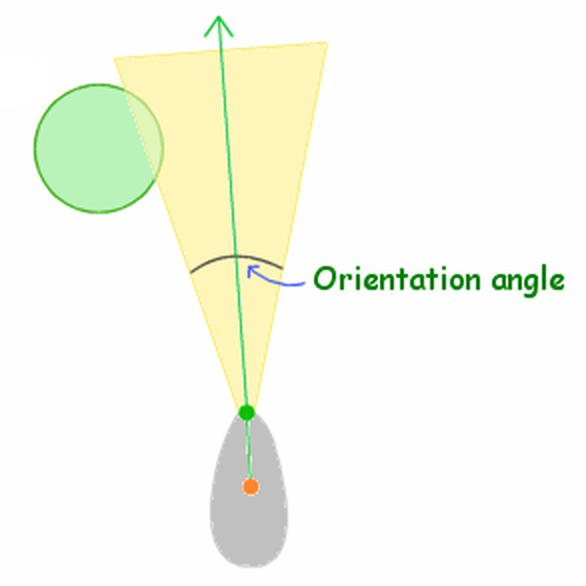
Figure 1. Here the orientation angle is just wide enough for the animal to be considered to be oriented towards the zone.
Setting the orientation angle
You should specify the orientation angle as the total width of the arc. For example, if you want the arc to extend by 20° either side of the orientation line, then you would enter 40°.
You can enter any value from 2° (1° either side of the line) to 170°. The default is 60°.
You can change the orientation angle at any time, including after tests have been performed. ANY-maze will simply reanalyse the data it collected during the test and update the orientation results accordingly.
Viewing the orientation
When tracking ANY-maze can optionally show the orientation by highlighting the orientation arc, as in figure 2.
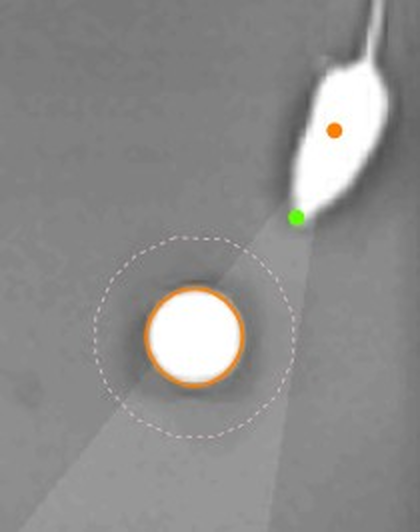
Figure 2. The flashlight-like highlighting shows the orientation arc (here the orientation angle was set to 30°).
See also:
| • | Analysing movement towards and away from zones and points |

© Copyright 2003-2026 Stoelting Co. All rights reserved
ANY-maze help topic T0346