ANY-maze Help > The ANY-maze reference > The Protocol page > The elements of a protocol > Testing > Procedures > Procedures and the end of a test
Procedures and the end of a test

Overview
The lifetime of a procedure in ANY-maze is not necessarily the same as the test for which it runs. A procedure may run through all its statements and then finish, while the test continues running; alternatively, if a procedure is still running when the test ends, the procedure will be stopped.
More information
A procedure may still be running when a test ends, usually because the procedure includes some kind of loop using a Repeat statement or Go to statement. If it's still running, then the procedure will continue executing statements until it reaches a Wait until statement, at which point it will stop running. This is because the procedure knows that no further events can occur after a Test ends event, so it will just exit. The exception to this is the Test continuation event, which is described below.
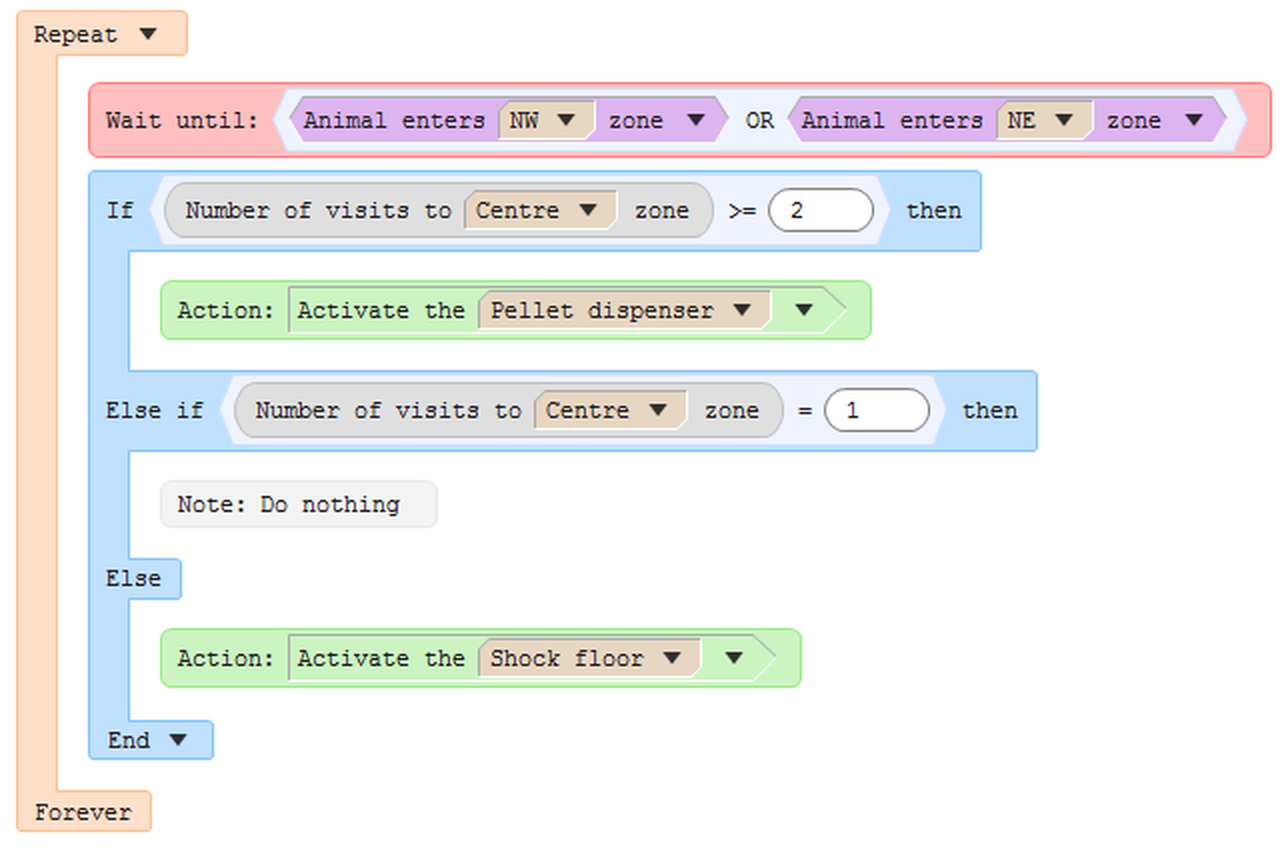
Figure 1. If this procedure was currently executing the If statement when the test ended, it would carry on evaluating the conditions, and take the appropriate action. Control would then loop back to the Wait until statement, at which point, the procedure would stop running as it knows that the test has ended.
Waiting for the Test ends event.
There may be circumstances under which you want to take specific action only at the end of the test. For example, you might have a radial arm maze that opens and closes doors in a particular sequence, or according to the animal's movements. When the test ends, you want to open all doors of the maze to leave it in a 'known' state. So how would you achieve this, if the procedure ends when the test ends?
When the test ends, the procedure will receive a Test ends event. If that's the event that the procedure is currently waiting for, then it will process that Test ends event and run any subsequent statements. Only if it reaches another Wait until statement (or there are no more statements in the procedure) will the procedure finally stop. So the following procedure could be used to close the doors of our radial arm maze:
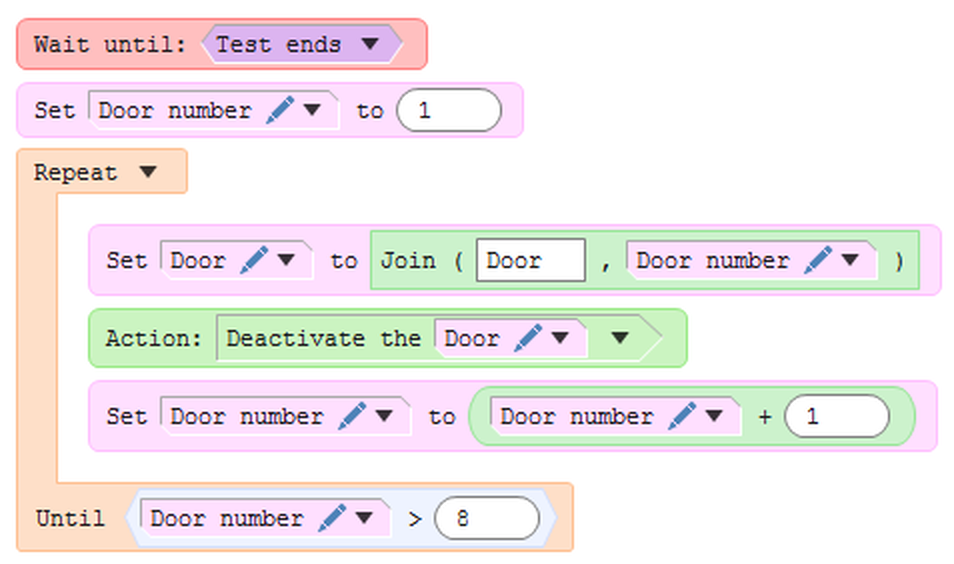
Figure 2. When the test ends, this procedure will run the statements after the Wait until statement. After repeating the loop 8 times, the procedure will drop out and end anyway.
 | Note the use of the 'Join' function to create some text for 'Door 1', 'Door 2', etc. These are the names of the output switches that control the doors of the radial arm maze. |
Note that when you create a procedure that waits for the Test ends event in this way, it is best to write it as a separate procedure, rather than adding these statements to an existing procedure. This will guarantee that the processing of the Test ends event will always occur.
To see why this is necessary, consider the two figures above. Imagine that we appended the procedure in figure 2 to the procedure in figure 1, i.e. the Wait for Test ends event was immediately after the end of the Repeat statement in figure 1.
What would happen at the end of the test? Well, it would depend on exactly which statement the procedure was executing when the test stopped. The chances are quite high that it is in the first Wait until statement, waiting for the animal to enter a zone. If this is the case, the Test ends event is received, the procedure looks to see if it's the event it's waiting for (which it isn't), and then, because the test has finished and the procedure is in a Wait until statement, the procedure will end. The actions to close the doors are never run.
Even if the procedure is currently executing the If statement or the Repeat statement when it receives the Test ends event, the result will be the same because the statements will always get back to the Wait until statement that is waiting for the zone entry.
Keeping the procedure separate, as in figure 2, works because that procedure is only waiting for the Test ends event - it can't get stuck waiting for something else when the test actually does end.
Test continuation
There are some circumstances under which a procedure may decide that it's right to end the test, but you want to manually override this and force the test to continue. For example, you might have a water-maze and a procedure that ends the test when the animal enters the platform zone. Sometimes, the animal might just swim straight over the zone and exit the other side, in which case you might not want this to count as the zone being found; however, the test has already ended because the procedure thinks that the animal entered the zone. In this case, you'd want to tell ANY-maze to resume running the test, allowing it to continue tracking until the animal really found the platform.
If you want to allow a test to be manually continued after a procedure has ended it, then you need to use the End the test, but allow continuation action rather than the basic End the test action. This will allow you 10 seconds after the test has finished, to press the  (Start test) button to force the test to continue.
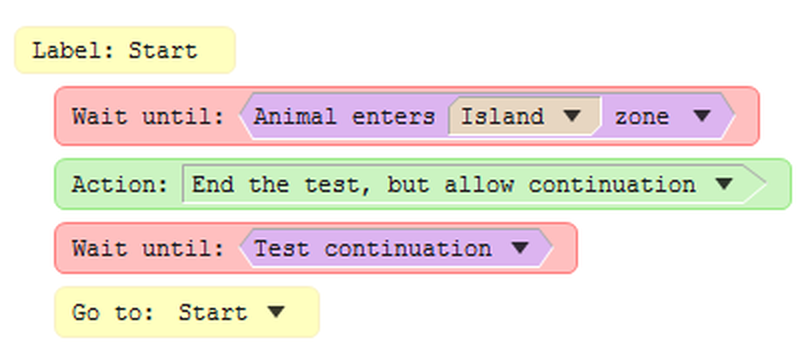
Figure 3. This procedure ends the test, but allows you to force it to continue if necessary.
Note that the procedure in figure 3 differs from the one described in the first walk-through example, in that it also loops back to the start of the test, in case you do force continuation - otherwise the procedure will never go back to waiting for the animal to enter the island again.
See also:
| • | Actions available to procedures |

© Copyright 2003-2026 Stoelting Co. All rights reserved
ANY-maze help topic T0469