ANY-maze Help > The ANY-maze reference > The Protocol page > The elements of a protocol > Inputs and outputs > Signals > Setting up a signal > Setting up a signal's conversion data
Setting up a signal's conversion data

In brief
The conversion fields on the Signal's settings page allow you to convert a signal from volts to the real-world units of whatever it is that the signal is measuring.
The conversion is a simple linear conversion, and so requires just two pairs of values, for example: 0V = 0mmHg, 1V = 250mmHg. You also need to specify what the converted units are (mmHg in this example).
You don't have to enter any conversion data - if you don't, then ANY-maze will just report the values it reads from the signal input port, which will typically be in Volts.
Details
A signal typically reads a voltage that's being output from some sort of sensing device. But the thing that's being 'sensed' is rarely a number of volts; usually it's something like a pressure, a temperature or a gas concentration. In all these cases, it would be helpful to you if the signal could convert the voltage back into the appropriate real-world value - perhaps mmHg, °C or %CO2, in the examples.
This is what the conversion fields do. Here you first need to specify what the Output units of the converted value are, and then provide two pairs of values. Each pair consists of a value in volts and a value in the signal's output units, for example: 0V = -20°C, 1V = 180°C. ANY-maze requires that there is a linear relationship between the voltage and the real-world units, so it is then very easy to perform the conversion - effectively it's the same as plotting a conversion line on a graph. Having done this, the software can just 'read-off' the output value of any voltage - see figure 1.
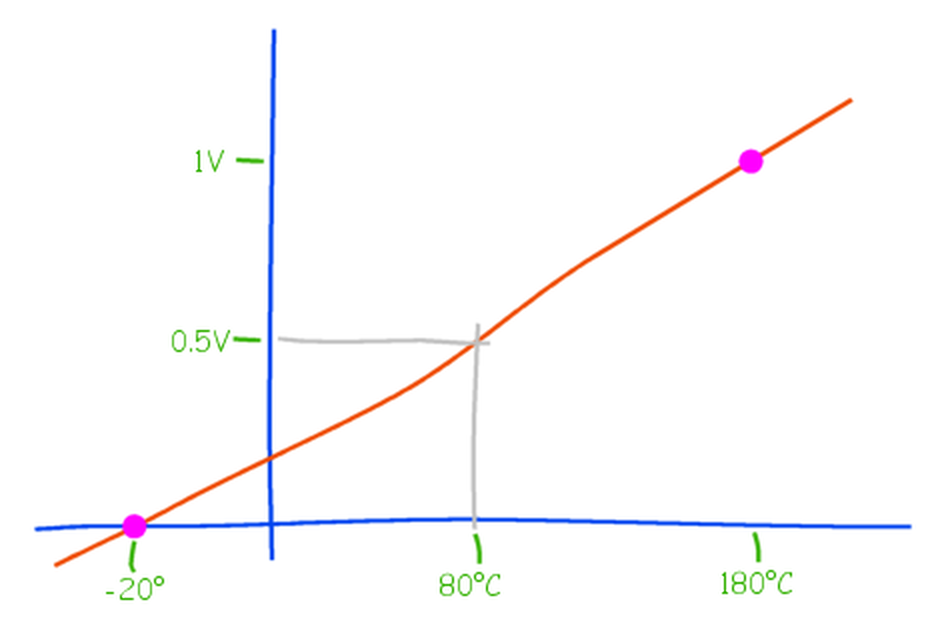
Figure 1. Conceptually, ANY-maze plots a graph using the two conversion points you provide and can then 'read-off' the output value of any voltage. Here, for example, a voltage of 0.5V is 'read-off' as a temperature of 80°C. Note that this requires that the relationship between voltage and the output units is linear.
Clearly, this process requires that you know two conversion points. In the majority of cases, these will be easy to find out from the documentation of the device which is generating the voltage. Often, the documentation will simply imply that 0V = 0°C (let's assume our device is measuring a temperature) and so it will simply report something like '10mV/°C'. In this case you could use one conversion point of 0V = 0°C and a second one of 0.01V = 1°C.
There may be cases where you don't know this information, in which case you will need to work it out either using another sensor (perhaps a standard mercury thermometer) or by using some 'standard' (for example, melting ice is at 0°C and boiling water is at 100°C). If you do generate these conversion values yourself, try to use values towards the two ends of the range of values you will be measuring in your tests.
Limits
For the Output units you can enter anything you like up to a maximum of 6 characters.
For the conversion values in volts, you can enter any value from -99.0V to 99.0V.
For the output value, you can enter any value from -9999.0 to 9999.0.

© Copyright 2003-2026 Stoelting Co. All rights reserved
ANY-maze help topic T0159