ANY-maze Help > The ANY-maze reference > The Protocol page > The elements of a protocol > Apparatus > Video sources > Setting up a Video Source > Adjusting a video picture's brightness, contrast etc.
Adjusting a video picture's brightness, contrast etc.

 | When you change the brightness, contrast etc. of a picture, you actually change the image supplied by the camera / digitizer. This means that any other video sources which also use the same camera / digitizer will be affected too. |
In brief
By clicking the  Properties button (which is shown in the ribbon bar when a video source is selected in the protocol), you can open the properties window for the video source's camera or digitizer. This window includes a page called Image control where you can alter the brightness, contrast etc. of the picture - the exact options available will depend on the capabilities of your camera or digitizer. You should use the controls to produce a clear image with a good contrast between the animal and the apparatus background - see figure 1.
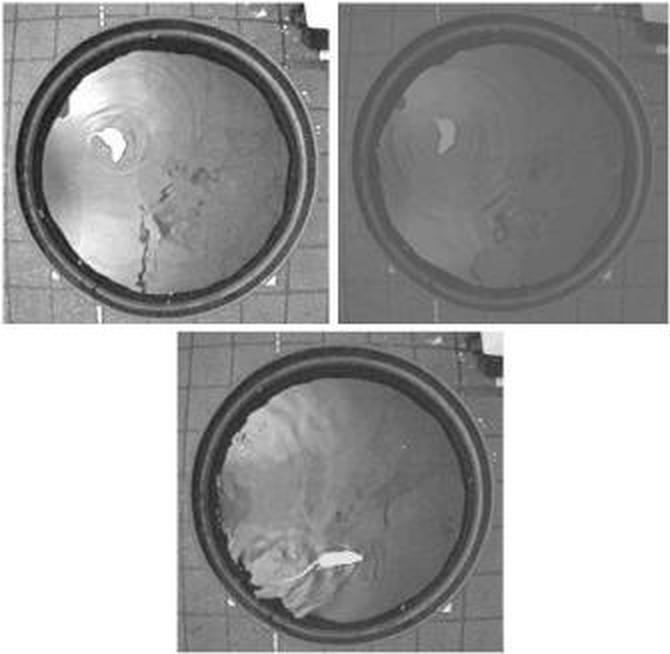
Figure 1. In the first image, there is too much contrast; in the second, not enough. In the third, the contrast is just right. In fact, ANY-maze would track without errors in all three images, but would identify the animal in more frames in the third image than in the other two.
Details
When adjusting the image, you should aim to create a good level of contrast between the animal and the background of the apparatus. This doesn't mean you should necessarily try to create the maximum contrast, as this can actually result in worse tracking if there are reflections in the image. In the figure above, the first image has too much contrast, whereas the second has too little - the last image is just right for tracking. You'll probably notice that it's also the image which is the most satisfactory to human eyes; in general, what looks good to you will look good to the software.
However, there are two situations when you will need to pay careful attention to these settings if tracking is going to be at its best. These are when the animal and apparatus background are very similar, for example, a white rat on a white background, and/or when you're tracking in low light conditions - see the following topics for details
| • | Tracking with low contrast between the animal and apparatus background |
| • | Working in low light or darkness |
See also:
| • | Camera/Digitizer Properties window : Image control page |

© Copyright 2003-2026 Stoelting Co. All rights reserved
ANY-maze help topic T0092