ANY-maze Help > The ANY-maze reference > The Protocol page > The elements of a protocol > Testing > Stages > Specifying positions of movable zones
Specifying positions of movable zones

Introduction
As you probably know already, you can create zones in ANY-maze which can adopt different positions in different tests - so called movable zones. These zones come in two basic types, those which have a fixed position for a specific animal, but can alter position between animals, and those which can alter position between an individual animal's tests.
Specifying the positions of the first type of movable zones, those which only change position between animals, is simply done by specifying the position for each animal before you start the experiment - usually by using the Animals spreadsheet on the Experiment page. However, specifying the positions of the second type of movable zones is a little more complex and is described here.
| • | Ways in which a zone's position can alter within a stage |
| • | Specifying a zone's position within a stage using the 'Zone position' sub-element |
Ways in which a zone's position can alter within a stage
ANY-maze identifies a number of possible ways that a movable zone's position can be defined within a particular stage.
| 1. | The zone simply isn't used in the stage - for example, in a water-maze, you might take the island out in some stages. |
| 2. | The position is set by a procedure. |
| 3. | The position just moves about randomly between the trials and the animals. |
| 4. | The position just moves about randomly between the trials and the animals, but for a specific animal it doesn't repeat until it has adopted all the possible positions. For example, if there are 4 positions, numbered 1 through 4, then in the first test for an animal, the zone might be in position 3; this would mean that for the next test, it could only be in position 1, 2 or 4 because position 3 has already been used, so ANY-maze would randomly choose one of these positions. |
| 5. | The zone's position follows a fixed pattern between the various trials in the stage, irrespective of the animal being tested. For example, in the first trial the zone might be in position 1; in the second trial, in position 3; in the third trial in position 2; etc. |
| 6. | The position in a test is the same as the zone in which the animal ended its previous test. Note that for this option to work correctly, you must ensure that all the movable zones in your apparatus have positions with the same names. You should also be aware that ANY-maze matches the names of the positions - which doesn't necessarily mean they are physically located in the same place. For example, imagine you have a circular piece of apparatus divided into 4 quadrants. You define two zones, A and B. Both zones have two possible positions, North and South. If you specified for both zones that North is the top-left quadrant and South is the bottom-left, then saying that the position of Zone A is the same as the position of Zone B in the previous test, would work as you would expect. But if you specified that the North position of Zone A is the top-right quadrant and the South position is the bottom-right quadrant, then if the animal ended one test in Zone B (which, let's say, was in the North, i.e. top-left, position) then the next test would have Zone A also in the 'North', although this would physically be in the top-right quadrant - probably not what you would want. Finally, note that when this option is selected, the user has to specify the position of the zone in the animal's first test. |
| 7. | The position follows some other, more complex sequence, perhaps following a fixed pattern that depends on both the trial number and the animal being tested. |
Specifying a zone's position within a stage using the Zone position sub-element
ANY-maze automatically includes one Zone position sub-element in each stage of your protocol for each movable zone which can alter position between an individual animal's tests. For example, if a protocol includes two such zones, perhaps a 'Food' zone and a 'Water' zone, then each stage will include two sub-elements for defining the position of each zone - see figure 1.
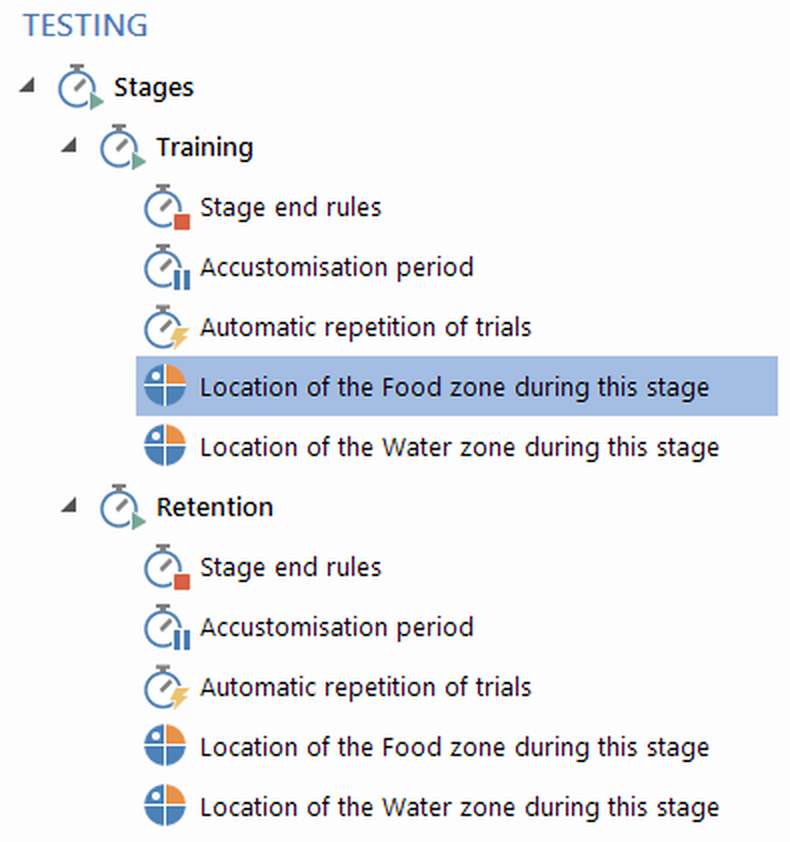
Figure 1. Each stage includes one zone position sub-element for each movable zone which can alter position between an individual animal's tests.
Selecting a zone position sub-element allows you to specify how the zone's position will be set during the stage, by selecting one of the possibilities described in the previous section.
| 1. | If the zone is specified as not being used in the stage, then ANY-maze will simply ignore it completely during the stage's trials, and all measures for the zone in the stage will generate undefined results. |
| 2. | For a zone whose position is set by a procedure, you must write a procedure which contains the Set location of movable zone procedure action. Note that the procedure must run this action before the test starts. |
| 3. | For a zone which follows a fixed sequence of positions, you can specify the sequence in the settings pane. This is very useful, because it means you won't need to set the position at the start of the tests because ANY-maze will already know it. |
| 4. | For a zone which adopts any random position, ANY-maze will simply choose a position for you at the start of each test. The position can be shown on the Test schedule report, so you know where to physically locate the zone. |
| 5. | For zones which follow a more complex sequence, you will need to tell ANY-maze the zone's position at the start of each test. You do this by clicking the position in the apparatus map before the test starts - see figure 2. This process is described more fully in Setting the positions of movable zones before a test. |

Figure 2. Specifying the position of an island in a water-maze. The purple areas indicate the positions the island can adopt; the blue area indicates the position the user has selected.

© Copyright 2003-2026 Stoelting Co. All rights reserved
ANY-maze help topic T0408