ANY-maze Help > The ANY-maze reference > The Protocol page > The elements of a protocol > Behaviour > Zones > Setting up a zone > Choosing how ANY-maze should detect entries into a zone
Choosing how ANY-maze should detect entries into a zone

Introduction
All standard zones include a sub-element in the protocol list called Zone entry settings. Selecting this will display options in the Settings pane which allow you to specify exactly how you want ANY-maze to detect entries into the zone.
There are various methods which ANY-maze can use to detect zone entries. The default method is to simply consider an animal to be in a zone when its centre point is in the zone. This, however, doesn't equate very accurately to zone entry rules used in some apparatus - for example, in the plusmaze, it's normal to count an arm entry when 'all four paws are in the arm'. Also, this method can easily create false entries if the animal's position oscillates slightly across the border of a zone.
Using the entire area of the animal to detect entries addresses these issues.
 | You specify how zone entries will be detected for each zone individually - so there's nothing to stop you using the animal's centre point for some zones, and its entire area for others. |
| • | Detecting zone entries using the centre of the animal |
| • | Detecting zone entries using the position of the animal's head |
| • | Detecting zone entries using the entire area of the animal |
| • | Why the animal can sometimes be 'nowhere' |
| • | Defining one zone as being a 'not in any other' zone |
| • | Using key presses to specify when the animal is in a zone |
| • | Only scoring a zone exit when the animal enters another zone |
| • | Ignoring the apparent entry that occurs when an animal starts in a zone |
| • | Only scoring an entry after the animal has been in the zone for a certain time |
| • | Altering zone entry settings |
Detecting zone entries using the centre of the animal
This is the default method for detecting zone entries. However, it can give rise to certain problems as described in the Introduction above, so you should carefully consider whether these issues will affect your apparatus. For example, in an activity cage you might be interested in how much time the animal spends in the left and right sides of the cage, and how far it travels during the test. In this case, there would be no need to precisely control what constitutes an entry into one side or the other, and counting some spurious entries would make almost no difference to the times in the two sides. Therefore using the centre of the animal to detect entries would probably be fine.
Detecting zone entries using the position of the animal's head
Selecting this method for zone entry detection will cause ANY-maze to consider that the animal is in the zone whenever its head is within the zone. Although this method of zone entry detection may seem very appealing, there are a couple of issues to consider before using it.
| • | As with using the animal's centre point to detect zone entries, this method can easily detect false entries if the animal's head position oscillates slightly across the border of a zone. In fact this is even more likely to occur when using the head position as this is generally less stable than the animal's centre point. Nevertheless, this may not be important as it will only affect the count of zone entries and not really alter measures such as the time in the zone, or the distance travelled in the zone. |
| • | In order to track the animal's head, ANY-maze does require: |
| • | that there's a good level of contrast between the animal and the background of the apparatus, |
| • | that there's relatively little noise in the image (noise is that 'snow' type of effect you see in low light images), |
| • | and that the entire body of the animal is usually visible (which wouldn't be the case in a water-maze, for example). |
You'll find that the protocol includes an element where you can choose whether or not ANY-maze should track the animal's head. It is not necessary to switch that option on in order to use the head position to detect zone entries, as the two functions are entirely independent.
Detecting zone entries using the entire area of the animal
This method of detecting zone entries requires you to specify two percentages: The first is the percentage of the animal which must be in the zone for an entry to be counted. For example, specifying 90% will require almost all of the animal to be in the zone before an entry is counted. The second value is the percentage of the animal which must remain in the zone to prevent an exit from occurring. In this case, it's normal to enter a value a little smaller than the entry percentage as this helps to prevent spurious entries.
There are a number of situations when using this method to detect zone entries is desirable, and some of them are described below:
| • | Preventing spurious zone entries |
A common problem with video tracking systems can occur when an animal straddles the border between two zones. If the system is using the centre point of the animal to count zone entries, and the animal moves even slightly, then the centre point can oscillate from one side of the zone border to the other - each time it does this, the system will count a zone entry. This is demonstrated in figure 1. Here, using the centre point to detect zone entries is approximated to using 50% of the animal to detect the entry. As 50% of the animal moves into the zone, an entry is counted, but if the amount of the animal in the zone drops even slightly then an exit is counted.

Figure 1. By using 50% of the animal's area to approximate tracking using the centre point, it can easily be seen how spurious zone entries can occur.
The problem of spurious entries can be resolved by using a zone entry and exit percentage. For example, setting the entry percentage to, say, 50% and the exit percentage to, say, 40% would resolve the problem shown in figure 1. Here, after the animal moves 50% of its body into the zone, it never moves more than 40% back outside it, so just a single entry is counted - see figure 2.

Figure 2. After 50% of the animal's area moves into the zone, an entry is counted. However, an exit will only occur if less than 40% of the animal is in the zone and this doesn't occur - thus just a single entry is scored.
| • | Controlling zone entries more precisely |
In some apparatus, special rules are generally used to determine when an animal enters a zone. For example, in the plusmaze and Y-maze, an arm entry is only counted when the animal has all four paws in the arm. Using the animal's centre point to detect entries makes it difficult, or impossible, to approximate such rules in an automated system. However, using the entire area of the animal to detect entries can overcome this - in the case of the fours paws rule, an entry percentage of about 85% usually creates a good approximation - see figure 3.
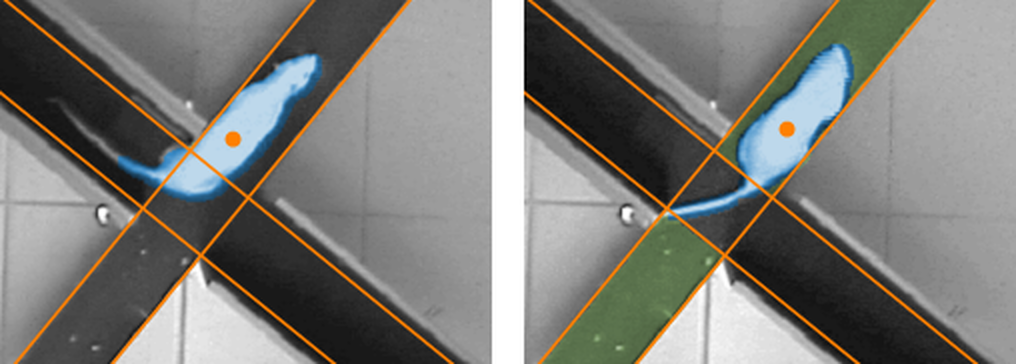
Figure 3. In the first image, the centre of the animal (indicated by the orange dot) has entered the open arm, but ANY-maze doesn't count this as an entry because less than the required amount of the animal - 85% in this case - is in the zone. The blue shading indicates the area that the system considers to be the animal. In the second image, ANY-maze does consider the animal to be in the zone, which it indicates by shading the zone in green. Here, the 85% entry value acts as a good approximation to the plusmaze 'four paws in the arm' rule.
In this case, you will probably also want to use an exit percentage a little below the entry percentage to avoid spurious entries - 75% in the case of the plusmaze is usually about right.
| • | Detecting zone 'touches' |
Another problem with using the centre of the animal to detect zone 'entries' is that the animal has to be able to actually enter the zone. This might sound rather obvious, but consider the case of a novel object placed in an open field, perhaps a wooden block. In this case you might want to know when the animal touches the object. But unless the animal can climb onto the object, its centre point will never actually enter the zone. Of course, you could draw a wide zone around the object and count a 'touch' when the centre point enters this zone, but it's hard to determine exactly how wide this zone should be. A better solution is to use a very low zone entry percentage, perhaps just 1%, and a zone which tightly encloses the object - this way you can detect when the animal touches the object.
NOTE: ANY-maze electronically 'removes' animals' tails when tracking, so if a tail touches an object it won't be detected.
Why the animal can sometimes be 'nowhere'
A possible side effect of using percentages to detect zone entries is that you can define a protocol in which the animal can be nowhere, and this can sometimes lead to confusion.
Consider a simple open field which is divided into two zones, left and right. You would expect that if you added together all the time the animal spends in the left zone and all the time it spends in the right zone, the total would equal the test duration. And so it would, if you use the centre of the animal to detect the zone entries. But if you use entry/exit percentages, then you can create a situation when the animal will be in neither zone. For example, if the entry percentage for the two zones is 80% and the exit percentage is 70% then, if the animal has 50% of its body in the left zone and 50% in the right zone it won't be considered to be in either of them.
Defining one zone as being a 'not in any other' zone
In most cases, it's quite easy to choose the entry conditions for a zone, but it can become difficult or impossible to do this if you have a small zone surrounded by zones that use 'percentage' entries - the centre of a plusmaze, for example.
Consider the situation where the entry conditions for a plusmaze are set to 60% for an entry and 50% for an exit (see above). Now try to think what conditions you should use for an entry into the centre of the maze. An entry percentage of 50% and an exit of 40% might seem logical in this case, but the animal could quite easily put some of its body in an open arm and some in a closed arm, and have less than 40% in the centre - it would then be scored as not in the centre.
Of course, you could overcome this by simply not including a centre zone and calculating the results for the centre (for example time in centre = total time - time in the other zones). But this gets complicated for entries, and is impossible for latencies.
The solution is to simply define the centre as 'not in any other zone'. As you'd expect, ANY-maze will then consider the animal to be in the zone when it isn't in any of the others.
You don't need to specify the areas of a 'not in any other' zone
By definition, ANY-maze knows where in your apparatus your zones are. Therefore, if you include a 'not in any other' zone, it will simply work out for itself which areas the zone includes.
One effect of this is that the 'not in any other' zone may move about if your apparatus includes some movable zones. For example, if you have a target arm zone in a T-maze that might be on the left or might be on the right, then, if you define just this target zone and another 'not in any other' zone, then the 'not in any other' zone would sometimes consist of the stem of the T plus the left arm and sometimes the stem plus the right arm, depending on where the target was.
Using key presses to specify when the animal is in a zone
In some apparatus, it may simply be impossible to track the animal automatically, in which case you can use keys on your keyboard to indicate to ANY-maze when the animal has entered a zone.
You may think that you could achieve the same result using the Key element of the protocol, and you'd almost be right; however there are a number of benefits to specifically telling ANY-maze that you're using a key to score a zone entry:
| • | The system will automatically score an exit when the animal moves to any other zone, whether that's a zone you're scoring with keys or not. |
| • | The system will be aware that the animal is in a ZONE, and this will be reflected in the results, where it will break key measures, such as grooming, into Grooming in the X zone, Grooming in the Y zone and so on. |
| • | The system will report zone specific measures such as Distance to the zone. |
| • | You can choose to highlight the zone when the animal is in it (i.e. when you press the key). |
Setting up a key zone
To actually define a key zone, you simply need to check the appropriate box and then specify which key you want to use to signify an entry into the zone. If you have multiple apparatus, you'll need to specify one key for each of them. Of course, the keys you choose must be unique both within other key entry zones you've set up and also within any Keys in your protocol - don't worry too much though, because ANY-maze will tell you if you try to use the same key twice.
When using a key zone, the option to only score an exit from the zone when the animal enters another zone will be disabled. This is because key zones always score exits either when the animal enters another zone, or when you press the Esc key.
Although you'll be using a key to tell ANY-maze when the animal is in the zone, you should still indicate where the zone is within the apparatus by clicking on the relevant areas in the video picture. Note that ANY-maze won't use the area to determine entries or exits to/from the zone, but it will use it to report some measures, such as the distance of the animal from the zone, and it will highlight the area when the animal is in the zone (assuming the highlight option is selected). If you can't select the area of the zone because the zone isn't visible to the camera, then you should probably be using a hidden zone rather than a key zone.
Using a key zone
Actually using a key to score a zone entry is very simple - just press the key when the animal enters the zone; there's no need to hold it down. An exit will be scored when the animal moves to any other zone or, if you want to explicitly score an exit, when you press the Esc key on the keyboard.
Only scoring a zone exit when the animal enters another zone
Ordinarily, ANY-maze will score a zone exit based on the same method it uses to score a zone entry. For example, if you use the centre point of the animal to score an entry into a zone, then, when the centre point exits the zone, an exit will be scored.
However, you might not want things to work like this. For example, in the plusmaze, you might prefer to ignore the exit from one arm until the animal enters another arm, thus avoiding the question of what to do with the time the animal spends in the centre of the maze.
If you want a zone to have its exits scored like this, you just need to check the box Only score an exit from this zone when the animal enters another zone. Thus ANY-maze will continue to consider that the animal is 'in' the zone (and, if set to do so, will continue to show the zone highlighted) until it satisfies the entry criteria for another zone. This can even mean that the animal is considered to be in the zone when no part of its body is physically in the zone's area.
By the way, if your protocol includes a zone with the entry criteria of Not in any other zone (let's call it zone A) and all the other zones have exit criteria of Only score an exit when the animal enters another zone, then ANY-maze will never consider that the animal has entered zone A, because it will only leave one zone when it enters another and thus will never be Not in any other zone.
Ignoring the apparent entry that occurs when an animal starts in a zone
When you start a test, the animal will (from ANY-maze's point of view) suddenly appear in the apparatus. Of course, it might appear in one of your zones, and ordinarily ANY-maze will count this as a zone entry.
However, you might wish to ignore this apparent entry. and only count an entry into the zone when the animal first enters it by actually crossing a border. If this is the case in your apparatus, then you should check the box titled Don't score any results in this zone until the first 'true' entry.
NOTE: Because ANY-maze won't count the entry into the zone, it won't consider the animal to be in the zone, therefore it won't update any of the zone's results - including such things as Distance travelled in the zone, Time in the zone, etc. However, it will only ignore these results in relation to the zone, not in relation to the apparatus as a whole, so measures such as Test duration and Total distance travelled will reflect the animal's activity in the zone.
Only scoring an entry after the animal has been in the zone for a certain time
You can optionally choose to only score an entry after the animal has been in a zone for a certain amount of time. You can enter the time using units of ms, s and min, for milliseconds, seconds and minutes respectively. You can also mix units and use decimals, so '90000ms', '90s', '1min 30s' and '1.5min' all specify the same time. If you don't specify any units then seconds are assumed.
For example, imagine you specify that the animal must be in a zone for 2s. If the animal enters the zone, remains in it for 1s and leaves, then the entry would not be scored at all; so the number of entries would not be incremented nor would the time in the zone be increased. On the other hand, if the animal remained in the zone for 3s and then left, the number of entries would be incremented and the time in the zone would be increased by 3s.
It is important to note that once the animal spends long enough in the zone for the entry to be scored, then ANY-maze considers the entry to have occurred at the time the animal physically entered the zone. This means, amongst other things, that ALL the time it has spent in the zone during its visit will be added to the 'Time in zone'. Hence, in the example, the time in the zone is increased by 3s, even though ANY-maze only decided that the animal had entered the zone after two of those three seconds.
Note that this option is not available for:
| • | Zones which use a key press to specify when the animal is in the zone |
| • | A zone that is defined as being a 'not in any other' zone |
Side effects of this option
1. If your protocol includes a procedure whose action depends on entries to a zone that is set to use this option, then the procedure (which will be running during the test) will only detect the zone entry once the animal has spent the specified amount of time in the zone. However, post-test, if you look at the time at which the animal entered the zone, then this will be reported as the time it physically entered the zone (see the previous paragraph).
For example, you specify that the animal must be in the X zone for at least 2s for an entry to be scored. During the test the animal enters the X zone at time 53s. At time 55s ANY-maze sees that the animal has been in the zone for 2s and reports that the animal has 'entered the zone'. This triggers a procedure which turns on a light.
Post-test, if you look at the time the animal entered the zone it will be reported as 53s, and if you look at the time the light switched on, it will be at 55s - but your procedure says 'When the animal enters the X zone, switch on the light', so these results would appear to be wrong. This apparent discrepancy is a side effect of using this option.
2. Using this option with zones that are set to Only scoring a zone exit when the animal enters another zone can create a curious effect - consider the following scenario:
| • | In a Y maze the arms are set to be zones A, B and C |
| • | The zones are all set to only score an exit when the animal enters another zone |
| • | The zones are all set to only score an entry after the animal has been in the zone for 3s |
| • | The animal starts the test in arm A and remains there for 6s |
| • | It then moves to arm C |
When the animal moves to arm C, ANY-maze will be waiting for it to be there for 3s before it scores the entry, so after say 1s, it will not have made an entry yet; and, because Arm A only scores an exit when the animal enters another zone, ANY-maze will consider that the animal is still in Arm A. This means the time in Arm A, shown in the Zones Panel, will still be counting up, so it will show time in Arm A as 7s. After the animal has been in Arm C for 3s ANY-maze will score the entry; at this point the time in Arm A will have reached 9s, but ANY-maze will have just decided that the animal has actually spent the last 3s in Arm C, so it will change the time in the arms to show Arm A as 6s and Arm C as 3s - in other words, the time in Arm A will suddenly drop from 9s to 6s because those 3s are being attributed to arm C.
A similar situation can occur when you have defined a zone as a 'not in any other' zone and some of the other zones only score an entry after the animal has been in the zone for a certain time. In this case imagine there are two zones, A and B, with A being set to only score an entry after the animal has been in the zone for 5s, and zone B defined as 'not in any other zone'. If the animal starts the test in zone A then ANY-maze will not consider it to be in the zone for the first 5s of the test, and because it is not in zone A it will therefore be considered to be in zone B. Thus after 5s, zone B will be shown in the Zones panel as having 1 entry and the time in the zone will be 5s; at that point ANY-maze will decide that the animal is in zone A and so it will show Zone A as having 1 entry and time in the zone of 5s and Zone B will be changed to have no entries and no time in the zone.
Altering zone entry settings
You can change any aspect of the zone entry settings at any time. For example, after an experiment is complete, you might realise that your results include a number of spurious zone entries (as described above). To resolve this, you could simply alter the zone's entry settings to use an entry and exit percentage - all the zone results would then automatically update to reflect the change.
 | There is one caveat to this ability to alter zone entry settings: Although you can change from using the centre of the animal to detecting entries using its entire area, the change won't affect any tests in which you didn't record the animal's 'images', (see What to record while testing). For these tests, ANY-maze will always use the centre point because it's the only information it has. |

© Copyright 2003-2026 Stoelting Co. All rights reserved
ANY-maze help topic T0327