ANY-maze Help > I/O devices supported by ANY-maze > Test equipment designed specifically for ANY-maze > The Repeated Acquisition and Performance Chamber (RAPC) > Connecting and testing RAPC apparatus
Connecting and testing RAPC apparatus

 | Version 1 of RAPC connected through two ANY-maze Digital interfaces (or one legacy AMi interface). If you have an older RAPC device (with no USB port on it), then you will find details about how to connect and test it here. |
Introduction
RAPC, the Repeated Acquisition and Performance Chamber, connects directly to your computer via USB.
| • | Connecting RAPC to your computer |
| • | Testing the RAPC device |
Connecting RAPC to your computer
RAPC simply connects to a USB port on your computer. You can also connect it through a USB hub, although if you do this, you should ideally use a powered hub, especially if the hub connects to multiple RAPCs.
Testing the RAPC device
Having connected the RAPC to your PC, you are ready to test that everything is working correctly, which you can do using the I/O page:
| 1. | Start ANY-maze. |
| 2. | Switch to the I/O page. |
| 3. | Select your RAPC box in the list on the left side of the page |
| 4. | The RAPC will 'open' and show a list of its ports, including an entry for Input switches, select it. |
| 5. | On the right-hand side of the page, you will see a graphical representation of each of the RAPC doors. They should all be shown 'red' - which means the ports are 'inactive'. |
The doors are numbered 1a to 4c, as shown in figure 1, below.
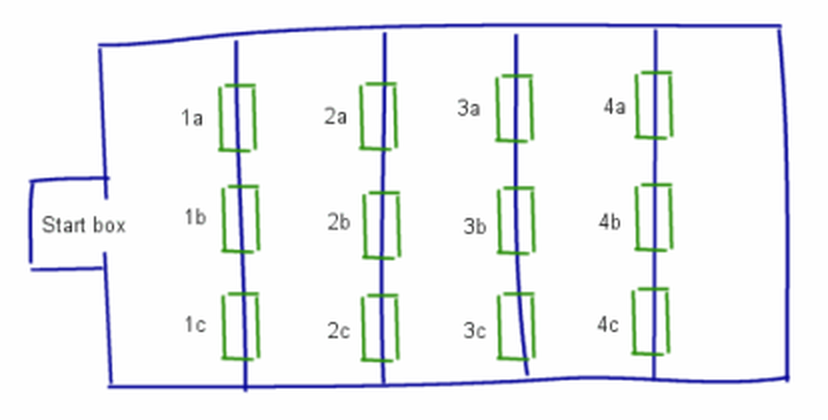
Figure 1. RAPC door numbering.
Push a door open with your hand, and it should be shown 'green'; closing it again should cause it to return to 'red'. Test all the doors to make sure they are working correctly.
| 6. | Next, select the entry for Photobeams |
| 7. | The right-hand side of the page will now show the state of the two RAPC photobeams; these should be shown with a red 'beam' indicating that the beam is not broken. Break each beam with your hand, and confirm that the beam is shown on the screen as broken. |
Having tested everything you are ready to use the RAPC in an experiment.
See also:
| • | The ANY-maze Digital interface |
| • | The ANY-maze Audio interface |
| • | The legacy ANY-maze interface |
| • | Using soundcards as I/O audio devices |

© Copyright 2003-2026 Stoelting Co. All rights reserved
ANY-maze help topic T1239