ANY-maze Help > The ANY-maze reference > The Tests page > Running tests > Before starting a test > Weighing the animal before a test
Weighing the animal before a test

Introduction
All protocols include an option to record the weight of your animals. If you choose to do this, then you can either weigh the animals and type in their weights manually, or you can weigh them using the ANY-maze Animal scales, in which case ANY-maze will automatically record their weights. You can also choose whether to record an animal's weight before every one of its tests (assuming it will be tested multiple times) or just before the first test it has in the experiment. These options are set up using the Animal weights element of the protocol.
Depending on the options you choose, you may need to weigh/record animal weights before some, or all, of the tests you perform in an experiment:
| • | Recording animal weights manually |
| • | Weighing animals using the ANY-maze Animal scales |
| • | Weighing animals when you have multiple apparatus |
| • | Weighing animals before every test |
| • | Weighing an animal again |
| • | Sorting out problems when weighing animals |
Recording animal weights manually
If you chose to record animal weights, whether manually or using the ANY-maze Animal scales, then ANY-maze will automatically include a field on the Test details report for the animal weight.
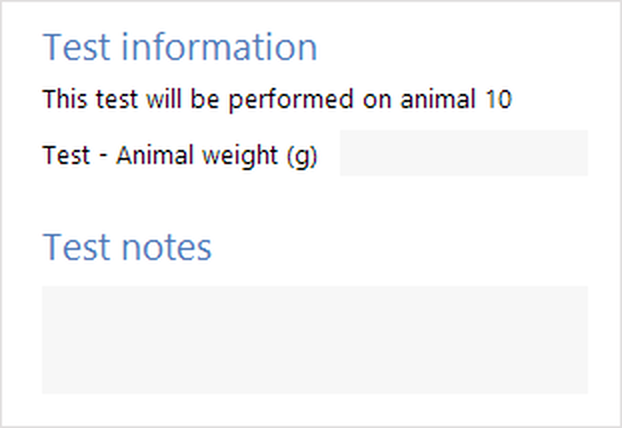
Figure 1. The animal weight field on the Test details report.
When recording the weight manually, all you have to do is type the weight into this field. In fact, if in the protocol you selected the option to Prevent tests from starting until the animal has been weighed then before a test you will see the following status:
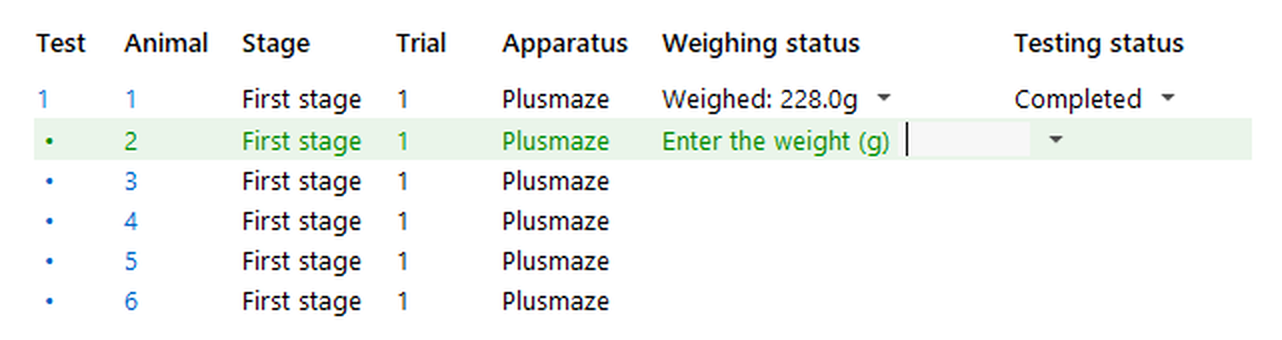
Figure 2. Status shown when the animal weight must be entered manually before a test can be performed.
Clicking the status message will open the Test details report ready for you to type in the animal's weight.
Note that you'll only see this status if the weight has not already been entered. Also, you'll see it only before the animal's first test, if the protocol is set to Manually enter animal weights for each animal (as opposed to entering them for each test).
Weighing animals using the ANY-maze Animal scales
Using the ANY-maze Animal scales to weigh your animals has the advantage that ANY-maze will automatically store the animal weight for you, so you just need to weigh the animal and then move straight on to testing it.
If you have just one piece of apparatus and you have selected the option in the protocol to Prevent tests from starting until the animal has been weighed then before a test you will see the following status:
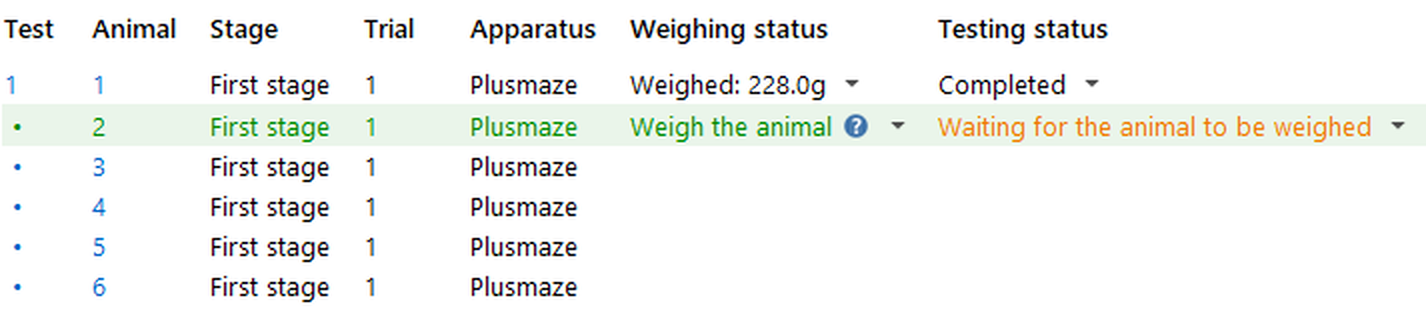
Figure 3. Status shown when the animal must be weighed before a test can be performed.
You just need to put the animal into the weighing basket (which should already be on the scales) and ANY-maze will weigh it and then store its weight. After the animal has been weighed, removing it from the basket causes the apparatus to move to the Ready... state - ready to begin the test

Figure 4. Status shown after an animal has been weighed.
If you haven't selected the option to Prevent tests from starting until the animal has been weighed then ANY-maze won't automatically expect you to weigh the animal before the test, rather it will go straight to the Ready... status, ready to begin the test. However, you can still weigh the animal, you just need to click the  Weigh animal button.
Things to be aware of when using the ANY-maze Animal scales
| 1. | When you first power-up the scales, they will automatically 'zero'. It's best to zero WITHOUT the animal basket on the scales, so if the basket was on the scales at power up, you should remove it and then press the scales' 'Zero' key. You just need to do this one before each session. |
| 2. | With the scales correctly zeroed (see previous paragraph) you need to 'Tare' them. To do this, place the animal basket on the scales (with its lid, if you use one) and then press the 'Tare' key - the display will then read 0.0g with the word NET shown in the bottom left. At this point, you're ready to weigh animals. |
| 3. | In between tests, you may find that the scales need to be tared again. For example, if you weigh an animal and then remove it from the animal basket, the animal may leave some urine or faeces behind. This will probably only weigh a gram or two, but to weigh the next animal accurately, you will either need to clean out the basket, or tare the scales. ANY-maze will attempt to detect this situation, and instead of asking you to weigh the animal, will suggest that the scales probably need taring. Simply ensure that the basket is empty (and, if you're using a lid on your basket, that the lid is on the basket) and press the 'Tare' button on the scales. |
If you tare the scales, and then later clean the basket, the weight of the urine or faeces will disappear and the scales will register a small negative weight. Again, ANY-maze will detect this and warn you before asking you to weigh the animal.
Note that there are some circumstances under which ANY-maze is unable to determine accurately whether the scales really do need to be tared. In these cases, you can simply ignore this message and continue the weighing process. For example, if you are using a lid that is a similar weight to your animals, then removing the lid and putting the animal in the basket will cause this message to appear. In this case, just carry on and put the lid on the basket, and ANY-maze will continue the measurement process and weight the animal accurately.
This process does require that the basket is left on (or is returned to) the scales between animals. If, for example, you weigh an animal, then remove the basket from the scales, remove the animal from the basket (with it leaving some faeces behind) and you then place another animal in the basket and put the basket back on the scales, then the weight of the faeces left behind by the first animal will be added to the weight of the second animal - this is because the scales never had a chance to tare with just the basket on the scales.
Weighing animals when you have multiple apparatus
When you have multiple apparatus and they all need to weigh an animal, then the status of each one will look like this:

Figure 5. Status shown when testing in multiple apparatus and the animal must be weighed before a test can be performed.
You just need to click the  Weigh animal button in the apparatus whose animal you intend to weigh and then proceed as described in the previous section.
If you change your mind about which apparatus you want to weigh the animal for, then just click the  Weigh animal button in a different apparatus.
In experiments in which the animals will be tested in multiple trials, you may want to record their weight before every trial, or you may want to just record their weight once. You can specify which option you want to use, in the Animal weights element of the protocol.
If you choose to just weigh the animals once and you include the option to Prevent tests from starting until the animal has been weighed then ANY-maze will only expect you to weigh the animal before the first test (note that the weight will be registered for the animal not for the test). In fact, you can weigh the animal at the start of any test (not just the first one) by selecting the  Weigh animal button, but if you do this then the weight measured will replace any weight previously registered for the animal.
Weighing an animal again
You can weigh an animal at any time when the  Weigh animal button is enabled, just click the button to begin the weighing process. The weight you measure will replace any weight already recorded for the same test or animal.
Sorting out problems when weighing animals
| • | I see a message saying the scales are not connected |
| • | I see a message saying the scales are not ready |
| • | I weighed the wrong animal |
| • | I need to weigh the animal again |
| • | I forgot to Zero the scales at the start of the session |
| • | I forgot to Tare the scales after I put the basket on |
| • | I started recording the animal weight just once in my experiment, but now I want to record it for every test |
| • | I started recording the animal weight for every test, but now I want to record it just once for the whole experiment |
| • | I can't run a test because ANY-maze wants me to weigh the animal but my scales are unavailable |
| • | I weighed some of my animals manually, and some using the ANY-maze scales, how do I now enter the manually weighed values |
| • | I have another problem not listed here |
I see a message saying the scales are not connected
Check that the scales' USB cable is connected to your PC and also to the scales (it's a good idea to unplug it from the scales and plug it in again, so as to be sure it's plugged in correctly).
Also check that the scales are connected to DC power, that their DC power block is plugged into an outlet and that the outlet is switched on. (You can use the scales with batteries - if you are doing this, then there's no need to connect the DC power supply.)
I see a message saying the scales are not ready
There are a number of reasons why the scales may not be ready:
| • | When the scales first switch on they can take up to 10 seconds to initialise. During this period ANY-maze will report them as being Not ready. |
| • | If you remove the animal basket from the scales they'll show a large negative weight and ANY-maze will report them as being Not ready. Just place the animal basket back on the scales. Note that if you put the animal in the basket and then put the basket on the scales, they will immediately go from 'Not ready' to weighing the animal. |
| • | The scales may have some sort of error. In this case the I/O icon in the status bar will be shown with a warning symbol over it (see figure 6) and clicking the icon will display information about the error and how to fix it. |
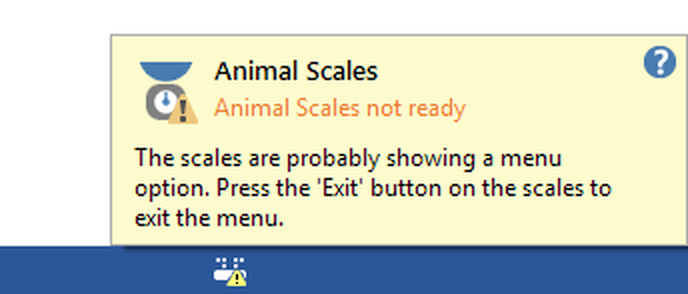
Figure 6. Example of the information shown when the scales have an error. Note the warning symbol on the I/O icon in the status bar.
I weighed the wrong animal
If you have weighed the wrong animal but you haven't yet started its test, then click the  Weigh animal button and then weigh the correct animal. The new weight will replace the old one.
If you have realised that you weighed the wrong animal but you have already performed the test, weigh the animal manually and then navigate to the relevant Test details report and overwrite the animal weight shown with the value you just weighed.
I need to weigh the animal again
If you realise that you made some sort of mistake when you weighed the animal (for example, you left something in the animal basket or you weighed the animal without the lid on the basket) then, provided the animal's test hasn't been started, you can weigh it again simply by clicking the  Weigh animal button.
If the test has been performed, then you should weigh the animal manually and then navigate to the relevant Test details report and overwrite the animal weight shown with the value you just weighed.
I forgot to Zero the scales at the start of the session
This doesn't matter, provided that the scales have been showing 0.0g whenever you are ready to weigh an animal (i.e. when the empty basket is on the scales). However, you can zero the scales at any time by:
| • | Removing the basket from the scales |
| • | Pressing the Zero key on the scales |
| • | Placing the basket back on the scales |
| • | Pressing the Tare key on the scales |
If the scales were not showing 0.0g when the empty basket was on them, then you will need to reweigh any animals you've weighed in this session.
I forgot to Tare the scales after I put the basket on
This doesn't matter, provided that the scales have been showing 0.0g whenever you are ready to weigh an animal (i.e. when the empty basket is on the scales). However, you can tare the scales at any time by:
| • | Placing the basket on the scales |
| • | Pressing the Tare key on the scales |
If you find the scales won't tare then follow the instructions to Zero them instead.
If the scales were not showing 0.0g when the empty basket was on them, then you will need to reweigh any animals you've weighed in this session.
I started recording the animal weight just once in my experiment, but now I want to record it for every test
You should change the option in the Animal weights element of the protocol to Weigh animals using the ANY-maze scales before every test, any weights you recorded already will be retained and ANY-maze will record weights for any new tests you perform. However, you'll need to manually enter the animal weight on the Test details report for any tests which have been performed and for which no weight was recorded (although you may not know these weights, in which case you can just leave them blank).
I started recording the animal weight for every test, but now I want to record it just once for the whole experiment
You should change the option in the Animal weights element of the protocol to Weigh animals using the ANY-maze scales just once - before their first test. Any weights you have recorded for tests other than the first test will be discarded.
I can't run a test because ANY-maze wants me to weigh the animal but my scales are unavailable
If your scales aren't available, but the protocol is set to Prevent tests from starting until the animal has been weighed, then you won't be able to perform any tests. To resolve this just unselect the Prevent tests from starting until the animal has been weighed, option in the protocol.
I weighed some of my animals manually, and some using the ANY-maze scales, how do I now enter the manually weighed values?
You can enter (or edit) an animal's weight at any time. Just navigate to the relevant Test details report and enter the animal's weight into the relevant field.
I have another problem not listed here
If you have any other problem, just contact ANY-maze Support and we'll be happy to help.

© Copyright 2003-2026 Stoelting Co. All rights reserved
ANY-maze help topic T0803