ANY-maze Help > The ANY-maze reference > The Tests page > Running tests > Running a test > Starting tests
Starting tests

Introduction
How you start a test in ANY-maze depends on whether the experiment's protocol has been set to use ANY-maze's auto start feature.
As the name implies, auto-start causes a test to automatically start without user intervention. This works by tracking you, the experimenter, and starting the test as you walk away from the apparatus. This has the advantage that you don't need to rush back to the computer to press a key.
Of course there maybe occasions when auto-start isn't necessary, perhaps you'll be tracking animals for 4 hours and a few seconds lost at the start is really not important.
Details
Preparing for a test
Naturally, you may need to perform various tasks in order to prepare for a test - for example you might need to clean the apparatus, close off a maze arm or perhaps reposition an island. In any event, provided the apparatus's status is Ready... ANY-maze will just ignore you while you perform these tasks.
That said, you may wish to refer to the following topics which relate to the types of changes you might want to make in ANY-maze before starting a test:
| • | Setting the positions of movable zones before a test |
| • | Adjusting the apparatus map so it aligns with the video picture |
Once the apparatus is ready for a test then, strictly speaking, you should ensure that there's a period of at least 4 seconds during which no one appears in the camera's view. However, this almost always happens without you having to think about it because you will necessarily have to go and get the animal and this rarely takes less than 4 seconds.
Making sure the user icon isn't shown
 | This issue is only relevant if you're using the auto-start feature. |
When you're ready to start the test the user icon should not be shown in the top-left of the video picture. This icon indicates that ANY-maze thinks there's a user in the image and clearly if there isn't then it must be confused. To correct the problem just click the icon and it'll go away - effectively you're telling ANY-maze that there isn't a user in the picture.
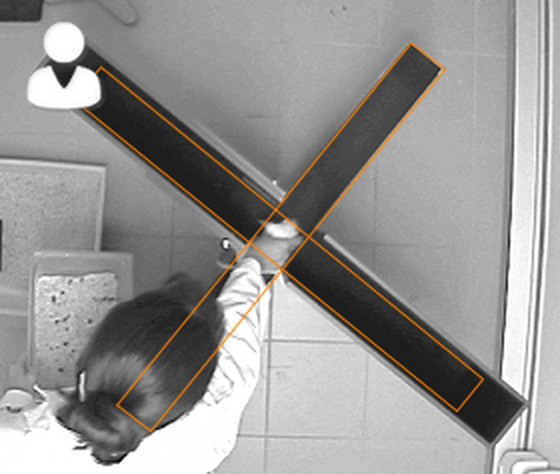
Figure 1. An example of the 'user icon'. ANY-maze uses this icon to indicate when it thinks there someone in the video picture.
If you're wondering how this situation could arise then consider the following: Imagine that yesterday you left a plastic cage on the floor next to your plusmaze. Today, you start ANY-maze and get ready to perform the first test. While preparing the apparatus you remove the cage. Now, ANY-maze will see that the cage is missing and it'll think it must mean something is covering it - something like a person - so it'll think there's someone in the image. What you have to do is tell it that the image it's now seeing is actually 'empty' - which is what clicking the icon does.
Starting a test using auto start
| 1. | Ensure the test status is Ready... |
| 2. | WITHOUT putting the animal in the apparatus, click the  button or press the test control key (or close the test control switch) - the test status will change to Waiting to start... |
| 3. | Walk up to the apparatus and put the animal in |
| 4. | Quickly walk away from the apparatus - as ANY-maze sees you leave the camera's view it will automatically start the test |
| 5. | In the unlikely event that the test doesn't start automatically you should click the  button or press the test control key (or close the test control switch.) |
Once a test has started you can re-enter the camera's view, this will cause the user icon to appear in the top-left corner of the video picture, as ANY-maze 'sees' you but this won't actually have any effect. What you should not do is place any part of yourself between the camera and the apparatus - this will affect the tracking.
Starting a test manually
| 1. | Ensure the test status is Ready... |
| 2. | Walk up to the apparatus and put the animal in |
| 3. | Quickly return to the computer and click the  button, press the test control key or close the test control switch - the test will start. |
The ability to use a test control switch can be very useful when you need to start tests manually, as you could connect a switch to a long cable and actually attach it to your apparatus - this way you wouldn't need to rush back to the computer to start a test.
When using manual start there's no technical reason why you have to leave the camera's view during the test - provided you don't appear between the camera and the apparatus ANY-maze will just ignore you, even if you move about. Nevertheless there are often good scientific reasons why you'd want to be distant from the apparatus during a test.
Starting tests in all the apparatus at the same time
If your protocol defines multiple apparatus, you can start tests in all of them simultaneously by simply click the  Start all button in the ribbon bar. (Note that this button is not shown unless the protocol include two or more apparatus).
Doing this has the same effect as clicking the individual  Start test buttons. For example, if you are using auto-start, this will set all the apparatus to Waiting to start... status and you'll then work your way through them placing the animals in each one. On the other hand, if you are not using auto start, then clicking the
 Start all button will cause tests to immediately start in all the apparatus, which can be very helpful if you want all the tests to be synchronised.

© Copyright 2003-2026 Stoelting Co. All rights reserved
ANY-maze help topic T0810