ANY-maze Help > The ANY-maze reference > The Tests page > Running tests > Before starting a test > Adding a test when using a manual schedule > The Add tests window
The Add tests window

 | This topic describes how to add tests to a manual schedule. |
Introduction
If an experiment's protocol is set to have test's scheduled manually then you will need to add each test to the experiment before it can be performed. To do this, click the  button shown just above the video image of the apparatus in which you want to perform the test, this will cause the Add Test window to open. (Note that this button is only shown when manually scheduling tests.)
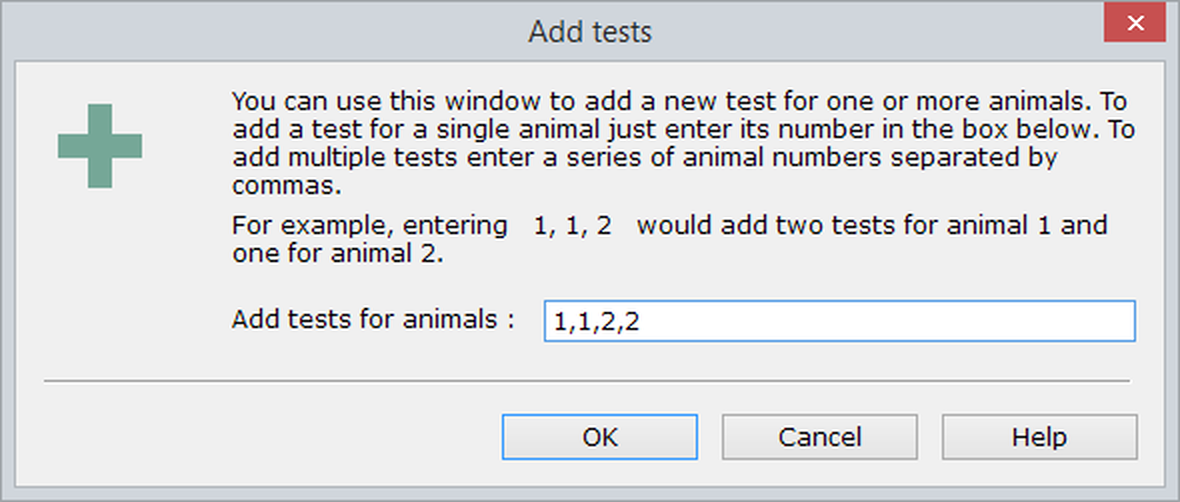
Figure 1. The Add tests window.
Specifying the animals to tests
To add tests you simply have to specify the animal numbers of the animals you'd want to test, in the order you want to test them. For example, you could enter 10, 1, 3 in which case ANY-maze will expect you to perform a test on animal 10 then one on animal 1 and then one on animal 3.
 | If your protocol includes an animal ID field, then you should enter the IDs of the animals you wish to test, rather than their ANY-maze animal numbers. |
If you repeat an animal's number, for example 10, 10, 10 then you're simply specifying that you will test the animal repeatedly, in this case in three trials.
As you enter the animals to test, the Test schedule report will update to show the tests you've scheduled, so, for example, entering 2, 2, 4, 4, 1, 1 would create a schedule like this:
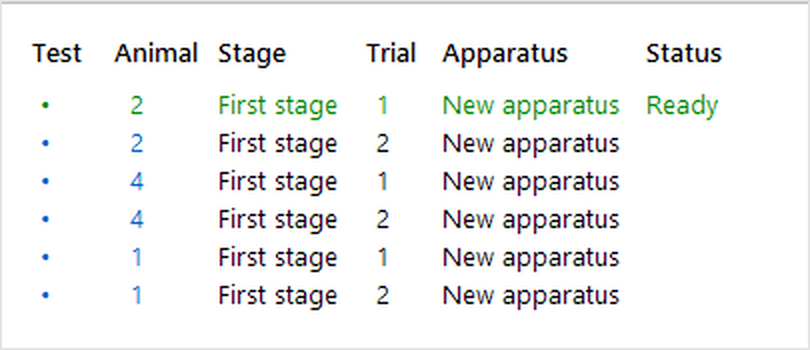
Figure 2. The Test schedule report after entering 6 tests.
Of course, if you want to, you can simply add each test individually just before you perform it - this can be a good idea, as it keeps things very simple.
Removing a test you've entered
It's easy to remove a test you've added to the experiment. To do this click the place-holder (i.e. the little dot) in the test number column in the Test schedule report (see figure 2) - this will open the Test details report. Then click the  Delete test button in the ribbon bar. Further details can be found here.
Editing the animal to test
You can edit the animal a test will be performed on (or the animal it was performed on), by changing the test's animal number in the Test details report.

© Copyright 2003-2026 Stoelting Co. All rights reserved
ANY-maze help topic T0807