ANY-maze Help > The ANY-maze reference > The Experiment page > Importing lists of animals or tests > Importing animals
Importing animals

Introduction
Normally you add animals to ANY-maze simply by entering a Treatment group and specifying the group's N. For example, entering groups of Saline and Drug each with an N of 6 would add twelve animals to the experiment. However, depending on how you have set the treatment group assignment options in the protocol, you may still have to specify exactly which of the two treatments each animal is to receive. Also, if your protocol includes any animal specific fields, such as sex or weight, then you may need to enter the field data for each animal, and if the protocol includes any zones whose positions vary between the animals you'll need to enter their positions too, and, finally, if you have chosen to use your own animals' IDs then you will need to enter this data as well.
Of course, using the Animals spreadsheet this is all quite easy to do, but even so, if all the information is already stored in some other system, then it would make more sense if you could simply import it rather than having to type it all in again. This is possible by using the Animal import option, which reads data about the animals in an experiment from a Comma-Separated Values (CSV) file.
Creating a list of animals to import
ANY-maze uses a standard file format called Comma-Separated Values, usually abbreviated to CSV, for animal import. A CSV file is simply a text file with data on different rows and with individual values separated by commas - for example:
Animal,Treatment,Sex,Weight,Platform
123,Saline,Male,200,NW
456,Drug,Female,220,SW
Microsoft Excel includes an option to save files in CSV format, and this often the easiest way to create the files (in this case the commas separate the columns of data that form the spreadsheet).
The actual data in an import file consists of a Header row and any number of Data rows. The Header row is the first non-blank row in the file (all blank rows, anywhere in the file are simply ignored). The header row defines the data that will be found in the subsequent Data rows. Valid entries in the header row are:
| Animal | Animal can only be included if the protocol has been set up to use Animal IDs. If this is the case then the entries in the data rows specify the ID for each animal and can be any text, up to a maximum of 80 characters. If the value in a data row specifies an ID for an animal that already exists in the experiment then ANY-maze will either report an error or will simply ignore the entire data row, depending on the active import policies. |
| Treatment | Specifies the name of the treatment group the animal should be added to. If the treatment group does not exist then a new group with the specified name will be created. |
| Field titles | Any animal fields defined in the protocol can be included in the import. In the above example, 'Sex' and 'Weight' are animal fields. |
For a field defined in the protocol as a choice field the data for each animal must be one of the choices specified for the field. For a field defined as a numeric field, the data must be a numeric value. For a field defined as a text field, the data can be anything, up to a maximum of 80 characters.
| Zone positions | Any zones defined in the protocol as having a position that varies between animals can have their positions included in the import. In the above example 'Platform' is such a zone, with its position being specified as 'NW' for animal 123 and 'SW' for animal 456. The name of a position must exactly match one of the zone's positions as defined in the protocol. |
If the header row includes an invalid entry then ANY-maze will either report an error or it will simply ignore that 'column', depending on the active import policies.
Examples of some import files
A very simple import file might look like this:
Treatment
Saline
Saline
Drug
Drug
Importing this file into an empty experiment would add two treatments to the experiment, one called Saline and one called Drug. It would also add four animals to the experiment, animals 1 and 2 would be placed in the Saline treatment group, while animals 3 and 4 would be placed in the Drug treatment group.
A slightly more complex file might look like this:
Animal,Treatment
C1A2,Saline
C1A3,Saline
C1A4,Drug
C2A1,Drug
Importing this file would have a similar effect to the previous example, except that the animals would be given IDs of C1A2, C1A3 etc. Note that this would only work if the experiment's protocol was set use your own animal IDs.
Note that there is no need to enter an animal number and an Animal ID - in fact, this is illegal, so a file that looks like the following would not be imported:
Animal,Animal ID,Treatment
1,C1A2,Saline
2,C1A3,Saline
3,C1A4,Drug
4,C2A1,Drug
Performing an import
To actually import an animal list, you simply need to switch to the Experiment page and click the  Import animals button in the ribbon bar. This will cause a window to open where you can select the CSV file that contains the animal list. ANY-maze will then read the file and attempt the import - this is a two stage process:
During the first part of the import process (called pre-processing), ANY-maze reads the entire file and checks that it all makes sense. For example, if the header row contains an entry for 'Sex' then the system will check that the protocol does indeed include a field called 'Sex'. Any errors detected are reported and the import does not occur.
If the check is successful, then the system will proceed to the second stage and will actually import the data and create the treatment groups and animals. At the end of the process a report is displayed showing exactly what the system did - see figure 1 below:
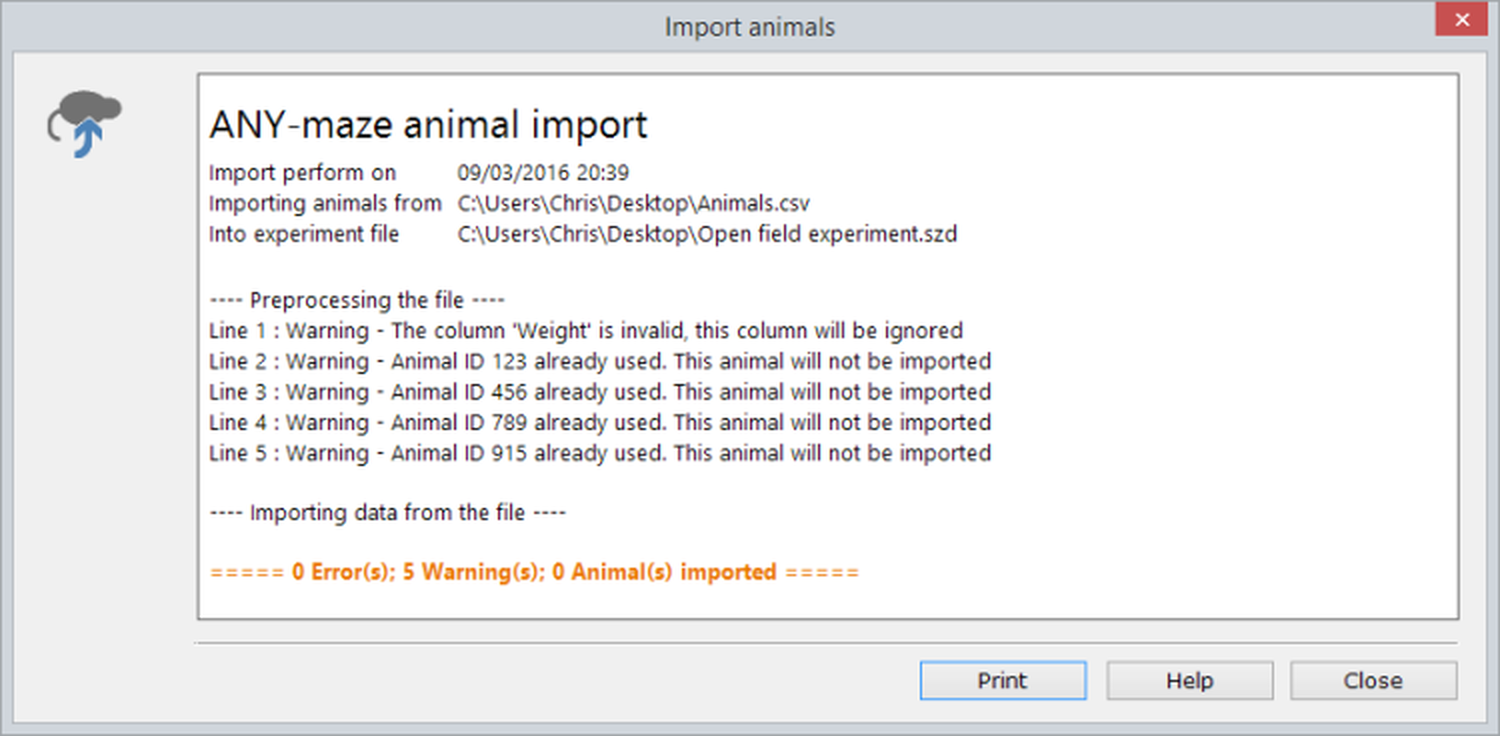
Figure 1. An example of an 'Import animals' report. In this case the CSV file included a column for 'Weight', but there was no 'Weight' field in the protocol. Import policies specified that invalid columns should be ignored, so the import was performed but the animal weights were not imported.
In most cases, you will probably import an animal list before you start any tests, but there are no rules about when you import animals. For example, you could import one file, perhaps including 30 animals, perform some of their tests and then import a second file, that might add another 20 animals to the experiment.
See also:
| • | Importing tests |
| • | Import policies |

© Copyright 2003-2026 Stoelting Co. All rights reserved
ANY-maze help topic T0761