ANY-maze Help > The ANY-maze reference > The Options page > Settings for importing animals and tests
Settings for importing animals and tests

 | Only ANY-maze administrators can alter the import policies. |
Introduction
ANY-maze includes the ability to import lists of animals and tests from CSV files. This feature is described fully in the Importing lists of animals or tests topic.
When performing an import, ANY-maze may encounter certain problems - for example, an animal import file may include an animal that is already part of the experiment, or a test import may specify a test on an animal that has been retired. In these situations, ANY-maze will refer to these import policies to see how it should proceed.
To access the Import policies settings, select the Options page and then click the  Import policies option in the left-hand side bar.
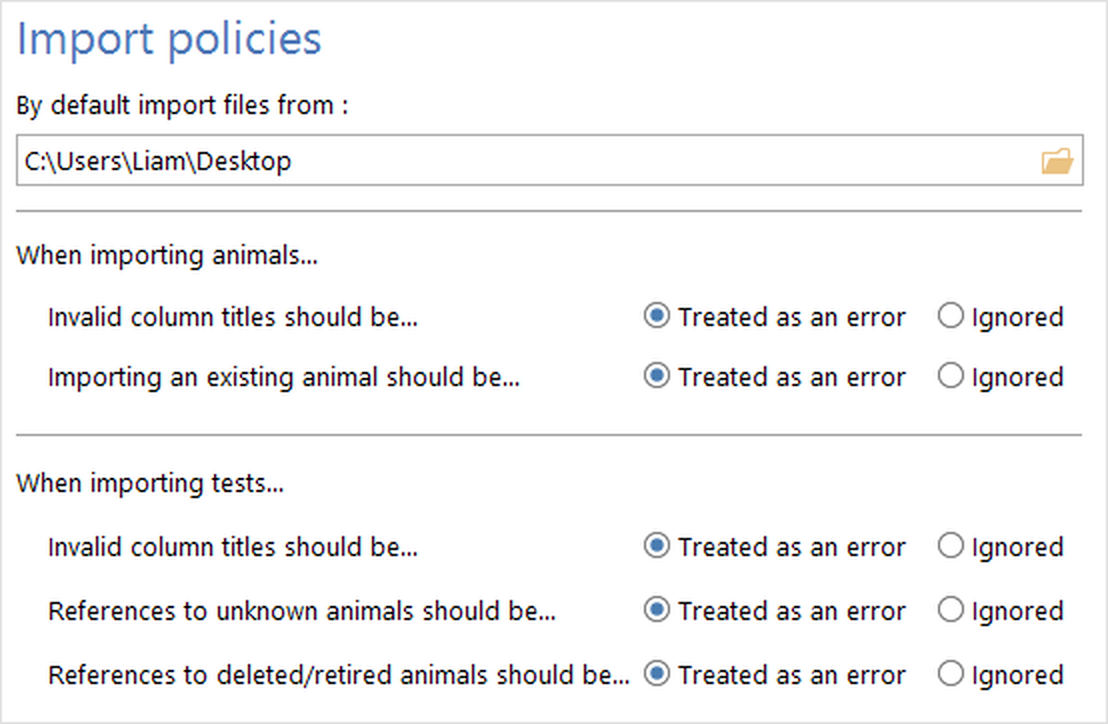
Figure 1. The Import policies settings on the ANY-maze Options page.
Default import location
The default import location simply specifies which folder ANY-maze should show by default when you perform an import. Specifying this folder is useful if you usually place the import files in the same location, as it avoids the need to navigate to the correct folder on each import. You can either enter the full path of the folder that the files will be in, or click the  button to open the Browse for folder window.
Animal import policies
The animal import policies define what ANY-maze should do when it encounters specific situations during the preprocessing stage of an animal import:
Invalid column titles should be...
The column titles are contained in the header row of the CSV file (the first non-blank row in the file) and define what information is contained in the data rows. Valid entries are 'Animal', 'Treatment' and the names of any animal fields defined in the protocol. If any other entries are found, ANY-maze will use this policy to decide what to do.
If you choose Ignored then the data in the column will simply be ignored during the import processing. If you choose Treated as an error then the preprocessing will fail and ANY-maze will report the problem. In this case the import will be aborted, i.e. no animals will be imported.
Importing an existing animal should be...
If an animal import file includes an 'Animal' column, the data is the ID of each animal. Clearly no two animals can have the same ID, so this policy defines what ANY-maze should do if an import specifies an animal whose ID already exists.
If you choose Ignored then the entire data row for the animal will be ignored, i.e. the animal simply won't be added to the experiment. If you choose Treated as an error then the preprocessing will fail and ANY-maze will report the problem. In this case the import will be aborted, i.e. no animals will be imported.
Test import policies
The test import policies define what ANY-maze should do when it encounters specific situations during the preprocessing stage of a test import:
Invalid column titles should be...
The column titles are contained in the header row of the CSV file (the first non-blank row in the file) and define what information is contained in the data rows. Valid entries are 'Animal', 'Apparatus' and the names of any test fields defined in the protocol. If any other entries are found, ANY-maze will use this policy to decide what to do.
If you choose Ignored then the data in the column will simply be ignored during the import processing. If you choose Treated as an error then the preprocessing will fail and ANY-maze will report the problem. In this case the import will be aborted, i.e. no tests will be imported.
References to unknown animals should be...
Animals are specified in the import file either using their ANY-maze animal numbers or, if the protocol is set to use animal IDs, using their IDs.
This policy defines what ANY-maze should do if the animal number or ID simply does not exist in the experiment. For example, the import file specifies that a test should be performed on animal 54 but there are only 40 animals in the experiment.
If you choose Ignored then the animal will simply be skipped and no test for it will be added. If you choose Treated as an error then the preprocessing will fail and ANY-maze will report the problem. In this case the import will be aborted, i.e. no tests will be imported.
References to deleted/retired animals should be...
During an experiment animals may be deleted or retired (for an explanation of these terms, see the 'Altering an animal's status to deleted or retired' section of the Animal details report topic). For example, an animal may become ill during the experiment and therefore you choose to retire it. However, you may have prepared a number of test list files to be imported into the experiment as it progresses, and these will, assumedly, still refer to the retired animal. When you import such a list, ANY-maze will use this policy to decide what it should do.
If you choose Ignored then the animal will simply be skipped and no test for it will be added. If you choose Treated as an error then the preprocessing will fail and ANY-maze will report the problem. In this case the import will be aborted, i.e. no tests will be imported.
See also:
| • | Importing animals |
| • | Importing tests |
| • | Setting up treatment groups and animals |

© Copyright 2003-2026 Stoelting Co. All rights reserved
ANY-maze help topic T0963