ANY-maze Help > I/O devices supported by ANY-maze > Legacy I/O devices > The ANY-maze interface (AMi) > The AMi ports > The AMi speaker ports
The AMi speaker ports

Introduction
AMi includes four independent speaker ports, each of which can play essentially any sound at a software-controlled volume.
| • | Types of sounds that can be played |
| • | Sound quality |
| • | Speaker port specification |
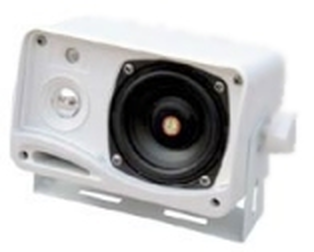
Figure 1. The PLMR24, a mini speaker that could be used with AMi.
Types of sounds that can be played
AMi can play any sound that ANY-maze can generate, provided they fall within its frequency range. There are essentially three options:
White noise
ANY-maze can play white noise, which can be useful for masking other sounds in the lab - for example the noises created by other equipment, noises in the room next door, etc.
Tones
ANY-maze can generate tones of any frequency, and AMi can play those from 65Hz up to 4500Hz. These can either be specified as a particular frequency, or they can be specified as a musical note using Scientific pitch notation. ANY-maze can play all notes from C2 to B7.
Sound files
ANY-maze can play most sound files that can be played in Windows Media Player - this includes Wave files (.wav), MP3 files (.mp3) and Windows Media Audio (.wma) files, although not MIDI files. (Note that the .wma format supports digital rights management - DRM - and ANY-maze cannot play DRM-protected files.)
If you want to play a file that's currently on a CD, then you will need to 'rip' the CD first and then play the resulting sound file.
Although ANY-maze cannot process MIDI files, there are cheap, commercial programs that can convert MIDI files to WAV format, which ANY-maze can play. In fact, converted MIDI files tend to provide the best sound quality on AMi, as you can specify that the WAV file should be generated as a mono, 8-bit, 11025Hz file - there's more about this below.
Sound quality
Because AMi uses 8-bit 11025Hz audio, the quality of the sounds it plays is only average. However, as the intention of AMi is to be a practical tool for laboratory work and not a hi-fi quality audio device, this is not seen (at least by the designers) as a problem. Nevertheless, there are things you can do to improve the quality of sounds that are played:
Tones
When choosing tones to be played, check the frequency response of your speaker - you can't expect a tone to sound good if it's at the limits of the speaker's ability to play it. Most small, low cost speakers have a good frequency response between about 1000Hz and 5000Hz, but outside this range (and most especially at frequencies below 500Hz) tones will sound very ragged or may not be audible at all. In fact at frequencies above 3500Hz, the problem starts to be AMi and not the speaker. This is because the DAC (digital to analogue converter) inside AMi runs at 11025Hz. This means that the highest theoretical frequency it can play is 5012.5Hz, but in practice any frequency above 4500Hz is reproduced very poorly and those between 3500-4500Hz are not particularly good. Nevertheless, there is still a good range of frequencies, from 500Hz-3000Hz, which will play well on most speakers (bear in mind that humans can discern a difference of 1Hz in a tone).
Sound files
Most sound files are recorded at frequencies above the 11025Hz used by AMi (for example, CDs use 44100Hz) and they're generally 16-bit as well. In order to play these files ANY-maze has to resample them and this process tends to introduce noise, which manifests as hiss, or sometimes crackle. There's nothing you can do about this, although if you use low quality speakers, the hiss will tend to sound much worse.
The best quality sound is usually achieved either by playing a .wav file that was recorded at 11025Hz (and ideally at 8-bit resolution), or by converting a MIDI file to this format.
MIDI files
Unlike other formats such as WAV files or MP3, MIDI files don't hold a digital representation of the sound of some music; rather they hold a series of notes that should be played to create the music - so they're a kind of electronic musical score. When a MIDI file is played, your computer synthesizes the notes in the 'score' and these are what you hear - this is why MIDI files played on computers usually sound a bit 'electronic'. However, there are two big advantages to MIDI as far as playing sounds through AMi are concerned:
First, it's quite easy to find free MIDI authoring software on the internet. This means that you can create your own 'music', which can be very useful if you'd like to create something more sophisticated than the simple tones that AMi can produce. For example, you could create a chord, something AMi couldn't otherwise play.
Second, by using a MIDI to WAV file converter (which you have to do, as ANY-maze can't natively play MIDI files) you can specify that the wave file should be generated as a mono, 8-bit, 11025Hz file - thus the sounds will be synthesised for this format, avoiding the need to resample the resulting file and thus reducing the noise (hiss) that resampling tends to introduce.
Speaker port specification
AMi speaker ports are simple mono audio outputs that can drive most loudspeakers. The full specification is as follows:
| Audio DAC | 8-bit, 11025Hz |
| Output frequency range | 65Hz-4500Hz |
| Speaker impedance | 4-8 ohm |
| Output power | 1.4W RMS into 8 ohms |

© Copyright 2003-2026 Stoelting Co. All rights reserved
ANY-maze help topic T1171