ANY-maze Help > I/O devices supported by ANY-maze > Accessories designed specifically for ANY-maze > The ANY-maze multifunction remote > Using the multifunction remote in ANY-maze > Using the multifunction remote to control tests
Using the multifunction remote to control tests

Introduction
The ANY-maze multifunction remote can be used to start tests in up to four apparatus independently, with the possibility to extend this to as many as 64 apparatus if required.
| • | Starting tests |
| • | Starting tests in more than 4 apparatus |
Starting tests
To start a test in ANY-maze using the multifunction remote you need to specify that the remote is the 'Test control switch' for your apparatus. Here's how to do this:
| • | First make sure the multifunction remote is all setup. |
| • | Go to the Protocol page and select your apparatus. |
| • | In the 'Apparatus Settings' open the drop list titled Test Control Switch. |
| • | Select the button on the multifunction remote that you want to use to control tests in this apparatus - see figure 1, below. |
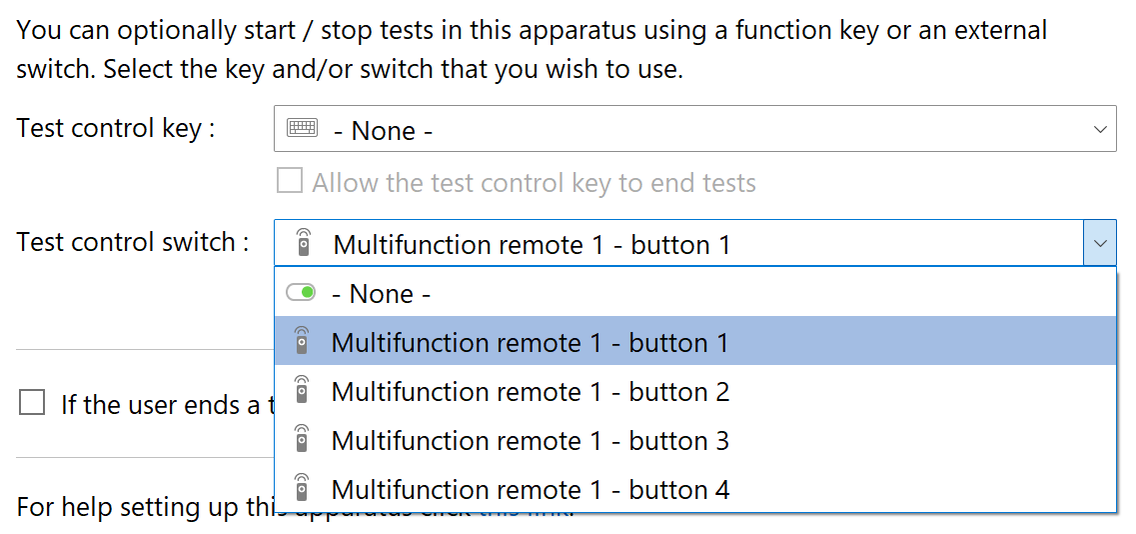
Figure 1. Selecting a multifunction remote 'Test control button' to start tests in a piece of apparatus.
Now pressing the button you selected will start tests in the relevant apparatus, but this will only work if the apparatus is Ready.... For full details see Starting tests.
Knowing that a test started
If a test does start then the remote will provide haptic feedback in the form of a quiet vibration, so you don't need to be able to see the computer's screen to know the test started OK. You can also configure the remote to give haptic feedback if a test doesn't start (in this case a longer, gradually fading vibration), or you can just rely on the fact that no feedback means failure.
Note that if the remote is asleep when you press a Test control button, the screen WON'T turn on, although the remote WILL transmit the button press to ANY-maze and feedback will occur. The fact that the screen doesn't turn on is deliberate, as it avoids the light from the screen interfering with your test. For the same reason, the remote doesn't beep or make any other noise to indicate that a test has started.
Starting tests in more than 4 apparatus
As the multifunction remote has four Test control buttons, it follows that you can start tests in up to 4 apparatus independently. But what if you have more apparatus than this? One solution would be to buy another remote, configure it's ID to be 2 and then use its four buttons for apparatus 5, 6, 7 and 8. But if you have, say, 24 apparatus, that would require 6 remotes which would be both expensive and confusing.
Fortunately, there's a simple solution which allows you to use just one remote to control tests in up to 64 apparatus:
| • | The first step is to set the IDs that you will be using. In the case of 24 apparatus, you would want to select 24 / 4 = 6 IDs, probably 1 through 6. |
| • | You'll see that this create 6 remotes on the I/O page and if you go to the Test Control Switch drop list in the 'Apparatus Settings' you will see that it lists six multifunction remotes with 4 buttons on each, so you can set each apparatus to use a different remote/button in this list. |
| • | But you still only have one physical remote, so how is this going to work? Well, managing multiple apparatus with a single remote is easy, as the remote’s ID can quickly be changed from the first page of the menu. For instance, set the ID to 1 to start tests in apparatus 1, 2, 3, and 4. Then, switch the ID to 2 (just one button press if the ID menu is already selected) to start tests in apparatus 5, 6, 7, and 8. Next, change the ID to 3 to handle apparatus 9, 10, 11, and 12, and so on. |
As there are 16 possible IDs, the total number of apparatus you could control is 16 x 4 = 64.

© Copyright 2003-2026 Stoelting Co. All rights reserved
ANY-maze help topic T1447