ANY-maze Help > The ANY-maze reference > The Protocol page > The elements of a protocol > Testing > Procedures > Retaining the state of an I/O element from one test to the next
Retaining the state of an I/O element from one test to the next

Introduction
 | The details outlined in this topic apply to all types of I/O output, although the explanation in the example is described for Output switches. |
In some experiments, you may wish to maintain the state of outputs from one trial of an animal to the next. For example, in a radial arm maze with motorised doors, you might open and close the doors based on the arms the animal visits. At the end of one trial you might want to retain the current open/closed state of all the doors so that they are the same at the start of the animal's next trial.
Details
 | IMPORTANT: In this topic, I'll describe how to retain the state of an output from one trial of an animal to the next trial of the same animal. This is not the same thing as retaining the state from one test to the next test, because sequential tests are not necessarily performed on the same animal. |
I'm going to continue with the example above, where we want to retain the opened/closed state of the doors of a radial arm maze from one trial to the next, but the technique I'll be describing can be applied to any type of output.
Clearly, there will be some rules that determine when a door should open and when it should close, but from the point of view of this discussion it doesn't matter what these are - all that we're interested in is how we can save the state of the doors at the end of a trial and restore it at the start of the next one (even if we exit from ANY-maze). So, for the rest of this topic we'll just assume that some existing procedure changes the state of the doors while the test runs, without worrying about its details.
As you may know, Procedures include lots of so-called built-in variables, whose values reflect something the system itself already knows about; for example, there are built-in variables for the day of the week (the system already knows what day it is), the test clock (the system knows how long the test has been running for) and, usefully for us, the state of outputs, such as the doors in our example (the system activates/deactivates the outputs, so it knows their state).
So if we want to store the state of the outputs at the end of a trial, all we need to do is note the state of these built in variables when the trial ends, and then use the note to set the state of the doors when the next trial begins. Of course, that raises an obvious question: where can we 'note' their state?
As well as built-in variables, procedures allow you to define your own 'user defined' variables - I won't go into all the details of these 'user defined' variables now (full details can be found here), but suffice to say that to add a new variable to a procedure you simply need to click the  Create variable button (which is included in the ribbon bar when a procedure is being edited). This will open the Create variable window shown in figure 2, below.
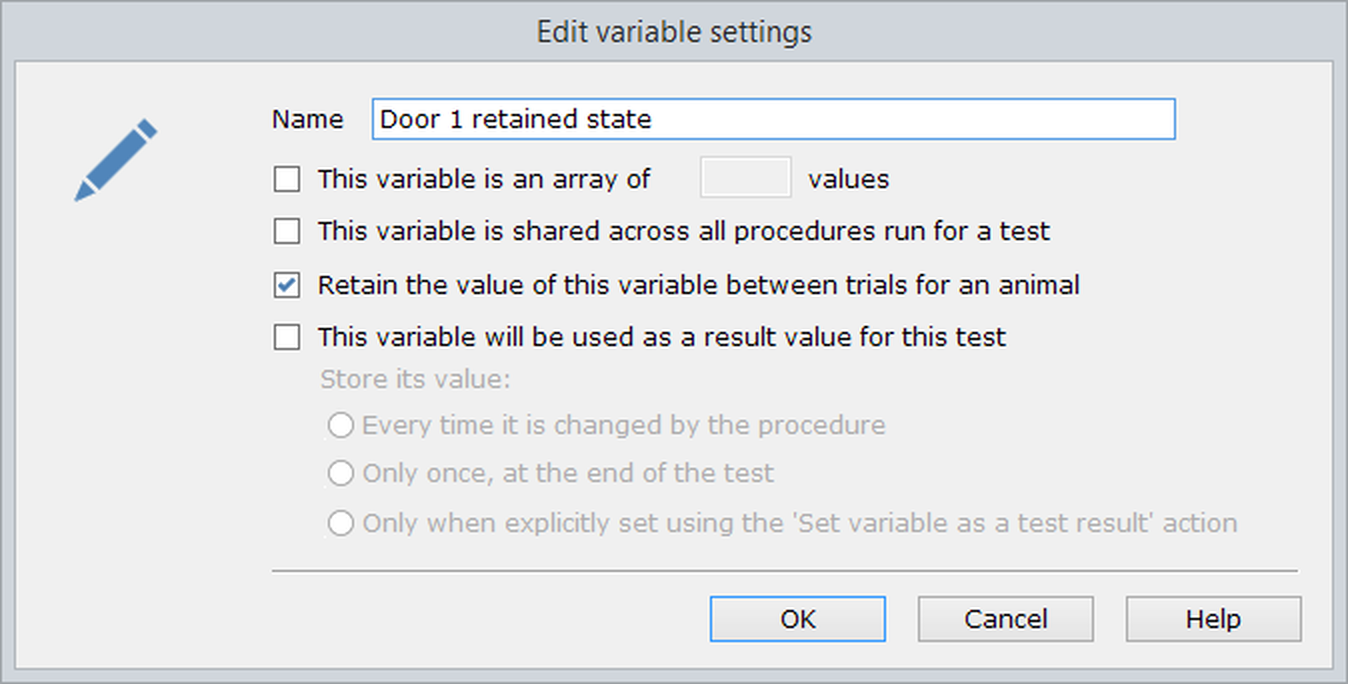
Figure 2. The Create variable window. Note that here, the option to 'Retain the value of this variable between trials for an animal' has been selected.
In this window, you can name the variable and also set various characteristics. What we want to do is to use a variable to store the state of a door between one trial and the next, so we would call our variable something like 'Door 1 retained state' and we would choose the option to Retain the value of this variable between trials / stages and then For the current animal. ANY-maze will automatically store this variable for us, and guarantee that whatever value it had at the end of one trial, it will have the same value at the start of the next trial of the same animal.
So, we now have somewhere to store the state of a door between trials, and we can also discover what the state of the door is at the end of a trial (using the built-in variable), so all that's left is to link this information together - which we can do using a procedure like the one in figure 3, below.
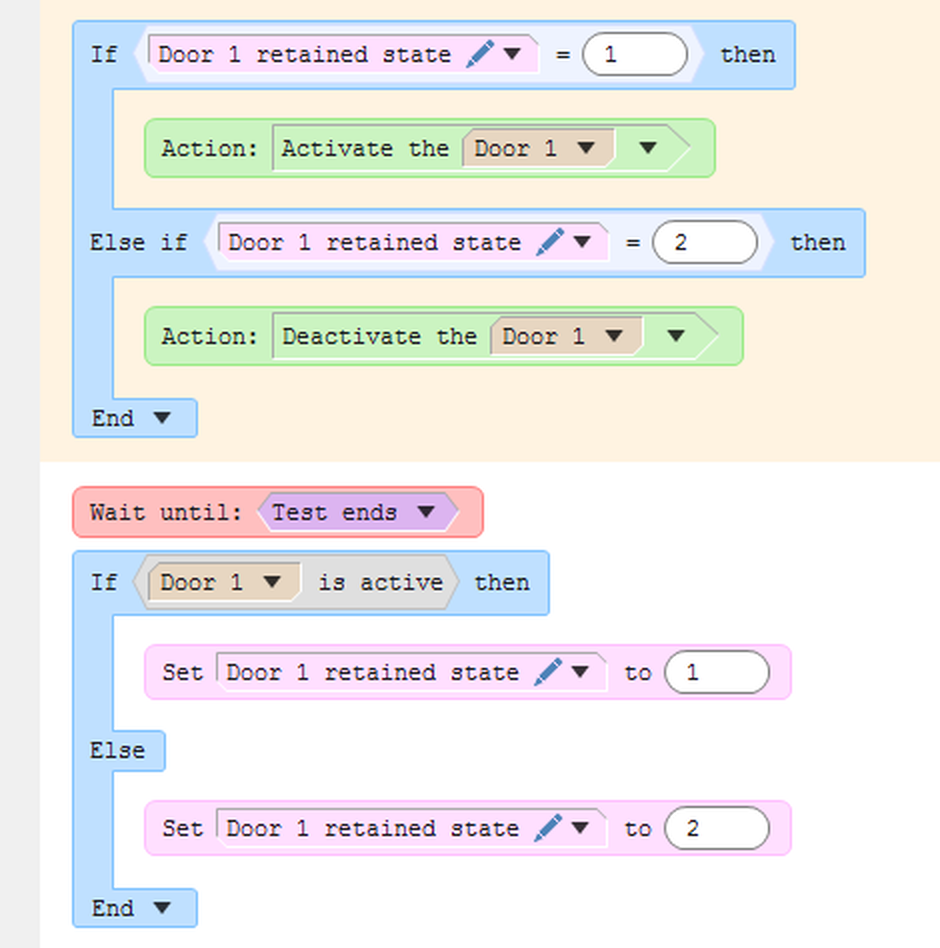
Figure 3. A procedure to retain the state of Door 1 between the trials of an animal. This procedure uses the variable 'Door 1 retained state' shown in figure 2.
It's easiest to understand this procedure by looking at the part with the white background first. Here, we start off by waiting until the test ends. When that happens, we look at the state of the 'Door 1' built-in variable, and if it is active (door open) we store a value of 1 in the 'Door 1 retained state' variable. If it is inactive (door closed) we store a value of 2. Remember, the value of the 'Door 1 retained state' variable will be stored by ANY-maze and the variable will have the same value in the animal's next trial.
Now let's look at the part of the procedure with the orange background. As you may know, the statements in the area with the orange background are run when a test is 'Ready' but before it begins. So what happens here is that we check the value of the 'Door 1 retained state' variable (which will be the value it had at the end of the previous trial) and if it is 1, we set Door 1 active (i.e. open it) and if it is 2, we set Door 1 inactive (i.e. close it). Voilà - we have achieved our goal!
Well, almost... this does leave one question, what happens in the animal's first trial? Clearly, there's no previous trial and so the 'Door 1 retained state' variable will not have been set, so when the first trial is 'Ready' and the statements in the area with the orange background are run, what will they do? The answer is that they'll do nothing, and the reason is because the 'Door 1 retained state' variable will start off (as do all variables in ANY-maze) with a value of 0. And as you can see in the procedure listing in figure 2, when the variable has a value of 0 the procedure won't take any action at all - thus the doors will simply be left alone (presumably, some other procedure will set them to whatever their initial states should be).
Clearly, the procedure shown in figure 2 only processes door 1 and, of course, our radial arm maze will have more doors than this, so we'd need to either add similar procedures for doors 2, 3, etc., or edit this procedure to process the other doors as well; either approach is fine.
Working with other types of output
In the previous section, I described how to retain the state of some doors in a radial arm maze. Within ANY-maze, these doors were being controlled by Output switches, but what if you wanted to retain the state of some other type of output, for example, a shocker (so the intensity would be retained between trials) or a speaker (so what's playing is retained between trials)? The answer is that you could use exactly the same technique, as all of ANY-maze's output elements include built-in variables that reflect their current state.
Older experiment files (prior to ANY-maze version 6).
Older versions of ANY-maze (prior to version 6) used to have an option to not reset the output at the end of the test, for some outputs. If you have an experiment file where this option was selected, it will still appear for backward compatibility.
However, this option has been removed in newer versions of the software, as it would not quite achieve the desired effect. This is because:
| • | The state will be retained from one test to the next, but not from one trial to the next. For example, imagine that your test schedule is such that you will test animal 1 in its first trial, then animal 2 in its first trial and then animal 1 in its second trial, etc. What would happen is that after animal 1's first trial the state of the outputs (i.e. the open/closed state of the doors) would remain the same and so this would be the state that would apply to animal 2's first trial... which is probably not what you want. |
| • | Even if the above didn't apply (for example, in your schedule you might test animal 1 four times in a row), then if you exited ANY-maze after trial 2 and then restarted it again, the state of the outputs would be lost. |
So, not resetting the outputs at the end of a test doesn't provide a way to achieve our goal, and for this reason, the option has been removed from the software. The solution is to use a Procedure to save the state of the outputs at the end of one trial, and restore it at the start of the animal's next trial.
See also:
| • | An introduction to procedures |
| • | Built-in variables |
| • | User-defined variables |
| • | Output switches |
| • | Speakers |
| • | Analogue outputs |
| • | Temperature controllers |
| • | Light controllers |
| • | Syringe pumps |
| • | Shockers |
| • | Laser controllers |
| • | Selectors |

© Copyright 2003-2026 Stoelting Co. All rights reserved
ANY-maze help topic T0310