ANY-maze Help > The ANY-maze reference > The Protocol page > The elements of a protocol > Testing > Procedures > Elements of a procedure > Variables available to procedures > User-defined variables
User-defined variables

Introduction
User-defined variables can be used as a kind of temporary storage within a procedure. They can be used to keep track of anything that you want to keep note of, and can be changed in any way throughout the lifetime of the procedure. They can be numerical values, True/False values or text, and can be passed to any function in a procedure that requires a value of that type.
 | When the procedure editor is in 'Simple' mode, the Variables tab is not shown. You can switch the procedure editor between  Simple view and Simple view and  Full view using the buttons on the ribbon bar. Full view using the buttons on the ribbon bar. |
Example
It's quite difficult to explain exactly what a variable is, so perhaps an example will help. The following procedure shows the use of variables to calculate the time interval between the animal entering a zone and the time it starts grooming.
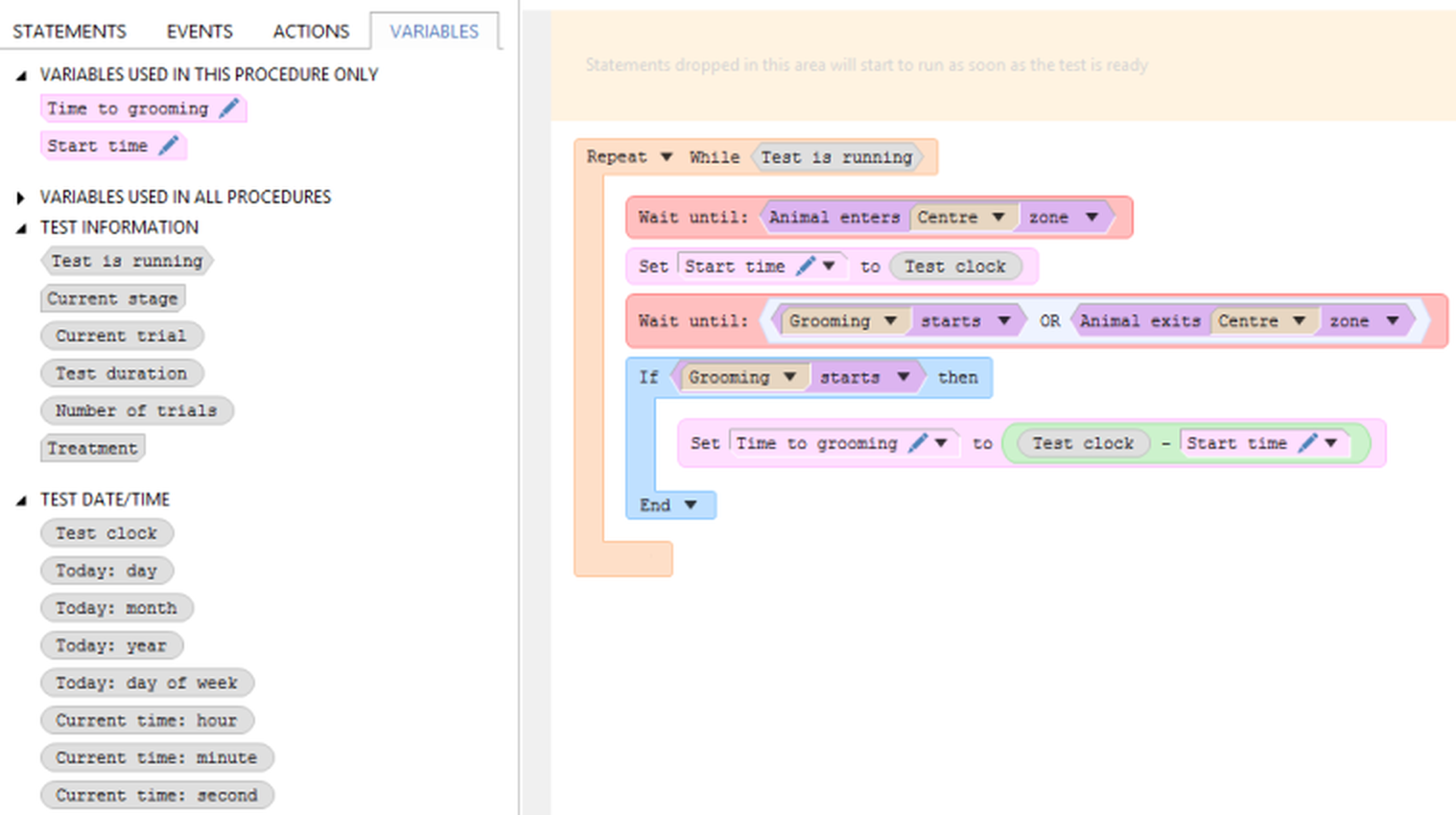
Figure 1. This procedure uses the 'Start time' variable to note the time that the animal enters the zone, then uses this in a calculation to determine the duration.
This example uses two variables - one called 'Start time', which is used to note the time at which the animal enters the zone, and the other called 'Time to grooming' which uses the previously-noted start time, together with the Test clock built-in variable to calculate the time it took to start grooming after entering the zone.
 | Note that if this value was something that could be useful in your test results, you could set the 'Time to grooming' variable up to be a Result variable - see below for further details. |
To see more about user-defined variables, click on one of the links below:
| • | Creating a variable |
| • | Editing a variable |
| • | Deleting a variable |
| • | Using a variable in a procedure |
| • | Sharing variables between procedures |
| • | Sharing variables between trials for an animal |
| • | Sharing variables between tests in an apparatus |
| • | Array variables |
| • | Result variables |
Creating a variable
Before you create a variable of your own, it's a good idea to take a look at the list of built-in variables, to see if ANY-maze already reports the information that you want the procedure to keep track of (for example, you might set up a procedure that counts the number of zone entries, but that's unnecessary as there's already a built-in variable that will give you that information).
To create a user-defined variable, click the  Create variable button on the ribbon bar. A window will open, allowing you to set up the properties of the variable - see the Variable Settings window topic for full details.
 | When the procedure editor is in 'Simple' mode, the  Create variable button is not shown. Create variable button is not shown. |
Once a variable has been created, it will be listed in the Variables tab, and can then be dragged into the procedure to the right location.
Editing a variable
Once you've created a variable, you can edit it using the  button on the variable, either under the Variables tab on the left-hand side of the procedure editor, or from any of the places you've used the variable within the procedure itself. For full details of the settings that you can edit, see the Variable settings window topic.
Deleting a variable
To delete a variable, you can right click on the variable in the list under the Variables tab on the left-hand side of the procedure editor. This will give you the option to Delete this variable. Confirming the 'Are you sure?' message will remove the variable from the list under the Variables tab, and will also remove the variable from all the places that it is used in the procedure.
Note that this may result in one or more 'holes' being left in the procedure - i.e. the expressions that the variable was used in will now have missing parameters - which will need to be resolved before you can use the procedure.
 | If you right click on the variable in the procedure itself, on the right-hand side of the procedure editor, you'll see a drop-down menu with the option to Delete this parameter. This will NOT delete the variable itself; it will simply remove it as a parameter to the expression it is being used in. |
Using a variable in a procedure
To use the current value of a variable, simply use the variable as a parameter to the expression that you want. For example, in figure 1, above, the 'Start time' variable is subtracted from the Test clock using the - operator.
To set a new value for a variable within a procedure, use the Set value statement.
Note that if the value of a variable is used before it is set, it will have the value of 0 (if used as a (Numeric) value), False (if used as a (True/False) value), or empty text (if used as a (Text) value).
Note that all variables start with a value of 0, so if they are used before being set, the variable will be evaluated as 0. If the variable is used somewhere that expects a (True/False) value, the variable will be evaluated as False, and a (Text) value will be evaluated as '0'.
Sharing variables between procedures
Variables can be used to store any internal state within a single procedure, but they can also be set up to be shared between procedures. This can be incredibly useful, as it allows you to share state between multiple procedures, and therefore split the procedure logic into smaller, easier-to-understand procedures that all have access to this information.
For example, you might have one procedure that sets a variable's value, and then another that checks the value and takes some appropriate action based on it. The worked example using I/O demonstrates an example of this, so if you haven't done so already, I'd advise following this example through to see how to do this.
The tech-savvy among you might wonder what happens if two procedures try to access the same variable at exactly the same time. In fact, this can't happen - since each procedure runs through a series of statements before the next procedure gets the chance to run, each statement runs in complete isolation and there's no danger of the variable being accessed by two procedures at the same time. However, it is certainly worth considering the order in which each procedure might do things, and how this might affect the value of a shared variable.
To specify that a variable should be shared between procedures, use the This variable is shared across all procedures run for a test option in the Variable settings window.
Sharing variables between trials for an animal
A variable will usually hold its internal state for an individual test - i.e. a specific trial for an animal. However, there are some circumstances under which you may need to know some information about the animal's previous trial - for example, you may decide on the location of a movable zone based on the zone that the animal visited last in its previous trial.
By default, a variable's value is reset at the beginning of every test - what this means is that if the variable is used as a numeric value, it will be reset to zero; if it's a True/False value, it will be set to False; and if it's a text value, it will be set to '0'.
You can, however, choose to keep the variable's value between subsequent tests of the same animal, which means that the variable will not be reset at the start of each test and will therefore keep the value that it had at the end of the previous trial for that animal.
To share a variable between subsequent trials, turn on the Retain the value of this variable between trials/stages option on the Variable Settings window, and select the For the current animal option.
At the beginning of the animal's first trial, the variable will have the same value as any other variable that has not yet been set - if it's used as a numeric value, it will be zero; if used as a True/False value, it will be False; and if it's a text value, it will be '0'.
 | If you run some tests on an animal, then close ANY-maze to resume the testing in another session, the current value of all variables that are shared between trials will be noted in the experiment file, so that they can be recalled before running further tests. |
Sharing variables between tests in an apparatus
In a similar way to storing a variables's value between trials for an animal, you can also choose to store a variable between tests that run in an apparatus (regardless of which animal the test is run on). This might be useful, for example, if you need to start an animal in a different part of the apparatus to the one that the previous animal finished in.
Choosing to keep the variable's value between subsequent tests in the same apparatus will mean that the variable will not be reset at the start of each test and will therefore keep the value that it had at the end of the previous test in that apparatus.
To turn this on for a variable, you should select the Retain the value of this variable between trials/stages option on the Variable Settings window, and select the For the current apparatus option.
At the beginning of the first trial in the apparatus, the variable will have the same value as any other variable that has not yet been set - if it's used as a numeric value, it will be zero; if used as a True/False value, it will be False; and if it's a text value, it will be '0'.
 | If you run some tests in an apparatus, then close ANY-maze to resume the testing in another session, the current value of all variables that are shared between tests for that apparatus will be noted in the experiment file, so that they can be recalled before running further tests. |
Array variables
Array variables are simply variables that hold a fixed number of values of a given type. This allows you to process multiple values using the same variable, rather than having to create a number of similarly-named variables.
For example, let's say that you have an apparatus with four zones. You want to play a tone when the animal enters each zone, but you want the time delay to be different for each zone.
Instead of setting up four variables to represent the time delay for each zone, you could set up a single array variable with four values. These four values would represent the time delay for each of the four zones:

Figure 2. Setting up the array to contain four values. The values are initialised and then randomised, so they're in a different order.
You then use each of the values in the array variable by referring to it by index. The four values in this array are accessed by indexes 1 to 4.
For example, you could use the array variable set up in figure 2 above as follows.
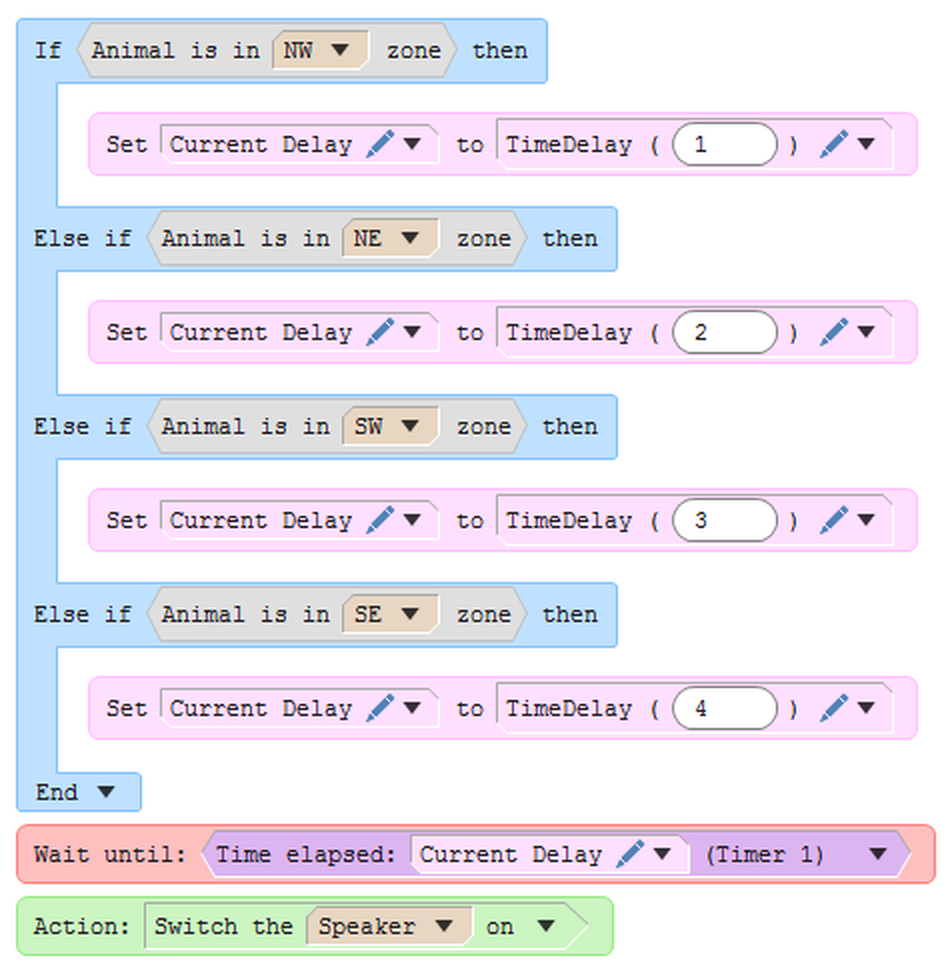
Figure 3. A section of the procedure that uses the array variable from figure 1. Note that the part of the procedure that waits for the animal to enter one of the four zones has been omitted.
This part of the procedure shows that different values in the array can be accessed using the indexes 1, 2, 3 and 4. The relevant value is then copied into a variable with a single value ('Current Delay') and this variable is then used in the Time elapsed event, to wait for the relevant time for the current zone.
Result variables
You may have a variable in a procedure that contains a value that you would find useful in the analysis of a given experiment - either as a single result value for a test, or to make note of a minimum, maximum or average value. In this case, you could set up a variable to be used as a test result, and use this in analysis.
In the example in figure 1 above, you could edit the 'Time to grooming' variable to be a result variable, and specify that it's to be noted 'every time it is set by the procedure'. This would then make the average, minimum, maximum, count and sum of these values to be available as procedure measures, i.e. available in the test's results.
For more details about result variables and how to use them, see Creating and using result variables.
See also:
| • | Built-in variables |
| • | Result variables |
| • | The Variable Settings window |

© Copyright 2003-2026 Stoelting Co. All rights reserved
ANY-maze help topic T0492