ANY-maze Help > The ANY-maze reference > The Protocol page > The elements of a protocol > Testing > Procedures > Variable settings
Variable settings

Introduction
The 'Variable settings' window is opened when you create a new variable for a procedure by clicking on the  Create variable button, or when editing a variable using the
  button.
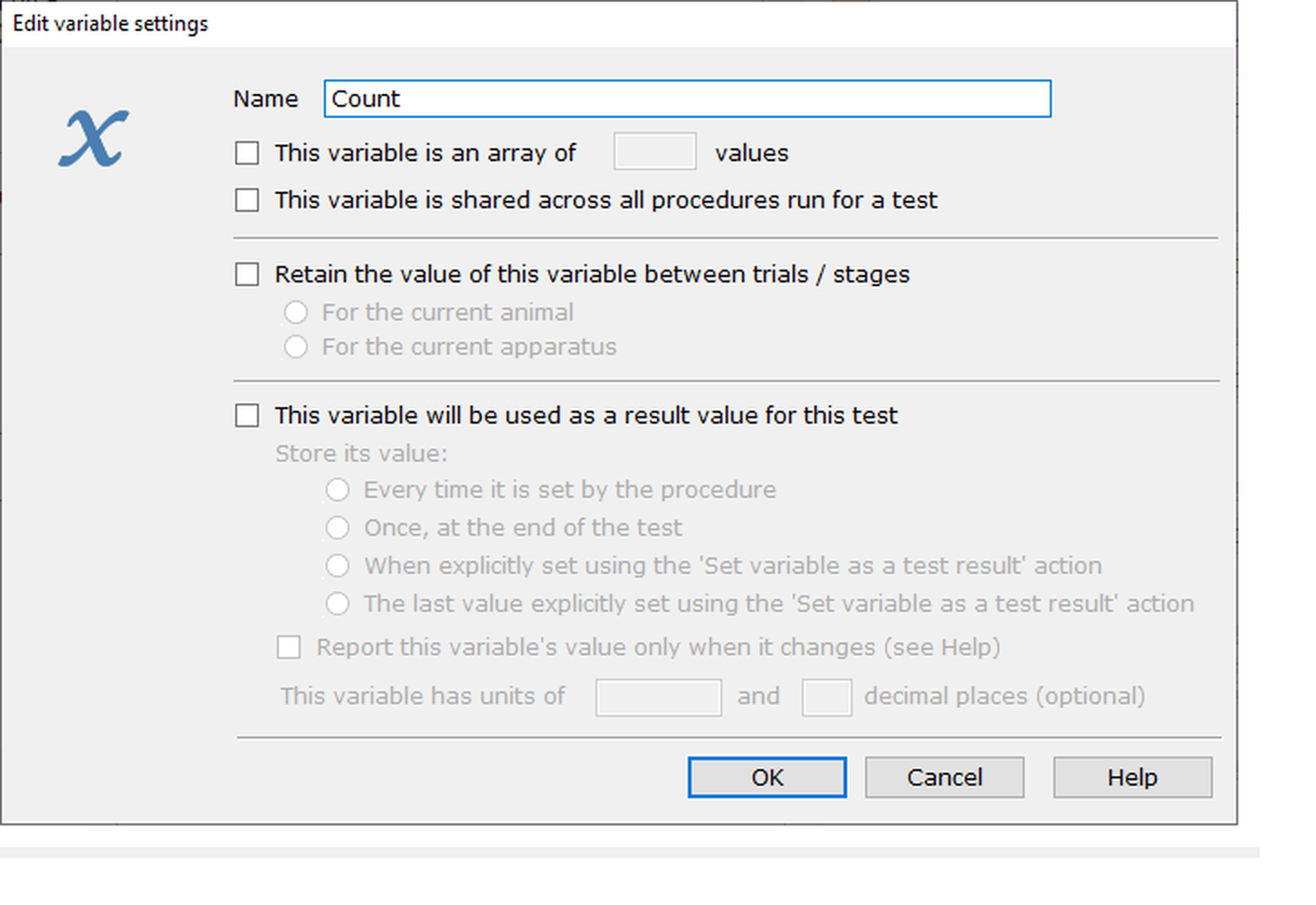
Figure 1. The variable settings window.
Details
The following controls are available on the variable settings window:
| • | Name |
| • | This variable is an array of ... values |
| • | This variable is shared across all procedures run for a test |
| • | Retain the value of this variable between trials / stages |
| • | This variable will be used as a result value for this test |
Name
Enter the name of the variable. The name must be unique amongst all variables used by this procedure (either variables that are only used in this procedure, or those that are shared between procedures and are therefore automatically available to this procedure). ANY-maze won't let you click the OK button to save the variable unless the name you've entered is unique.
There is no limit to the number of characters you can use for a variable name, and it can contain any alphanumeric characters, including spaces. You'll usually want to keep the name fairly short, while still being meaningful.
If you edit the name of an existing variable, then ANY-maze will update everywhere in the procedure that you've used this variable to reflect the new name.
This variable is an array of ... values
Specify whether you want the variable to be an 'array' of values, rather than a single value. This can be useful if you want to store multiple values for something - for example, an array of tone frequencies that you want to play out of a speaker in a certain order.
For more details, see User-defined variables.
This setting is off by default.
This variable is shared across all procedures run for a test
Usually, you'll only need a variable to store some kind of internal value for the procedure it's created for. However, there are circumstances where you might want to share this state across multiple procedures that are running for the same test - for example, you might have one procedure that sets a variable's value, and then another that checks the value.
For more details, see User-defined variables, or the worked example using I/O to see an example.
This setting is off by default.
Retain the value of this variable between trials / stages
A variable will usually hold some internal state for an individual test - i.e. a specific trial for an animal. By default, a variable is reset at the start of each trial. If the variable is used as a numeric value, its value will be set to 0; if it's a True/False variable, it will be set to False, and if it's a text variable, it will contain '0'.
There are some circumstances under which you may need to know some information about the animal's previous trial - for example, you may decide on the location of a movable zone based on the zone that the animal visited last in its previous trial. In this case, you would turn on this option to store the value of the variable at the end of a test, For the current animal, and therefore make it available to the next trial for the same animal. Note that this storage of variables will apply even across stages - so, for example, if a variable's value is stored in the last trial of a Training stage, that variable will retain the same value at the start of the animal's first trial for its subsequent Treatment stage.
Similarly, you can select to retain the value of the variable For the current apparatus - this means that you can store some information about the state of the apparatus between tests in that apparatus (for example, if you need to record which area of the apparatus an animal finished in, so you can determine where the next test in that apparatus should start).
For more details, see User-defined variables.
For an example of how to retain the state of an I/O element between an animal's trials, see here.
This setting is on by default.
 | This variable is not shared between animals, only between different trials for the same animal. |
This variable will be used as a result value for this test
Variables are useful within a procedure, to maintain some internal state and help in the running of the procedure, but what if you're using a variable to calculate some value that you'd like to use in your analysis?
In this case, you would set up the variable to be used as a 'result variable'; the variable will then be shown in the list of measures available in the Animal details report, the Test details report and the Test data report, as well as in the measure lists on the Results and Data pages.
Once you've checked this option, you need to choose when this result variable's value will actually be noted:
| • | Every time it is set by the procedure |
| • | Only once, at the end of the test |
| • | When explicitly set using the Set variable as a test result action |
| • | Only the last value that was explicitly set using the Set variable as a test result action |
The second and last of these options ('only once...', and 'only the last value...') will simply make a note of the value of the variable when the test ends. Since there's only one value, the only measure available for analysis will be 'value'.
The first and third of these options will potentially result in the variable's value being noted several times during a test. This will make more measures available - maximum, minimum, average, etc. See Procedure measures for more details of the results available.
An optional unit can be specified for this variable. This has no effect other than to be given alongside the result variable's name in reports and on the Results page and Data page.
You can also optionally specify the number of decimal places to which you want to display results of this type. Enter any number between 0 and 6, or leave this blank to use the system default.
For more details on the use of result variables, see Result variables.
Showing a result's value on the Test data report
The Test data report is a spreadsheet-format report showing a list of the 'events' that happened during a test, and one of the things you can show on this report is a column for the value of a procedure Result variable (i.e. a variable that has been set as 'This variable will be used as a result value for this test' in the options described above).
By default, a variable is set to 'Report this variable's value only when it changes', which means that you'll only see a value in this column when the variable's value actually changes - all the other entries in the column will be blank. However, you can un-check this option, which will then show the current value of the variable in every cell of the spreadhseet, regardless of whether it has changed.
See also:
| • | User-defined variables |
| • | Result variables |
| • | Procedure measures |

© Copyright 2003-2026 Stoelting Co. All rights reserved
ANY-maze help topic T0567