ANY-maze Help > I/O devices supported by ANY-maze > Accessories designed specifically for ANY-maze > The ANY-maze shocker cable
The ANY-maze shocker cable

Introduction
The ANY-maze shocker cable is an inexpensive USB-based cable which connects to the San Diego Instruments programmable shocker, pictured below. By using this cable ANY-maze is able to control both the duration and intensity of shocks delivered during a test.
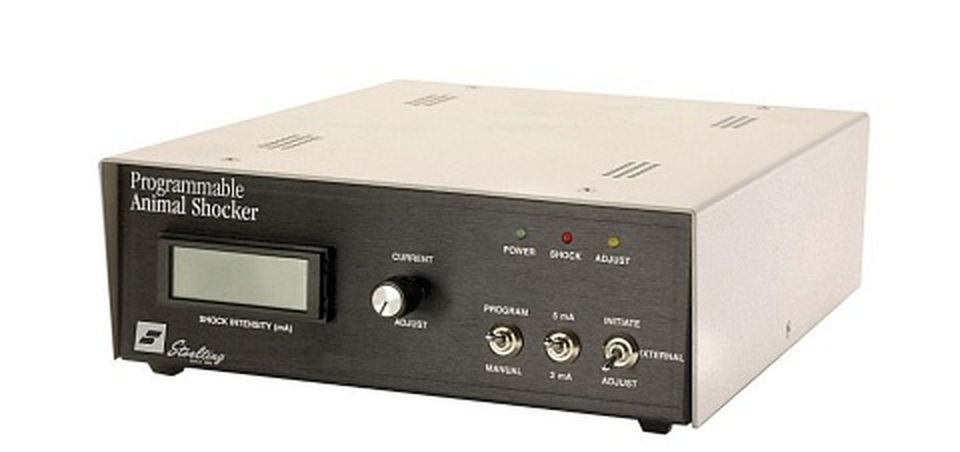
Figure 1. The San Diego Instruments programmable shocker, which can be controlled using the ANY-maze USB shocker cable.
| • | Connecting the shocker cable |
| • | Testing the shocker cable |
| • | Using the shocker cable in experiments |
Connecting the cable
Installing the driver
 | You must be running ANY-maze as an administrator in order to install drivers. To do this, right-click on the icon you use to start ANY-maze and then select 'Run as administrator' from the menu which appears. (If you run ANY-maze by clicking on an icon in the Windows task bar at the bottom of the screen, then you should right-click the icon, then right-click the entry that reads 'ANY-maze' and then select 'Run as administrator' from the menu which appears). |
IMPORTANT: You should install the driver software BEFORE you connect the shocker cable to your computer.
The driver software is a standard component of the ANY-maze system ,and can be installed from within ANY-maze itself by following these steps:
| 1. | Close any open experiment. |
| 2. | Switch to the Support page. |
| 3. | In the list on the left side of the page, select Drivers. |
| 4. | The right-hand side of the page will display the ANY-maze driver settings (see figure 1, below) and towards the top of the list you will see an entry for ANY-maze USB devices which will report the current installed-state of the driver. |
| 5. | If the driver is not installed, first select it in the list and then click the  Install driver button in the ribbon bar. If the button is disabled, it means you are not running ANY-maze as an administrator - see the note above. Install driver button in the ribbon bar. If the button is disabled, it means you are not running ANY-maze as an administrator - see the note above. |
For further details, see the ANY-maze USB device driver topic.
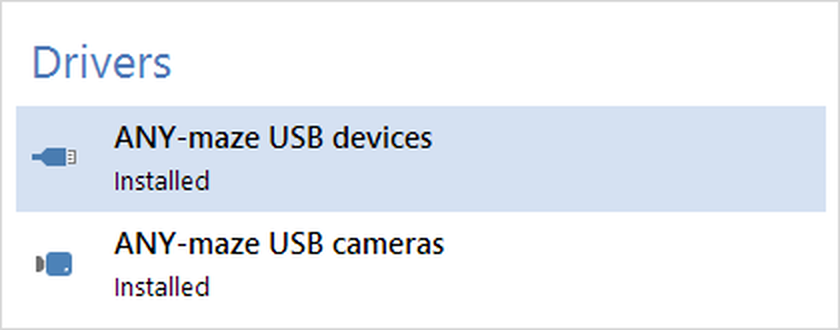
Figure 1. To install the driver, you should select the ANY-maze USB driver entry and then click 'Install' in the ribbon bar.
Connecting the shocker cable
Once the driver is installed, you can connect the cable. At the computer end, the cable simply plugs into a USB port on your computer. It can connect to any port, including ports on USB hubs. The cable is powered directly from the USB port and draws a current of around 80mA, so it should work correctly even with an unpowered hub.
On the other end of the shocker cable are two connectors which plug into sockets on the rear of the San Diego shocker. Specifcally there is a jack connector which plugs into the connector labelled 'Shock trigger In' and a BNC connector which plugs into the connector labelled 'Shock Level In'.
You also need to set some switches on the front of the shocker so that it knows that it is being controlled from ANY-maze. Specifically:
| • | Set the Program/Manual switch to PROGRAM |
| • | Set the Initiate/External/Adjust switch to EXTERNAL |
| • | Set the 5mA/2mA switch to 5mA* |
*Note that setting the 5mA/2mA switch to 2mA will NOT change the range of the shocker. When the Program/Manual switch is in the PROGRAM position the shock range is always 0 - 5mA, irrespective of the position of this switch.
Testing the shocker cable
To test the shocker cable, you should:
| • | Start ANY-maze. |
| • | Switch to the I/O page - there you should see the shocker cable listed on the left side of the page. |
| • | Click the cable in the list and it will open to show a list of ports - in fact it will just have a single entry for Shockers, select it. |
| • | The right-hand side of the I/O the page will then show a graphical representation of the shocker. |
| • | Drag the slider to some shock level, for example 3mA, and then click on the 'shock' icon. The icon will turn red and a 1s duration shock at the programmed intensity will be applied. While the shock is on, the red 'Shock' LED on the front of the shocker should be illuminated. |
The San Diego Instruments programmable shocker includes the nice feature of displaying the actual shock applied to an animal on its front panel display. When you test the shocker you will probably not have an animal in a cage (indeed you may not even have the shocker connected to a cage at all), in which case the shock level will be zero (because no current will flow) even though you will have set it within ANY-maze to some value, for example 3mA. This is normal.
See also:
| • | An introduction to shockers |
| • | Setting up a shocker |

© Copyright 2003-2026 Stoelting Co. All rights reserved
ANY-maze help topic T1191