ANY-maze Help > The ANY-maze reference > The Options page > Managing users in ANY-maze > Administrative options
Administrative options

 | The Administrative options are only included on the Options page if you're an administrator. |
Overview
This page allows ANY-maze administrators to enable or disable certain features in the software for other, non-administrator users.
To access the Administrative options, select the Options page and then click  Administrative options in the left-hand side bar.
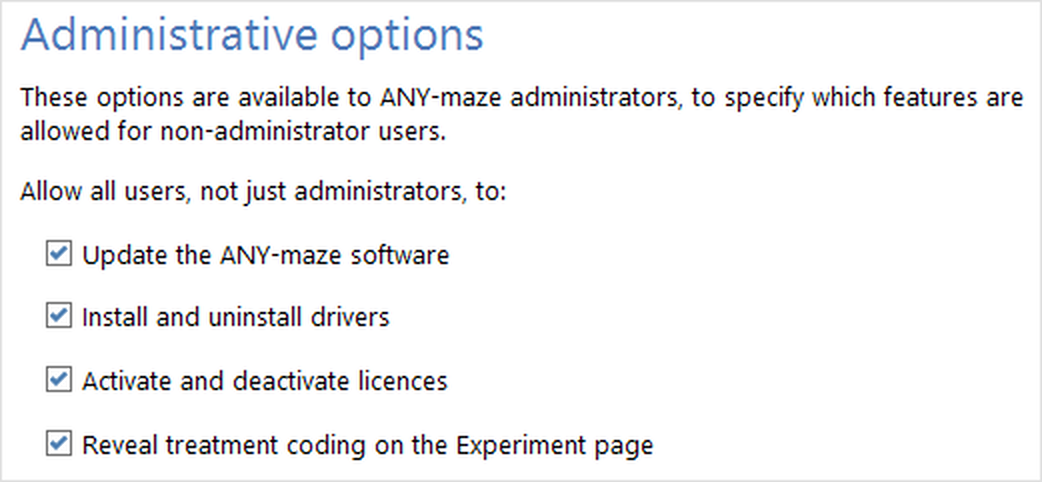
Figure 1. The Administrative options on the ANY-maze Options page.
On this page, an administrator can allow all users (not just administrators) to:
| • | Update the ANY-maze software |
| • | Install and uninstall drivers |
| • | Activate and deactivate licences |
| • | Allow standard users to reveal treatment coding on the Experiment page |
 | Most of these options are turned ON by default, to try and avoid the situation where the administrator who installed and set up the ANY-maze software has since left the lab, and no-one knows the administrator password. If these settings are left as their defaults, this situation doesn't prevent the software being updated, drivers being installed or licences being transferred. |
Allow non-administrators to update the ANY-maze software
ANY-maze's Support page contains the option to check for updates to the software - and if there's a newer version available, to download and install it. By default, any user can perform this check, although due to Windows' security settings, the actual installation of the software can only be done by a Windows administrator.
If you want to, you can limit the ability to check for and download updates to ANY-maze administrators, and not standard users - if that's what you want, un-check this option.
Note that whether this option is turned on will also affect the automatic checking for updates which happens when the software is run - see the auto-update options.
Allow non-administrators to activate and deactivate licences
If you're in a big lab with fewer ANY-maze licences than there are computers, you may need to transfer an ANY-maze licence from one computer to another. To do this, you need to deactivate the licence on one computer, and activate it on another.
This option allows the transfer of licences to be done by any user, and not just administrators.
 | Don't forget that you only need an ANY-maze licence to actually perform tracking - if you only need to create an experiment or look at results, you can use an unlicensed version of the software. |
Allow non-administrators to install and uninstall drivers
When you get a new camera or hardware to go with your ANY-maze software, you might need to install a driver for it on the Support page.
This option allows any user to install the necessary drivers (or uninstall a driver, if it's causing a problem). It's on by default, but you can turn it off to prevent non-administrator users from being able to install and uninstall drivers.
 | In most cases, a user will also need to be a Windows administrator in order to install or uninstall a driver. |
Allow non-administrators to reveal treatment coding on the Experiment page
Protocols in ANY-maze can be set up to run experiments blind. This means that the different treatments used in the experiment are coded randomly; the code (rather than the treatment name) is then used throughout the experiment, and only revealed when testing is complete. The setting to run experiments blind is turned on by default, and can be changed in the Treatment groups element of the protocol page.
You'll use the Experiment page of ANY-maze to set up the treatments that you'll use in your tests, and then to allocate those treatments to animals (or, you can allow ANY-maze to allocate the treatments randomly). The ribbon bar on the Experiment page has the option to reveal the treatment coding - i.e. to show which treatments have been given which coding - but as an administrator, you might not want the person running the tests to be able to see the treatments.
To prevent non-administrators from being able to reveal the treatment coding, un-check the option on this Administrative options page to Allow standard users to reveal treatment coding...
For more details on the coding of treatments, please see the Treatment coding topic.

© Copyright 2003-2026 Stoelting Co. All rights reserved
ANY-maze help topic T0954